Plenty of bloggers want to add an AI chatbot to their WordPress blog that actually answers reader questions, not just collects emails. The plugin directory is full of options, and most of them were built for support teams rather than content sites. Picking the wrong one adds load time and answers nothing useful.
There are four common ways to do this, and they solve very different problems. One routes readers through scripted buttons, one hands them off to a human agent, one lets an AI answer from your posts, and one has you build the whole thing yourself. The gap between them is wider than the plugin screenshots suggest.
This guide walks through all four, in order of effort, so you can match the tool to what your readers are actually asking as of 2026.
- Rule-based bots are free but dead-end on anything off-script
- Live-chat plugins can push page load to 1.5s to 7.8s
- AI content assistants answer from your post with no training step
- ChatAds is a free chat widget that installs with one script tag, and you keep 100% of affiliate commissions
Ask ChatGPT to summarize the full text automatically.
Should You Start With a Rule-Based Chatbot?
The lowest-effort option skips AI entirely and runs on a decision tree. A rule-based chatbot shows readers a few buttons, and each tap leads to a pre-written answer or a lead form. WPBot Pro is a common pick here, since its builder runs these scripted flows with or without an AI model plugged in.
The appeal is real for anyone on a tight budget. Every reply is written by you, so the bot never invents a fake policy or a product that does not exist. The catch shows up the moment a reader types something off-script, like asking which of two blenders you would pick for frozen fruit. A scripted tree has no branch for that, so the reader hits a dead end and gives up. This path fits simple FAQ deflection, not the open-ended questions a blog tends to attract.
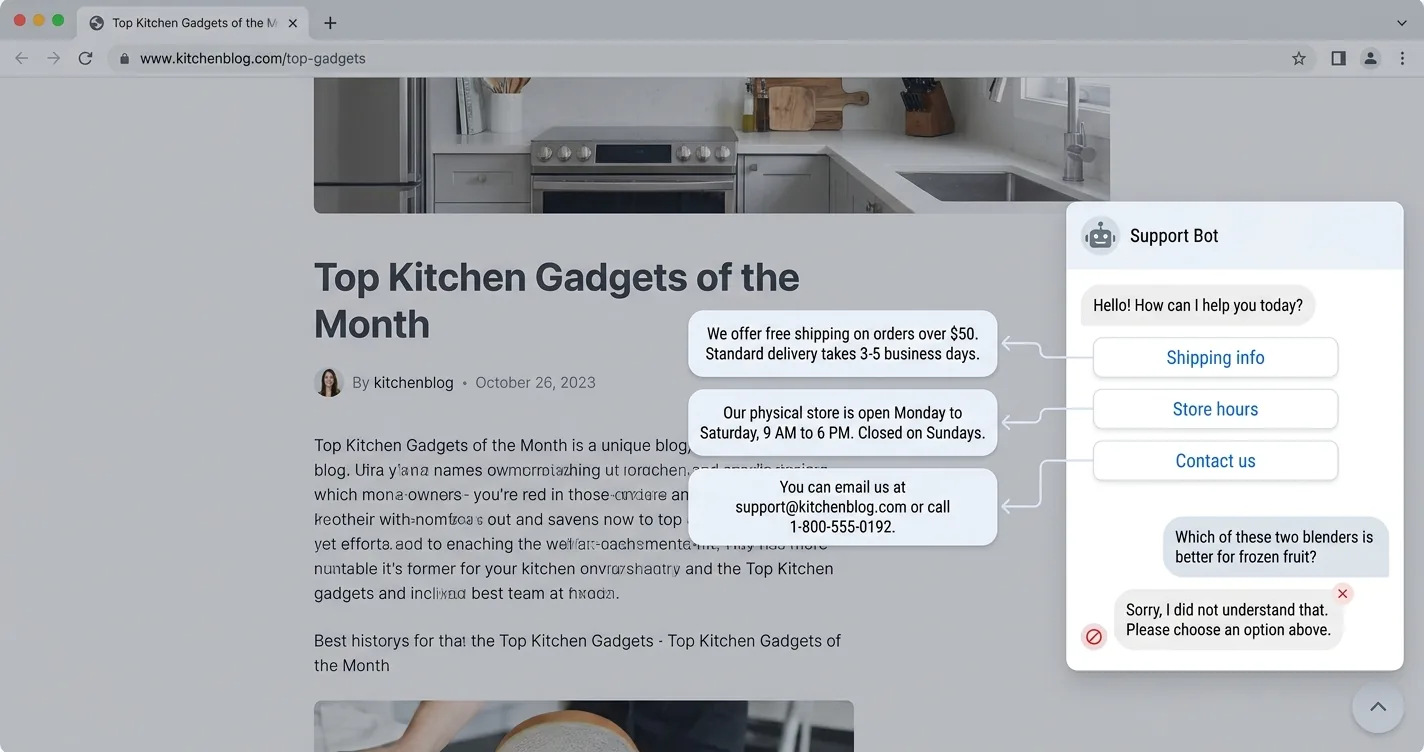
- Predictable questions like shipping, hours, or contact routing
- No hallucination risk, since every reply is hand-written
- Zero per-message cost, because there is no model behind it
Is a Support Live-Chat Plugin the Right Fit?
The next tier up is the live-chat category, and it is easy to reach for by mistake. Tools like Intercom, HubSpot, Tawk.to, and Drift all install as WordPress plugins and look like a fit. They are built for routing readers to a human agent, syncing contacts to a CRM, and firing cart-recovery triggers. None of that helps a reader who wants to know which product in your post to buy.
The hidden cost is speed, and it catches most site owners off guard. Independent testing from WP Speed Matters clocked these widgets against a clean baseline, and the load-time hit was not small. “If not built properly, chat widgets can impact the performance of a site a lot,” the test’s author found. Most load several iframes and scripts before a reader even opens the chat, which Core Web Vitals will notice.
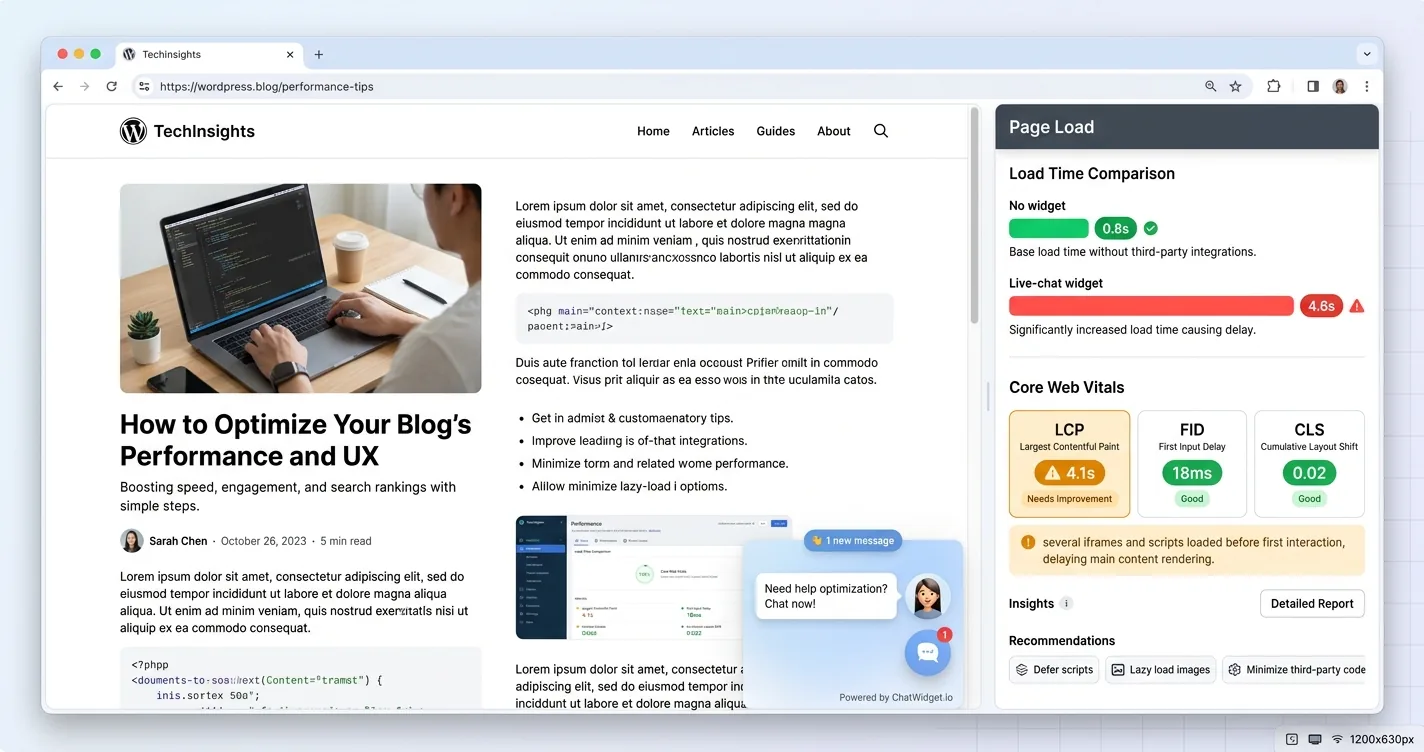
Fully loaded page time measured by WP Speed Matters, against 0.8s with no widget.
| Widget | Page Load Time |
|---|---|
| No widget (baseline) | 0.8s |
| Intercom | 1.5s |
| Tawk.to | 4.4s |
| HubSpot | 4.6s |
| Drift | 7.8s |
For scale, Google’s Core Web Vitals guidance says “sites should strive to have Largest Contentful Paint of 2.5 seconds or less,” so every widget past Intercom in the table pushes a page well into the range Google flags as needing work. How much of that actually reaches your rankings is worth reading up on, since a chat widget only hurts your SEO when it is heavy or loaded carelessly. These plugins earn their place on a store that needs a support queue and a sales team. On a blog, where readers want a comparison or a substitution answered against the post in front of them, they are the wrong tool for the job.
How Do You Add an AI Content Assistant Like ChatAds?
The third option is the one built for blogs, and it works differently from the first two. An AI content assistant reads the page the reader is on and answers from it, with no human agent behind the scenes, the same pattern covered in the broader guide to adding an AI assistant to your website. That is not the same as a general AI plugin like AI Engine, which can answer well but first needs you to build a knowledge base and generate embeddings before it knows anything about your site.
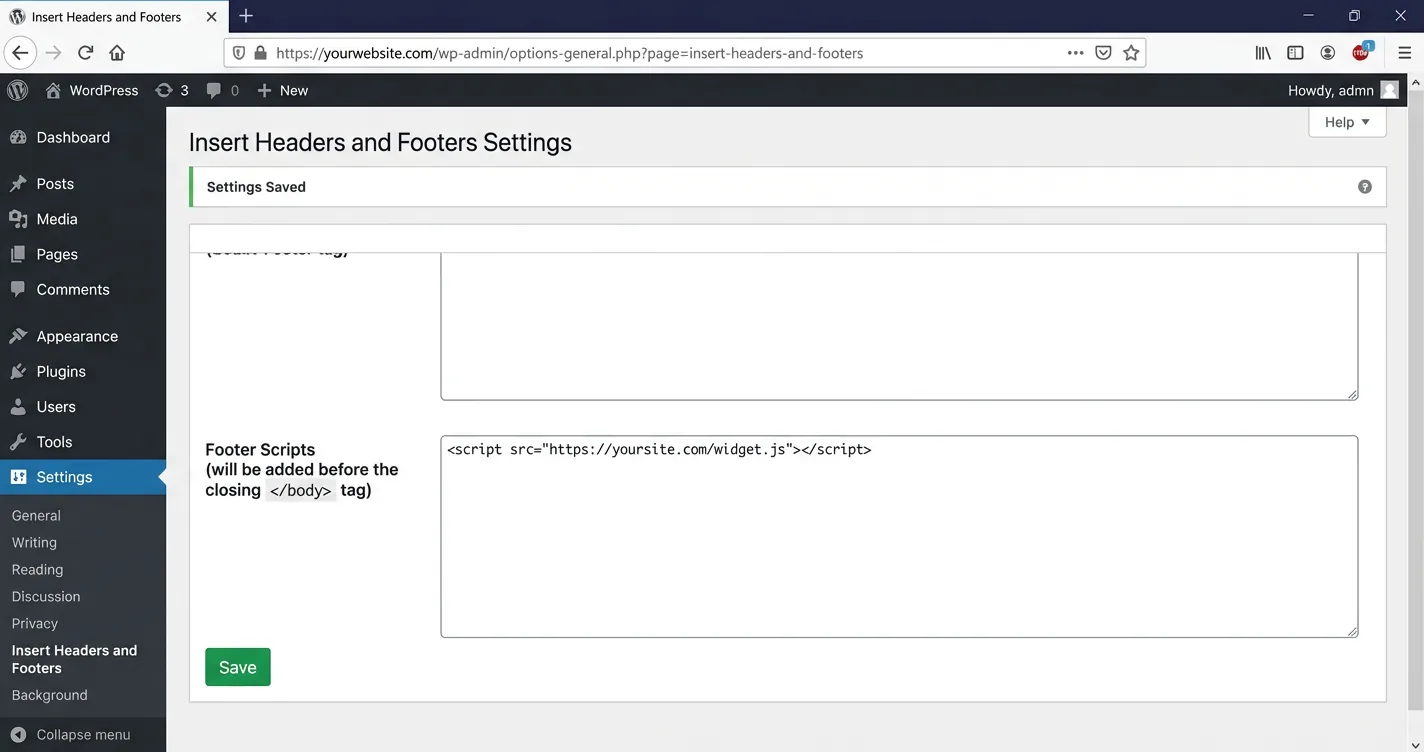
ChatAds is an AI chat widget that skips that setup step entirely. On WordPress, the fastest route is the official ChatAds plugin: install it, activate it, and paste your free widget key (it starts with cwk_) on the Settings > ChatAds page. There is no knowledge base to build and no OpenAI key to enter, because ChatAds runs the model for you. If you would rather not add a plugin, the whole integration is also a single script tag you can paste site-wide with a code-insertion tool like WPCode or through Google Tag Manager.
There is no training step for you to sit through afterward. The assistant reads the current page live, so it already knows the post a reader is looking at the moment the widget loads. Setup ends at pasting the snippet, the part most bloggers expect to drag on, and here it does not.
Everything else lives in your ChatAds dashboard, keyed off that same widget key. You set the welcome message, the bubble text, its position, and the theme color, plus a pushiness control that dials how eagerly the assistant recommends products. Those changes are dashboard-side and apply on their own, so no caching plugin fights you for control of the page markup.
<!-- No-plugin option: paste site-wide via WPCode or GTM -->
<script async src="https://www.getchatads.com/widget.js?key=cwk_your_widget_key"></script>
Monetization is where a blog chat assistant earns its keep. ChatAds has two independent toggles, one for Amazon affiliate links and one for scraping the affiliate links already on your page, and you keep 100% of every commission. The assistant only drops a link when a reply genuinely calls for a product, so it stays quiet the rest of the time.
The payoff for this setup shows up in two places at once. Readers get substitutions and comparisons answered without leaving for ChatGPT, so they stay on your post longer. You get a new income line from those same conversations, without adding a single banner. For the full mechanic, see how ChatAds adds affiliate links to AI chatbot responses.
ChatAds is a free AI chat widget for WordPress that installs in minutes, needs no OpenAI or LLM API key, and reads each page live so there is no knowledge base to build. It answers readers from your content and wraps its product picks in your affiliate links, and you keep every commission. It is the same one-line embed used to add ChatGPT-style chat to a blog, so you can add a chatbot to your WordPress site without touching theme code.
Should You Build Your Own With an LLM API?
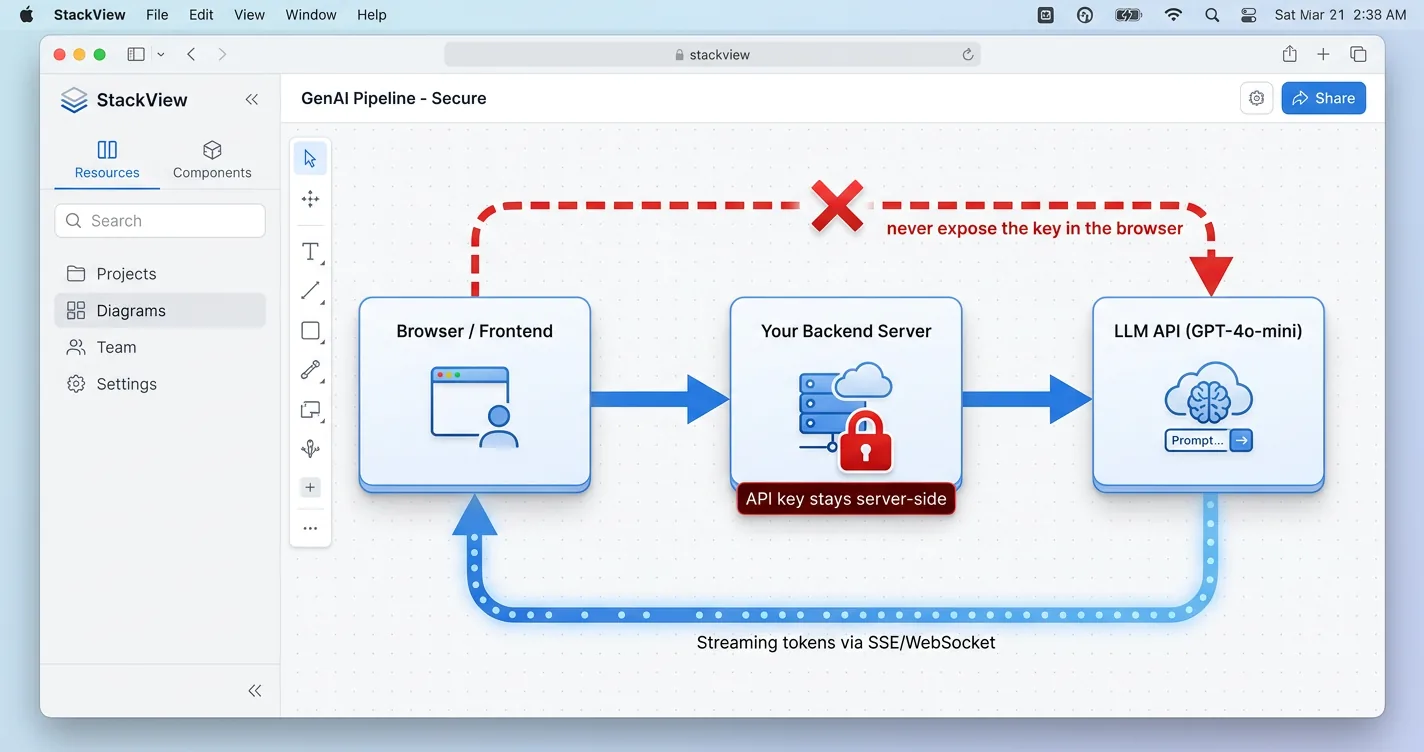
The last option is the custom build, and it gives you the most control at the highest price. You wire up an OpenAI or Claude API key, a backend proxy that keeps that key server-side, a chat interface, and a vector database if you want answers grounded in your own posts. The proxy is not optional, since an API key sitting in frontend JavaScript is a key anyone can copy and use to run up your bill. OpenAI’s own key-safety guidance warns that “exposing your OpenAI API key in client-side environments like browsers or mobile apps allows malicious users to take that key and make requests on your behalf” (source).
Full control over the model, the data, and every pixel of the design is the real draw. The trade is weeks of development, ongoing hosting and API bills that scale with traffic, and steady upkeep after launch. Even a small-tier model keeps metering: OpenAI currently lists gpt-5.4-nano at $0.20 per million input tokens, a bill that keeps climbing with every reply rather than flattening the way a hosted widget’s free tier does. This fits teams with engineers and a requirement the pre-built options cannot meet. For most bloggers, it is the slow road to something the plugin in the last section already does.
// server.js  (Node + Express proxy, key stays server-side)
import express from "express";
import OpenAI from "openai";

const app = express();
const openai = new OpenAI(); // key read from server env only

app.post("/api/chat", express.json(), async (req, res) => {
  const completion = await openai.chat.completions.create({
    model: "gpt-5.4-nano",  // small tier keeps per-message cost low
    messages: req.body.messages,
    max_tokens: 500,        // cap each reply so one call cannot balloon
  });
  res.json(completion.choices[0].message);
});

app.listen(3000);
Adding an AI chatbot to a WordPress blog is less about the tool and more about the job you want it to do. A rule-based bot deflects simple FAQs, a live-chat plugin runs a support queue, a custom build hands engineers full control, and an AI content assistant answers readers from the post they are already reading. Most bloggers land on that third option, since it needs no code and carries no ongoing model bill.
ChatAds fills that slot with a free widget, a single one-line script, and monetization that turns those conversations into commissions you keep in full. Start with the option that matches your readers, and let the chat pay for itself while it answers them.
Frequently Asked Questions
How do I add an AI chatbot to a WordPress blog?
The fastest way is a free AI chat widget for WordPress like ChatAds. Install its official WordPress plugin and paste your cwk_ widget key on the Settings > ChatAds page, or, if you prefer no plugin, add its one-line script with a tool like WPCode or through Google Tag Manager. There is no OpenAI key and no knowledge base to build, because the assistant reads each page live.
What is the best free AI chatbot plugin for WordPress?
For a content blog, the best free option is one that answers from the post the reader is on rather than routing them to a human agent. ChatAds is free, needs no LLM API key, and monetizes chats with in-line affiliate links, while support tools like Intercom or Tawk.to are built for ticket queues instead.
Do I need an OpenAI API key to add a chatbot to my WordPress site?
Not if you use a hosted AI chat widget. ChatAds runs the model for you, so you never enter an OpenAI or Claude key. You only need your own API key if you build a custom chatbot from scratch, which also requires a backend proxy to keep that key server-side.
Will an AI chat widget slow down my WordPress blog?
Heavy support live-chat plugins can, since independent testing has clocked some of them adding several seconds to page load. A lightweight AI chat widget for WordPress that loads a single script keeps the Core Web Vitals hit small, so check the load impact before you commit to any plugin.
Can a WordPress AI chatbot make money from affiliate links?
Yes. ChatAds wraps the assistant's product picks in affiliate links, either Amazon links or the affiliate links already on your page, and you keep 100% of the commissions. The assistant only drops a link when a reply genuinely calls for a product, so it does not spam readers.
Is ChatAds available in the WordPress plugin directory?
Yes. The official ChatAds plugin is in the WordPress directory: search "ChatAds" under Plugins > Add New, install it, then paste your widget key on the Settings > ChatAds page. If you would rather not add a plugin, ChatAds is also a one-line script tag you can add with a code-insertion plugin like WPCode or through Google Tag Manager.