The AI chatbot for affiliate sites

Readers ask follow-up questions about your articles. ChatAds answers from the page and links products with the affiliate links you've already placed.

  • Free plan
  • No credit card
  • Commissions go straight to you

Most site chatbots are built for support. ChatAds is built for commissions.

A support bot answers the question and stops there. ChatAds is built around one job: when a product comes up in the conversation, link it the way you would have, with your affiliate link.

What a chatbot has to get right on an affiliate page

General-purpose site chatbot ChatAds
A reader asks which one to buy Answers, then the reader goes off to find where to buy it Links the pick with the affiliate link from your article
"Check price" buttons and product boxes A button with no product name attached Matched to the product each one sells, in AAWP, Lasso, and AmaLinks boxes or comparison tables
Cloaked and network links Just more URLs on the page /go/ links, Impact, CJ, Awin, and Skimlinks-wrapped links recognized as yours
A product your page doesn't link No link An Amazon search link tagged with your Associates ID
Affiliate disclosure Up to you A disclosure line shown in the chat automatically

Reader asks. AI answers. You earn.

1
Reader asks

Readers open an AI chat on your page

An AI chat button sits anchored to your page. When clicked, readers can ask questions about the article they're reading, or anything related to it.
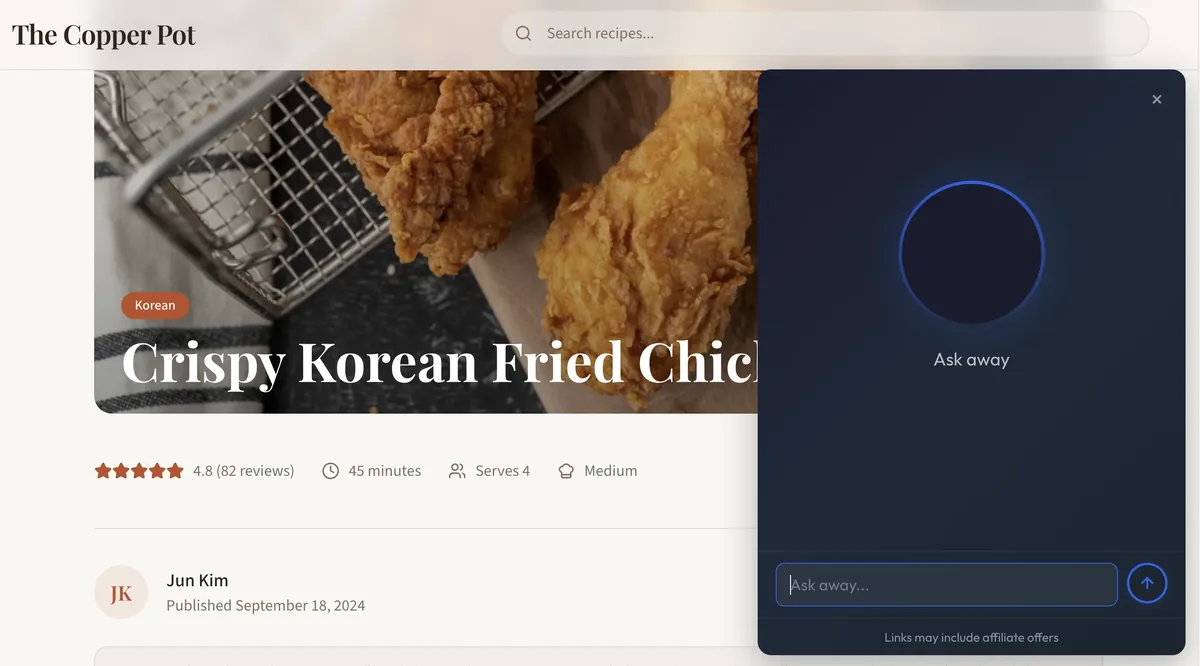
ChatAds AI widget open on a content page
Monetization is optional - run the chat with links off if you prefer
2
AI answers with links

Product mentions become your affiliate links

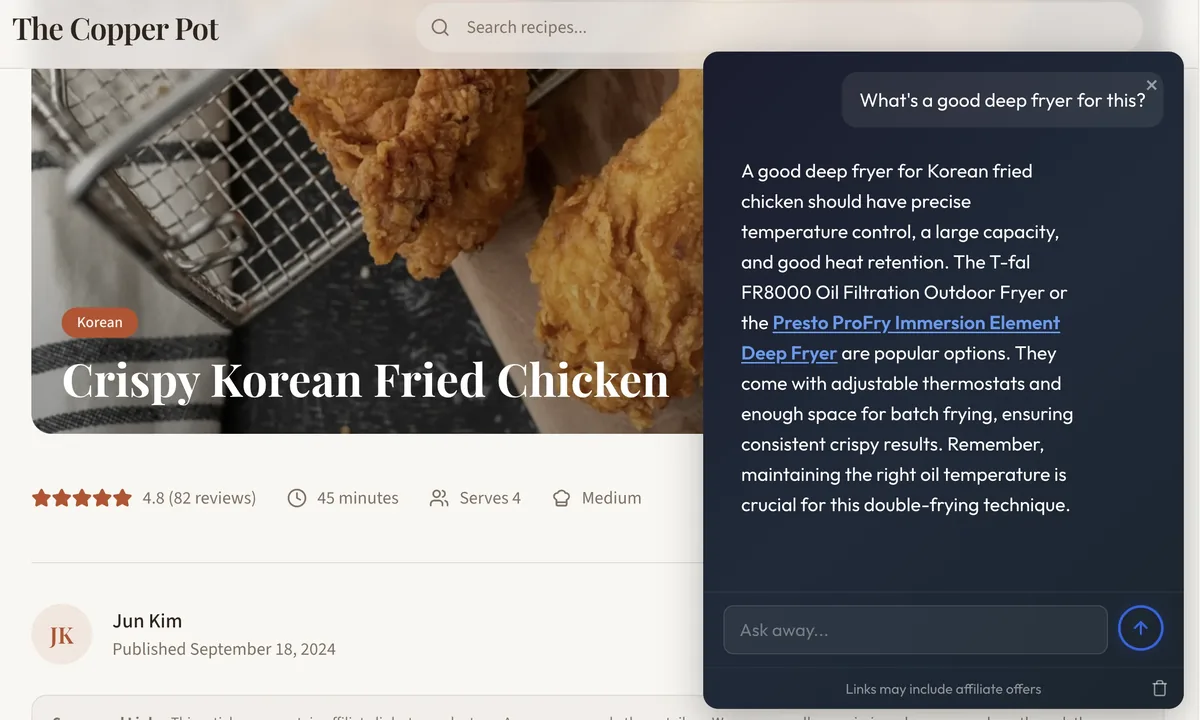
When the answer mentions a product from your page, ChatAds links it with the same affiliate link you used in the article.

ChatAds response containing an affiliate product link
Uses the links already on your page. Nothing to map or configure.
3
You earn

Clicks become commissions

When a reader clicks through and buys, the commission is yours - paid by your network directly, same as any link on your page.

affiliate product landing page opened from a ChatAds affiliate link
No new affiliate accounts to set up - it uses the partners you already have
Installs anywhere you publish
Works with the links you already have
  • Amazon Associates
  • Impact
  • CJ Affiliate
  • Awin
  • ShareASale
  • Skimlinks
  • Affilizz
  • AAWP
  • Lasso

Every product mention, linked your way

Links go inside the answer, in this order. No banner ads, no carousel widgets.

  1. Pulls your existing on-page affiliate links

    The money link from your article shows up in the answer. Clicks credit your affiliate account, same as a click on the page.

  2. Links to your internal pages

    If your article links a product to another page on your site, the answer uses that link too, so the reader stays on your site.

  3. Have ChatAds find Amazon affiliate links for you

    Anything your page doesn't link gets an Amazon search link tagged with your Associates ID.

Commissions pay out to you directly from your networks. No money flows through us.

Which of these would you get for a small kitchen?

For a small counter I'd go with the Breville Bambino Plus1. It's the most compact machine in this roundup and heats up in seconds. If you're torn between it and a model with a built-in grinder, the Bambino vs. Barista Express breakdown2 covers the trade-off. Either way, pick up a milk frothing pitcher3 for lattes.

Links may include affiliate offers

Your readers are going to ask ChatGPT anyway. Let them ask you.

When a reader wants to compare two picks, or asks if the budget option is good enough, they leave to ask an AI, and that AI links without your tag. ChatAds answers on your page, from your article, and the product mentions in its answers become your links.

See it running on a recipe blog

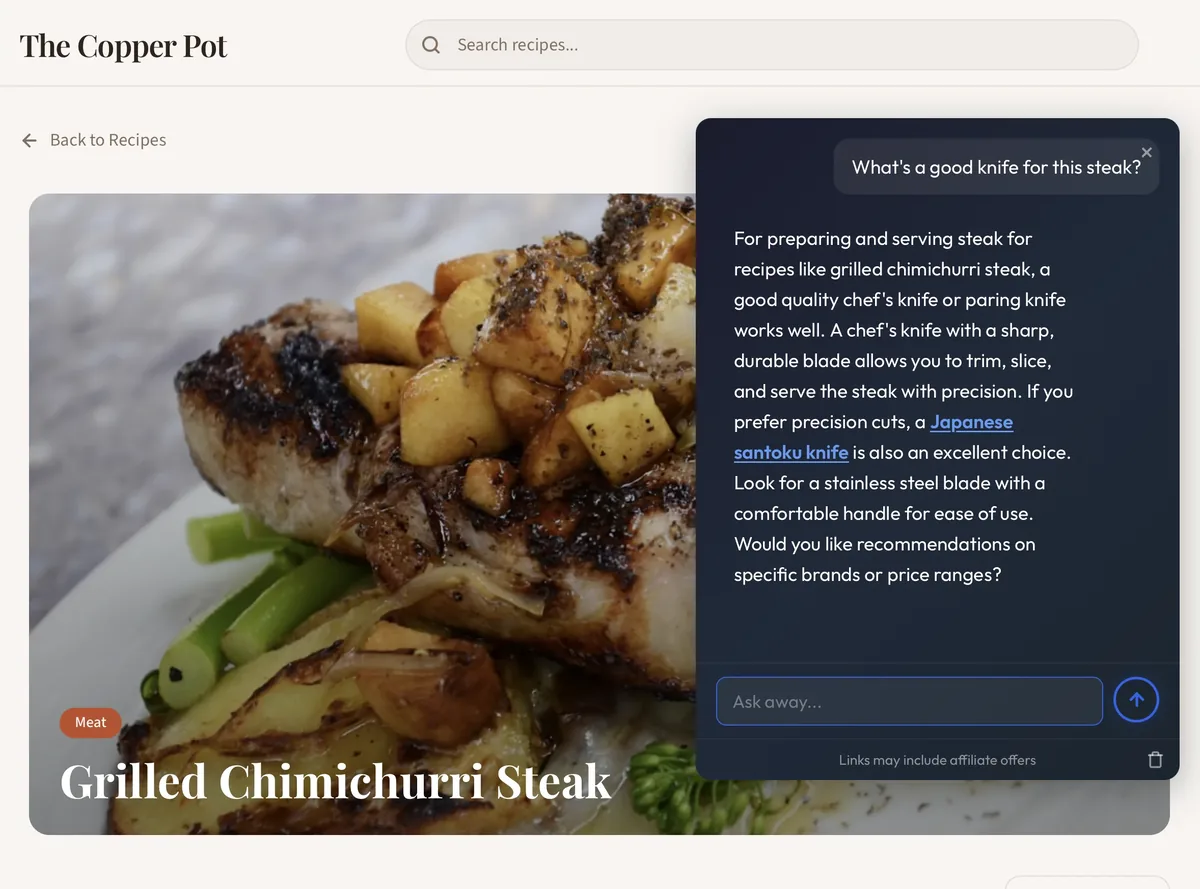
Fits the page: An AI chatbot sits unobtrusively in the corner, styled to match the site.
Knows the page: Readers can ask about substitutions, timing, and techniques.
Built to monetize: Reuses the page's affiliate links, with tagged Amazon search links as a fallback.
Grilled Chimichurri Steak recipe page on The Copper Pot with the ChatAds widget open

Live in two minutes

No coding, no approval process, no credit card.

  1. 1

    Create a free account

    Sign up and configure how the chatbot looks and behaves on your site.

  2. 2

    Paste one script tag

    Add the tag directly or through Google Tag Manager. On WordPress, our official plugin lets you skip the tag - just paste your key. The chat appears on your site instantly.

  3. 3

    Toggle on monetization

    Products mentioned in the chat become affiliate links, using your own affiliate IDs.

index.html
<!-- Paste before </body> -->
<script
  async src="https://www.getchatads.com/widget.js?key=cwk_your_widget_key">
</script>

Common questions

What is an affiliate chatbot?

An affiliate chatbot is an AI chat assistant that earns commissions from its own conversations: when a reply mentions a product, the mention becomes an affiliate link. ChatAds is built for affiliate sites - readers get answers about your articles, and the links are the ones you already placed, carrying your own affiliate tags.

How is this free? What's the catch?

We charge publishers for volume, not for your revenue. The affiliate links in chat use your own tags, so commissions are paid to you directly by your affiliate network - there's no mechanism for us to take a cut. If your site outgrows 100 free messages a day, paid plans raise the cap. That's the whole business model.

Do I need a credit card to get started?

No. The free plan includes up to 100 messages per day (about 3,000 a month) with no credit card required. A card is only needed if you move to a paid plan.

How do I add ChatAds to my site?

After signing up, you'll get a JS tag. Add it to your site directly or through Google Tag Manager (or similar). On WordPress, our official plugin lets you skip the tag - just paste your key. Either way, ChatAds appears in the bottom right of your page.

Do I need to train it on my content?

No. ChatAds reads the page it's installed on automatically, so it can answer questions about your content from the first message. There's nothing to upload, index, or maintain.

Which affiliate programs does it work with?

Any program whose links are on your page: Amazon Associates, Impact, CJ, Awin, ShareASale, Rakuten, Geniuslink, Affilizz, and Skimlinks- or Sovrn-wrapped links. It also reads AAWP and Lasso product boxes, comparison tables, and cloaked links from ThirstyAffiliates or Pretty Links. For products your page doesn't link, it can add an Amazon search link with your Associates tag.

What if the AI says something wrong or off-brand?

ChatAds grounds its answers in the page it's installed on, so replies stay close to the content you actually wrote. On the monetization side it's deliberately conservative: when no product clearly fits, it adds no link at all rather than forcing a bad one. And you control how often and how strongly it recommends products from your dashboard.

Will it slow down my site?

No. The widget is a single ~20 KB script that loads async, so it never blocks your page from rendering, and it causes no layout shift. Your Core Web Vitals won't notice it's there.

The AI chatbot for affiliate sites

It answers your readers' questions and links products with the affiliate links already on your page.