Plenty of bloggers want a ChatGPT-style assistant answering questions right on their page. The old assumption was that this meant hiring a developer and burning a month of budget. That changed over the past year.
There are two ways to do it, and they are not the same kind of project. One is a custom build on the OpenAI API, which hands you full control and a long to-do list. The other is a no-code widget that you paste in once and mostly forget about.
As of 2026, this guide walks through both paths, then covers grounding the chat in your own content, monetizing the conversations, and measuring whether the whole thing earns its place.
- A no-code widget goes live in minutes; a custom OpenAI build runs weeks of dev time
- Smaller nano and mini models cost a fraction of flagship price per million tokens
- Publishers are warned they could lose up to 43% of search traffic by 2029
- ChatAds is a free blog widget, and you keep 100% of affiliate commissions
Ask ChatGPT to summarize the full text automatically.
Should You Build ChatGPT-Style Chat or Drop In a Widget?
The first decision is also the biggest one. You can build a ChatGPT-style chat yourself with the OpenAI API, or you can drop in a no-code widget that handles the model, hosting, and streaming for you. The custom build gives you total control over the model, the look, and your data. It also costs weeks of developer time, ongoing API and hosting bills, and steady upkeep after launch.
The no-code path sits at the other end of that trade. You point a widget at your site, copy one script tag, and go live in minutes for free or a flat monthly fee. One framing note before you choose, since it trips people up. This is ChatGPT-style chat trained on your own content, not the literal ChatGPT product bolted onto your pages. The table below lays out the trade-off so you can self-select, and the next two sections walk each path in detail.
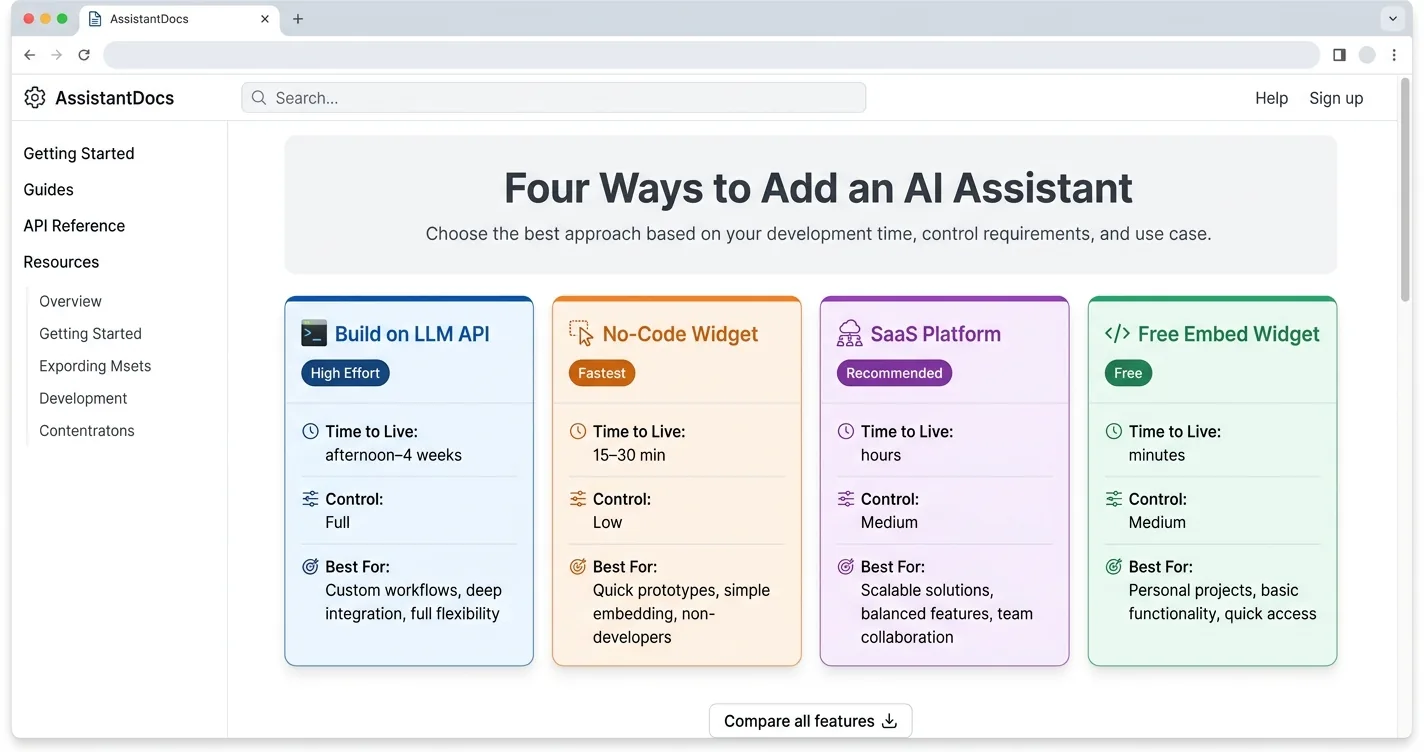
| Factor | Custom OpenAI Build | No-Code Widget |
|---|---|---|
| Time to live | Weeks | Minutes |
| Cost | API + hosting + dev hours | Free to ~$79/mo |
| Who maintains it | You | The vendor |
| Customization ceiling | Total | Medium |
How Do You Build It With the OpenAI API?
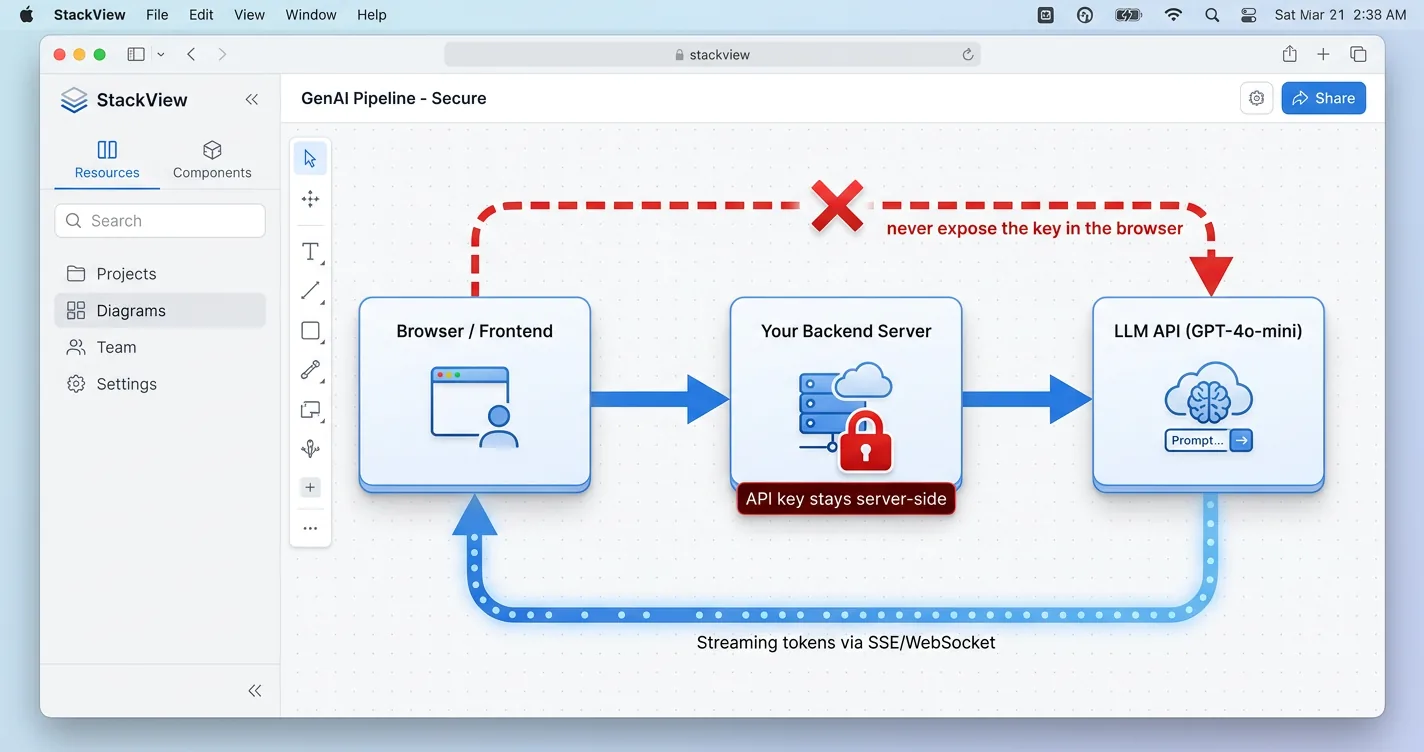
Building it yourself means standing up a few parts that have to work together. At minimum you need an OpenAI API key, a backend in Node or Python that proxies the calls, a chat interface, and a vector database if you want answers drawn from your own posts. The backend matters more than people expect, because it keeps your key off the client. Never put an API key in frontend JavaScript, since anyone can read it and run up your bill.
Cost scales with traffic, so the model you pick drives most of the spend. Smaller nano and mini tiers run about 25 times cheaper per million tokens than the flagship model, which is plenty for typical blog questions. You also carry hosting, a vector store, and the engineering hours to keep all of it current. There are ways to trim LLM API costs once traffic grows, but the upkeep never fully goes away. This path fits teams with real development resources, and most bloggers will be happier with the widget in the next section.
// server.js  (Node + Express proxy)
import express from "express";
import OpenAI from "openai";

const app = express();
const openai = new OpenAI(); // key read from server env only

app.post("/api/chat", express.json(), async (req, res) => {
  const completion = await openai.chat.completions.create({
    model: "gpt-4o-mini", // small tier, cheap per token
    messages: req.body.messages,
    max_tokens: 500,      // cap every call so one reply cannot balloon
  });
  res.json(completion.choices[0].message);
});

app.listen(3000);
How Do You Add a No-Code Chat Widget?
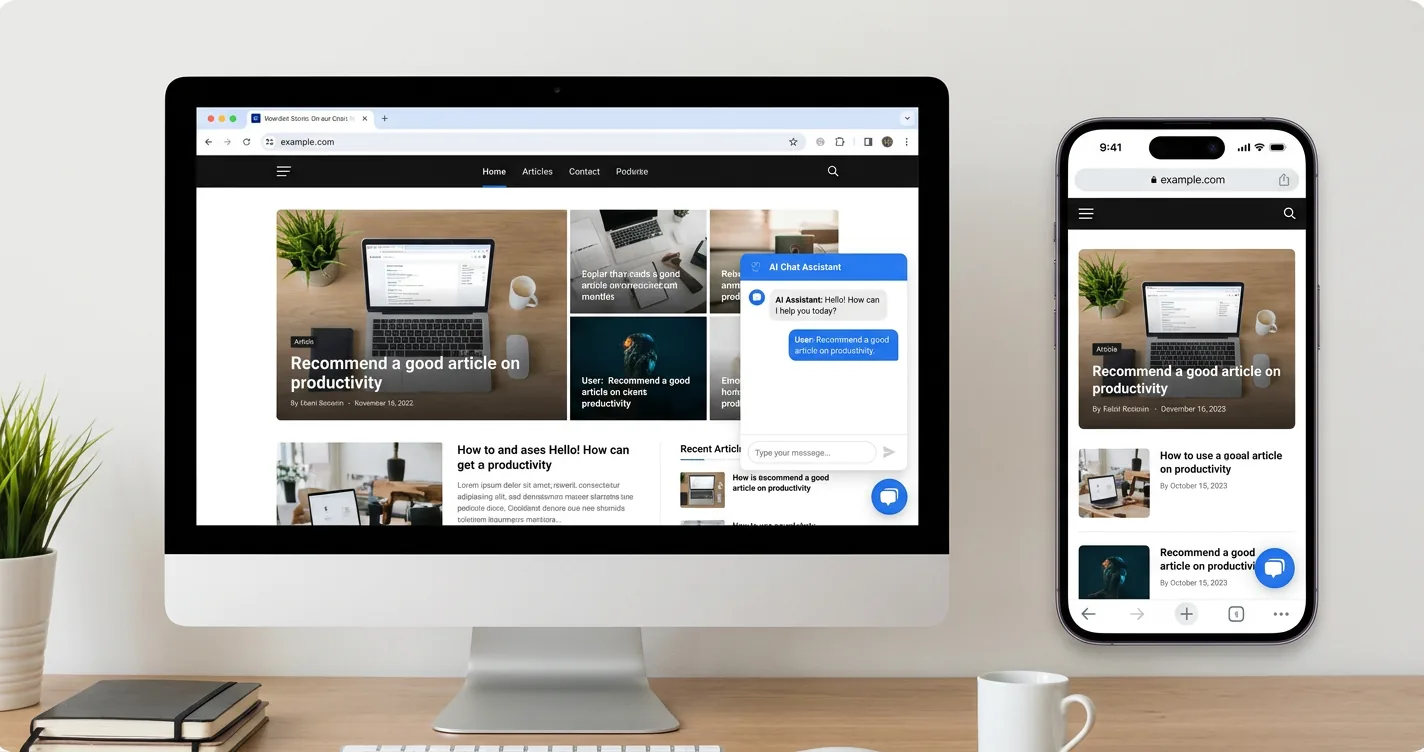
The no-code route is as short as it sounds. You sign up for a widget platform, point it at your site, copy one script tag, and paste it right before the closing body tag. Many widgets load asynchronously, so the script does not block your page or drag down load time. The install is the same shape everywhere, with only the paste location changing per platform, and it is route one of the five ways to add an Ask AI button to your site.
Each platform has its own spot for that snippet, and none of them need a developer. WordPress takes it in the footer or an Insert Headers and Footers plugin, Ghost uses Code Injection, Squarespace uses Code Injection on Business plans and up, and static sites take it in the base layout. ChatAds is a free option built specifically for blogs, with one line of JavaScript, no backend, and no per-message bill. You drop the tag in once and the chat starts answering readers.
<!-- Paste right before </body> on any page -->
<script
  src="https://www.getchatads.com/widget.js?key=cwk_your_widget_key"
  async>
</script>
How Do You Train the Chat on the Right Content?
Training the chat on your content does not mean retraining the model itself. It means retrieval, often called RAG, where your pages get chunked, embedded, and pulled into the answer when they match the question. The tooling hides all of that, yet the concept shapes a real decision about scope.
More content is not automatically better, and feeding the bot your whole site usually backfires. Whole-site ingestion dilutes relevance, invites off-topic answers, and raises the odds of a confident mistake. Air Canada learned that when its chatbot invented a refund policy a tribunal later forced the airline to honor, ruling that “it should be obvious to Air Canada that it is responsible for all the information on its website.”
A better default grounds the chat in the page the reader is on plus your core topic. A purpose-built blog widget like ChatAds does that on its own, while a full-site knowledge base is a heavier build you rarely need. Scoping the chat down is a feature here, not a limitation.
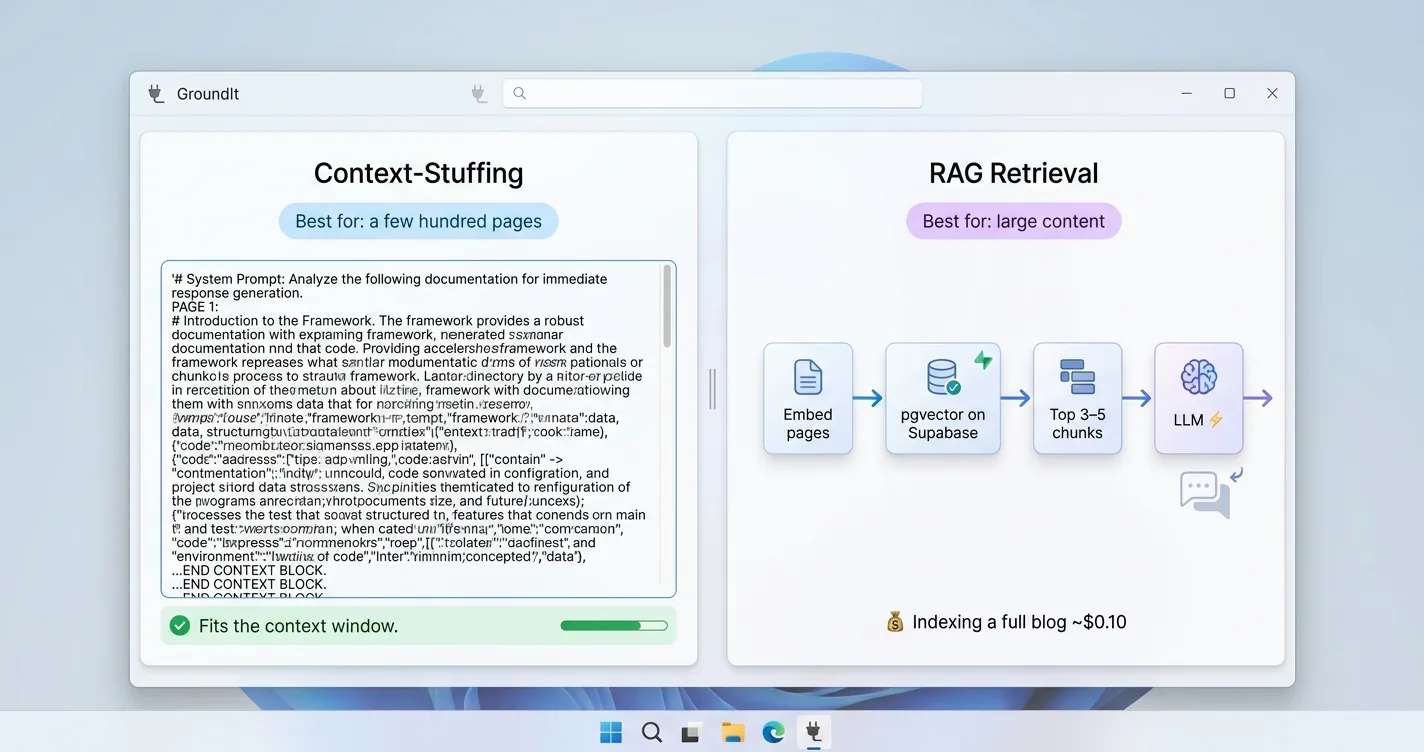
- Ground in the current page plus your main topic, not every URL you own
- Less drift: a narrow scope keeps the chat on subject and cuts hallucinations
- Stays fresh: a smaller knowledge base is far easier to keep current
How Do You Monetize the Conversations?
Chat is a new revenue surface. Search clicks are drying up fast, with the Reuters Institute reporting that “publishers expect traffic from search engines to decline by more than 40% over the next three years,” with executives on average forecasting a 43% drop by 2029. When fewer readers arrive from Google, monetizing the ones who do show up beats chasing more traffic.
You have a few options for earning from chat, and they are not mutually exclusive. In-chat affiliate links, sponsorships, lead capture, and gated chat all work, but affiliate links inside answers fit blogs the most naturally. The mechanic is simple, where the AI spots a product-relevant question and drops a tracked link right into its reply.
ChatAds runs that step automatically and lets the publisher keep 100% of the commissions. Sponsored and contextual placements are an emerging layer on top, and funded startups like Koah, whose CEO Nic Baird says the goal is “the economic infrastructure for conversational AI, making Gen AI apps flexible, scalable, and investible,” and Dappier show the category is real. The chat below shows how a link surfaces only when it actually helps.
ChatAds reads the chat's replies, detects genuine product intent, and drops in a tracked affiliate link only when one fits. It stays quiet when nothing belongs, and you keep 100% of the commission. See how ChatAds adds affiliate links to AI chatbots for the overview.
How Do You Measure Engagement and Revenue?
A chat only earns its spot if you actually track what it does. On the engagement side, watch chats started per visitor, messages per chat, and whether chat users stay longer or view more pages than everyone else. Those numbers tell you fast whether readers find the chat useful or ignore it.
Revenue needs its own small set of metrics that mirror display advertising. Track in-chat affiliate click-through rate, revenue per chat session, and revenue per 1,000 chat-engaged visitors, which is the chat version of display RPM. One wrinkle is attribution, since last-click affiliate tracking misses conversions the chat assisted but did not close.
Session-level views are more honest than last-click for exactly that reason. If a reader chats, sticks around longer, and occasionally buys through a link, the chat is already paying for itself. Start with these few numbers and add more only once the basics show it is working.
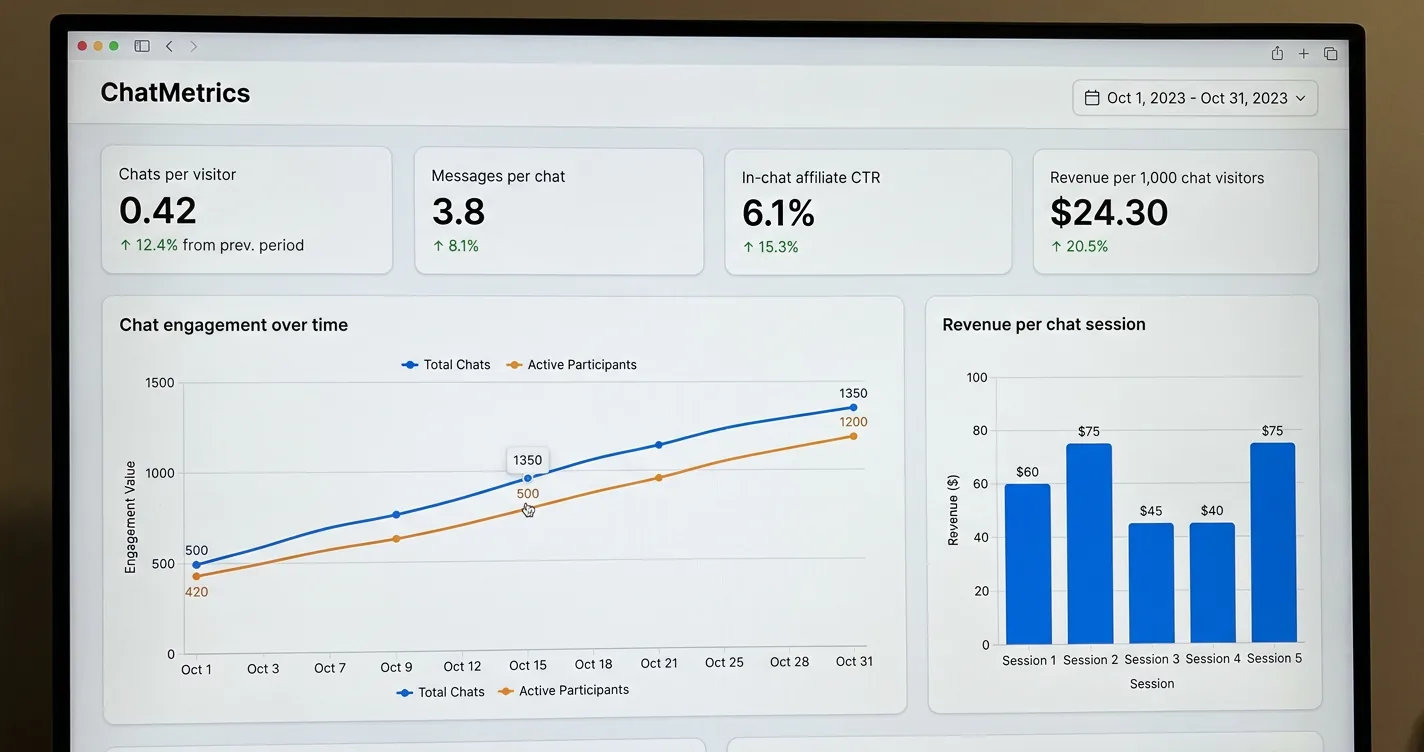
- Engagement: chats per visitor, messages per chat, time on page versus non-chat readers
- Revenue: in-chat affiliate CTR, revenue per chat session, revenue per 1,000 chat visitors
- Attribution: use session-level views, since last-click misses chat-assisted sales
Adding a ChatGPT-style assistant to your blog comes down to one early choice and a few habits after it. Pick the custom OpenAI build if you have developers and want full control, or the no-code widget if you want to be live today. Ground the chat in the page and topic at hand instead of your whole site, since a tighter scope answers better and drifts less. Then watch a handful of engagement and revenue numbers so you know it is actually working.
The part most bloggers skip is turning that chat from a cost into income. A tracked affiliate link inside a genuinely helpful answer earns money without nagging anyone, and tools like ChatAds make that step automatic while you keep every commission. Build it simply, scope it honestly, and let the conversations pay their own way.
Frequently Asked Questions
How do you add ChatGPT to your blog?
You add ChatGPT-style chat to a blog in one of two ways: build it yourself on the OpenAI API with a backend and an optional vector database, or drop in a no-code widget that installs with one script tag before the closing body tag. The widget route goes live in minutes, while a custom build takes weeks of development time.
Can you add a ChatGPT-style chat widget without coding?
Yes. A no-code chat widget lets you point a platform at your site, copy one script tag, and paste it into your footer or code injection area. It works the same on WordPress, Ghost, Squarespace, and static sites, with no backend for you to run.
How much does it cost to add an AI chatbot to a blog?
A custom OpenAI build carries API usage, hosting, and developer hours, and the bill scales with traffic. A no-code widget runs from free to around $79 a month, and ChatAds is a free blog widget that monetizes chats with affiliate links instead of charging per message.
What does it mean to train a chatbot on your blog content?
It means retrieval, not retraining the model. Your pages get chunked, embedded, and pulled into the answer when they match a question, a method called RAG. Grounding the chat in the current page plus your core topic works better than feeding it your entire site, which dilutes relevance and raises hallucination risk.
How do you monetize an AI chatbot on a blog?
The most natural option for blogs is affiliate links inside the chat's answers, where the AI detects a product-relevant question and returns a tracked link. ChatAds runs that step automatically and lets the publisher keep 100% of the commission, with sponsorships and contextual placements as an emerging layer on top.
Is it safe to put an OpenAI API key in your blog?
No. Never put an OpenAI API key in frontend JavaScript, because anyone can read it and run up charges on your account. Keep the key on a backend server that proxies the calls, or use a no-code widget that handles the model and keys for you.