About half of U.S. adults now use AI chatbots, per Pew’s 2026 report, and many bloggers are weighing one for their own site. Most advice on the topic is still written for support desks, where success means fewer tickets, a number a recipe site or tech blog does not track. The chatbot pros and cons shift once the visitor is a reader instead of a customer with a problem.
A blog reader usually wants a quick answer about the post in front of them, like how long to rest the dough in this recipe. The publisher wants engagement, content ideas, and some revenue without slowing the page down.
For a content site with a steady flow of visitors from search, a chatbot is worth a test when it answers from the page, stays out of the reader’s way, and costs nothing until readers use it.
A chatbot pays off on a blog when readers ask questions the post already answers, like swaps, steps, and comparisons. The real risks are confident wrong answers, a bill that grows with traffic, privacy duties, and clutter on phones. Test one on a single busy post against a written baseline before adding it everywhere.
Ask ChatGPT to summarize the full text automatically.
What Does a Chatbot Actually Do on a Blog?
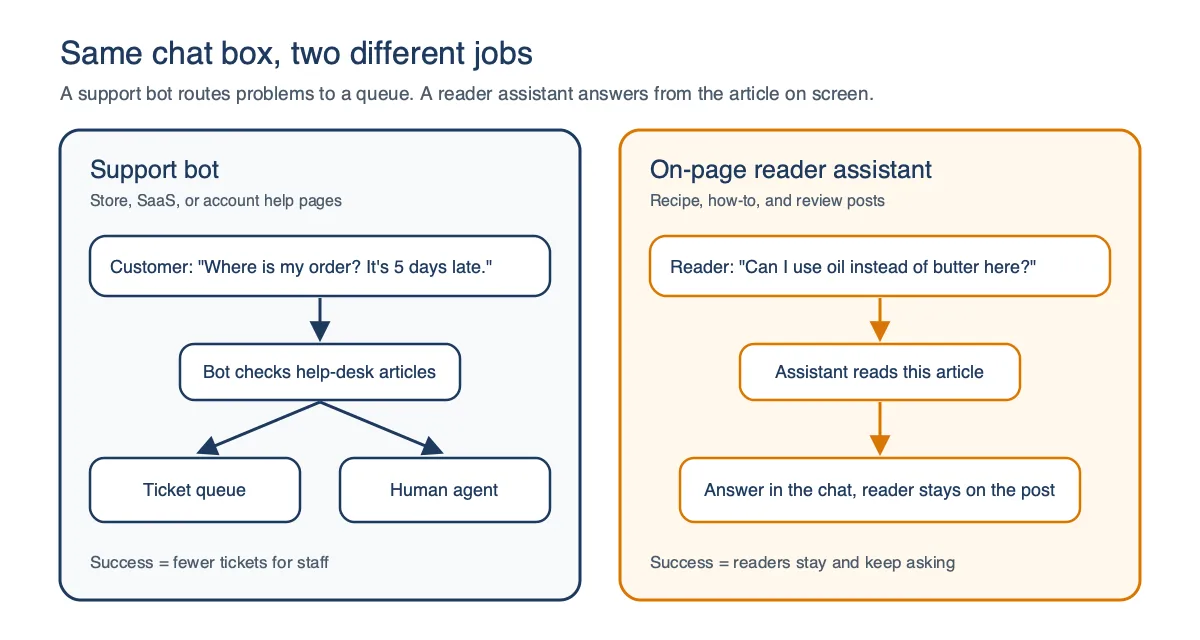
A chatbot on a blog works as an on-page assistant that answers questions about the article a reader is already viewing. A support bot does a different job, routing order problems and password resets toward a ticket queue or a human agent.
The reader assistant usually reads the page it sits on and replies in plain language. A question like “can I use oil instead of butter here” gets an answer tied to that exact recipe, not a generic help article.
ChatAds is one example of this kind of tool, and you add it by pasting one line of code into your site or installing its WordPress plugin. It sends the page content to the AI model so it can answer questions about your article, and it works out of the box without training on your archive.
The Washington Post treats its own AI Q&A, Ask The Post AI, as a reader product instead of a support channel. Announcing it, CTO Vineet Khosla wrote that “The changed search experience across the industry calls for us to meet the moment and meet audiences how, when and where they want to be served with an updated user experience.”
| Support bot | On-page reader assistant | |
|---|---|---|
| Main job | Resolve tickets, hand off to agents | Answer questions about the current post |
| Typical question | Order status, refunds, logins | Substitutions, steps, comparisons |
| Where answers come from | Help-desk articles and account systems | The page it sits on |
| Success looks like | Fewer tickets for staff | Readers stay and keep asking |
What Are the Benefits of a Chatbot for Your Readers?
Readers get the biggest benefit from a chatbot when a post is long and they only need one detail from it. Instead of scrolling back through 2,000 words to find the oven temperature, they ask and get the answer in the same window.
Follow-up questions are the part readers value most, at least among people who already use chatbots for news. In the Reuters Institute’s 2026 Digital News Report, the most popular feature among those users was the ability to ask follow-up questions, chosen by 42% of respondents. That same report puts chatbot use for news at only 10% of people, so this is a habit that is still forming.
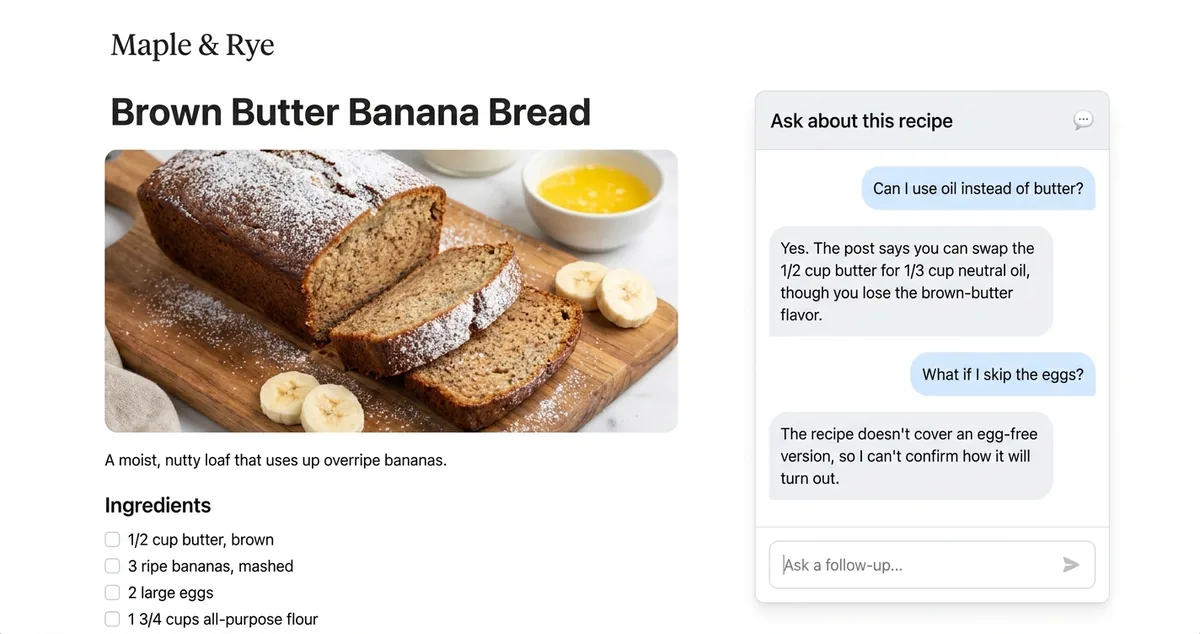
Here is what readers get from a chatbot on a blog, as long as the answers it gives hold up:
- A direct answer to the exact question. Readers can skip the hunt through headings, jump links, or comments to find one number.
- Follow-ups without leaving the page. The reader can ask “what if I skip that step” and keep going in the same chat.
- A path to older posts, with the right tool. Assistants that search your whole archive, not just the current page, can point readers toward related articles they would never find through the menu.
- Plain-language help. Readers who are new to a topic can ask for a simpler explanation of a term the post assumes they know.
None of these benefits require readers to change how they browse. A well-behaved chat stays closed until someone has a question, so readers who never open it see only a small launcher in the corner.
Pick three questions your readers often leave in the comments, then add one the post cannot answer and one built on a wrong premise. A good assistant answers the first three from the post and admits it does not know the last two. Passing this is a first check, not proof the bot will always be right.
What Are the Benefits of AI Chatbots for Publishers?
Search sends fewer clicks to publishers when an AI summary sits above the results, which makes each visitor worth keeping. In a 2025 Pew Research Center study, Google users who saw an AI summary clicked a regular search result in 8% of visits, compared with 15% when no summary appeared.
A reader who gets an answer to their next question has a reason to stay, instead of heading back to the search results to ask somewhere else. That is a likely benefit and not a measured one, so treat engagement as something to test on your own site.
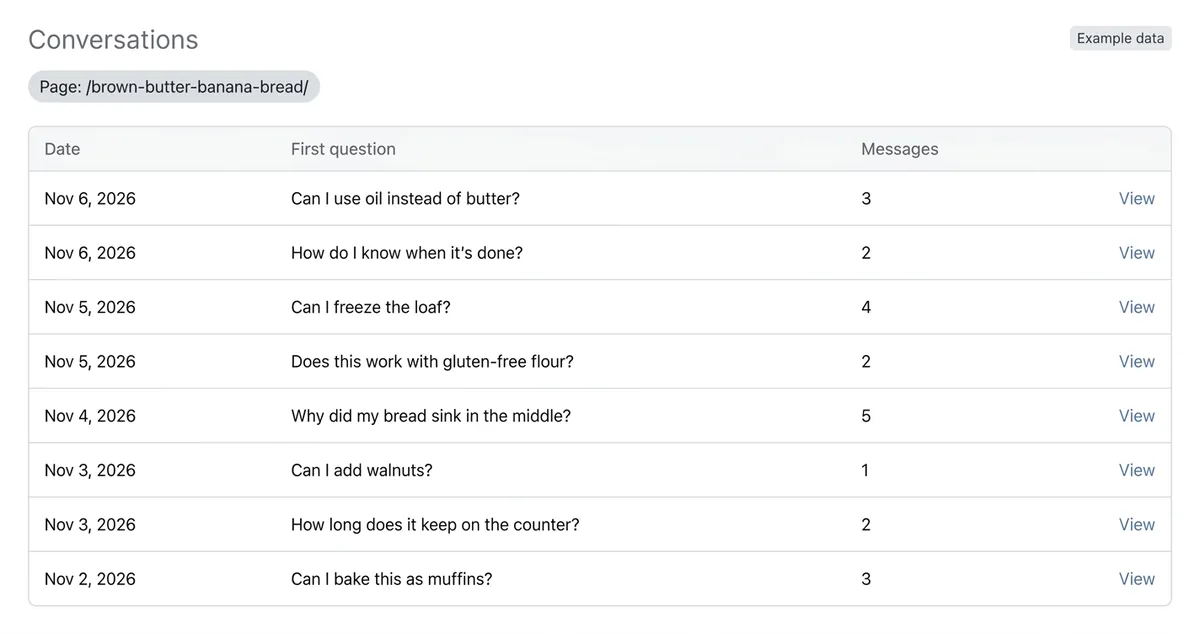
Chat transcripts show what readers ask in their own words, which often reads like a ready-made list of post ideas. A question that comes up every week with no article behind it is a gap you can fill.
Some tools can also earn money from the chat, depending on how they monetize. ChatAds, for example, can add in-line affiliate links to relevant replies once you switch monetization on, using your own Amazon Associates tag or the affiliate links already on your page. Commissions are paid to you directly by Amazon or your network, and ChatAds takes 0% of them.
Its Amazon links only appear on English replies for US and UK visitors, so a site with a mostly international audience will see less from them. A zero cut also does not guarantee extra income, since a chat link can replace a click the reader would have made on a link in the post. Links need to fit the question, too, because a reply that pushes a product over the answer spends the trust the chat was meant to build.
| Benefit | What it looks like | What to track |
|---|---|---|
| Engagement | Readers ask a follow-up instead of leaving | Conversations per 1,000 pageviews, plus time on page against posts without chat |
| Content ideas | Repeat questions with no matching post | Top questions per topic in transcripts |
| Revenue | Affiliate links inside relevant replies | Total affiliate earnings per post, before and after |
ChatAds is free for 100 messages a day with no credit card required. It installs with one script tag or the WordPress plugin, and monetization is included on every plan. Add it to one busy post for a month and compare that post's affiliate earnings with the month before.
What Are the Disadvantages of a Chatbot?
A chatbot on your blog answers in your site’s voice, which makes wrong answers the biggest disadvantage. NewsGuard’s August 2025 audit found the 10 leading AI tools repeated false claims about news topics 35% of the time, and their rate of declining to answer fell to zero. That test used tricky news prompts instead of questions about one page, but it shows the tested models had stopped saying “I don’t know.”
A Canadian tribunal has already ruled on who is responsible for those mistakes. Air Canada was ordered to pay a customer C$650.88 plus interest and fees after its chatbot gave him wrong information about bereavement fares. Tribunal member Christopher Rivers wrote, “It makes no difference whether the information comes from a static page or a chatbot.”
One bad answer can cost a reader’s trust in the whole site, which our guide on whether readers will trust an AI assistant on your blog covers in depth.
Every reply is a paid call to an AI model somewhere, so cost grows with your traffic. Free tiers cap usage and paid plans climb as readers chat more, and our chatbot pricing breakdown runs the numbers at several pageview levels.
Upkeep is lighter than with a support bot, but it still takes some regular attention. Someone has to skim transcripts, adjust the instructions, and hide the bot on pages where it adds nothing.
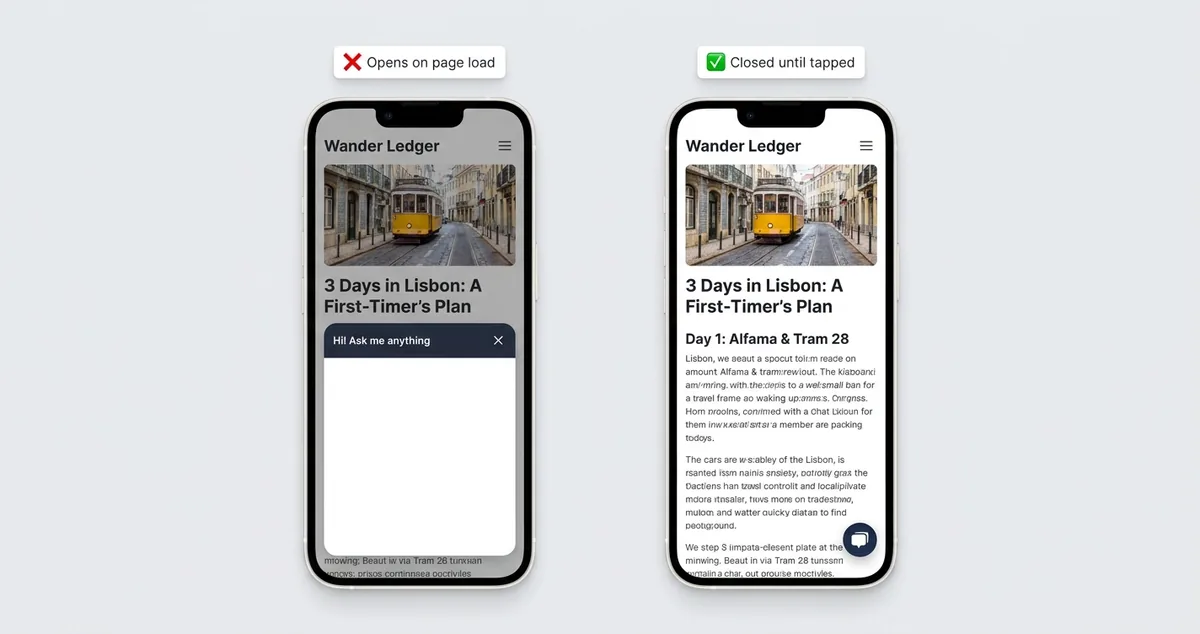
Mobile screens are where a chat widget is most likely to get in the reader’s way. A chat window that opens over the post blocks the content the reader came for, and Google’s guidance on intrusive interstitials warns that overlays like that can erode trust in a site.
| Con | Why it happens | How to limit it |
|---|---|---|
| Wrong answers | Models answer confidently even when unsure | Answer from the page, read transcripts weekly for the first month |
| Rising cost | Every reply is a paid model call | Daily caps, per-visitor limits, start on a free tier |
| Upkeep | Instructions and page rules drift as the site grows | Monthly transcript review after the first month |
| Mobile clutter | Panels that auto-open cover the post | Closed launcher, or hide it on mobile |
Is an AI Chatbot a Privacy Risk?
An AI chatbot on a blog works by sending what the reader types, and often the page content, to a hosted AI model. That means reader messages leave your site and pass through at least one outside company, sometimes two.
Readers also type more into chat boxes than you might expect. OpenAI CEO Sam Altman said that with a therapist, lawyer, or doctor “there’s legal privilege for it,” then added, “And we haven’t figured that out yet for when you talk to ChatGPT.”
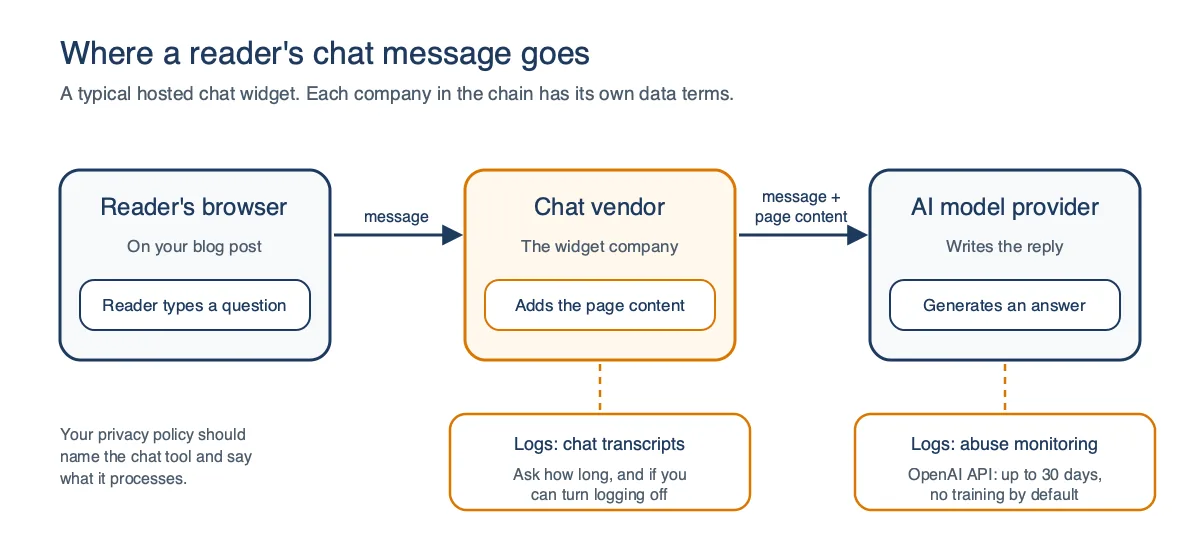
For tools built on the OpenAI API, the model provider’s own data terms decide part of the risk. OpenAI says API data is not used to train its models by default, though abuse-monitoring logs are kept for up to 30 days.
Legal rules stack on top of the vendor’s terms, and which ones apply depends on where your readers live. If personal data from EU readers ends up in those chats, GDPR may apply, so your privacy policy should say a chat tool processes what readers type and which company runs it.
Article 50 of the EU AI Act also requires chat tool makers to tell people they are talking to an AI, unless that is already obvious. That duty applies from 2 August 2026, and a clearly labeled chat box likely covers it, so confirm your vendor does this.
Affiliate links inside chat replies add one more disclosure duty. The FTC asks for disclosures that are clear and conspicuous, and it warns that readers may miss the connection when the disclosure sits far from the link. Our guide to disclosing ads in AI chats covers wording that sits next to the chat.
Find out what the vendor sends to its AI provider, how long it keeps transcripts, and whether you can turn logging off. If you have EU readers, ask for a data processing agreement, the contract that spells out how the vendor handles your readers' data. Update your privacy policy and label the chat as AI, and treat this list as a starting point, not legal advice.
Will a Chatbot Slow Down or Hurt Your Site?
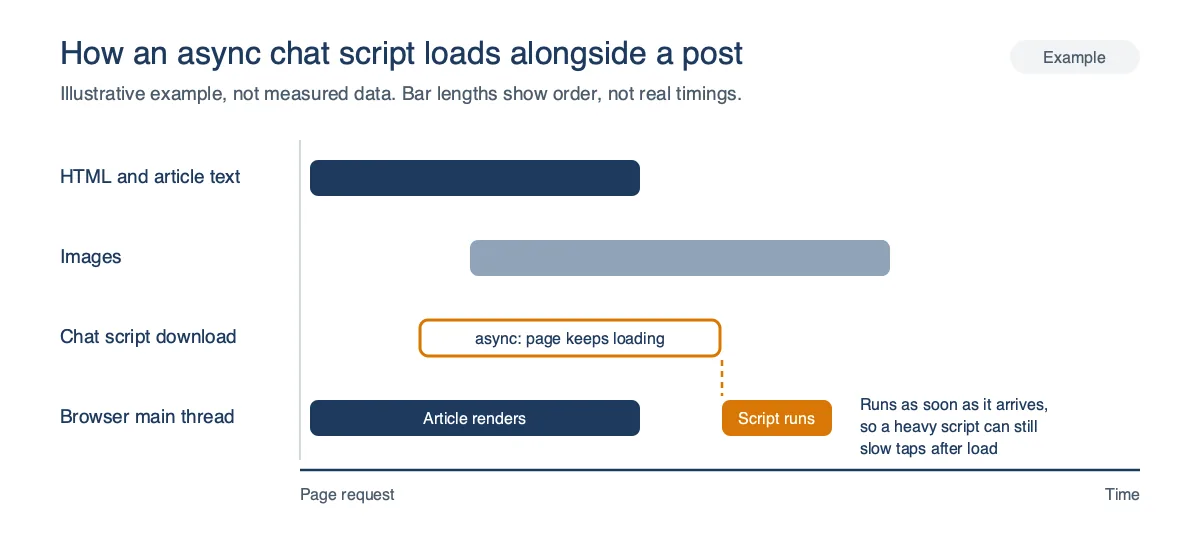
A chat widget adds one more third-party script to your pages, so its speed impact depends on how that script loads and runs. A script marked async downloads without stopping the browser from reading the rest of the page, but it still runs as soon as it arrives, so async is a good sign and not a guarantee.
The bigger speed risk is how quickly the page responds to taps after it loads. Google treats an Interaction to Next Paint of 200 milliseconds or less as good, and a heavy widget that runs code on every tap can push a page past that line.
Launcher placement matters on phones too, because a chat button that covers a sticky ad or a cookie banner gets in the reader’s way no matter how fast it loads.
You can test any widget yourself before committing to it, and the test needs no coding. Run your busiest post through a speed test with the widget off, then again with it on, and compare the results. Then open the post on your own phone, tap the launcher, ask a question, and scroll while the reply loads, since slow taps or a jumping page are warning signs a lab test can miss.
Search rankings are a separate question from raw speed, and will an AI chat widget hurt your SEO walks through both.
| Check | Good sign | Red flag |
|---|---|---|
| Script loading | async or deferred, then confirm with a test |
Blocking script in the page head |
| Panel behavior | Closed until the reader taps | Opens on page load |
| Launcher position | Can sit above sticky ads or be hidden on phones | One fixed position for every screen |
Chatbot Pros and Cons: Is a Chatbot Worth It for Your Blog?
A chatbot is worth it when your readers ask questions the post can answer and you can check its replies for a few weeks. The decision comes down to the kind of questions your readers ask, how much a wrong answer would cost you, and how much traffic you have.
Recipe, how-to, and product review blogs tend to fit best, because their readers ask concrete questions with answers already on the page. News, health, and finance sites can still use one, but the cost of a confident mistake is higher there. A site with only a handful of daily readers produces too few conversations to judge.
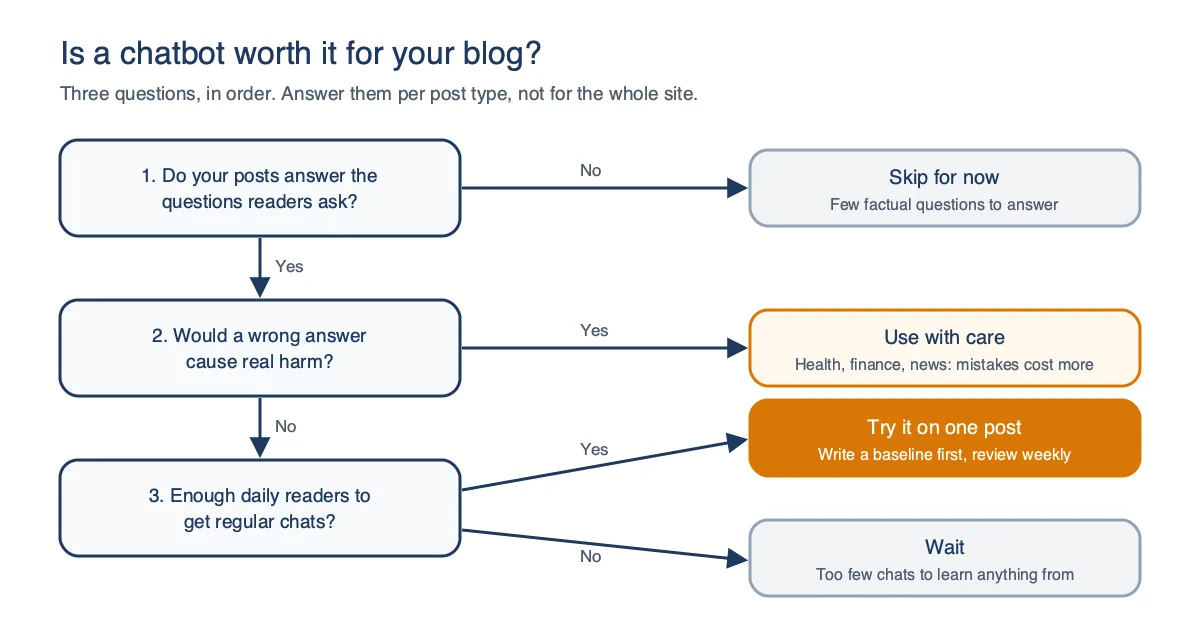
| Blog type | Fit | Why |
|---|---|---|
| Recipe and how-to | Strong | Readers ask about steps, swaps, and timing |
| Product reviews and tech | Strong | Comparison questions, where a relevant affiliate link can fit the reply |
| News and fast-moving topics | Use with care | Wrong answers on current events spread fast |
| Health, legal, finance | Use with care | A wrong answer can cause real harm |
| Personal essays | Weak | Few factual questions to answer |
| Brand-new blog, little traffic | Wait | Too few chats to learn anything from |
A free tier keeps that trial cheap, since you only pay once readers prove they use the chat. ChatAds, for example, is free for 100 messages a day, and paid plans at $29 and $59 a month raise the cap to 500 and 1,500 messages a day. On any plan, the widget stops answering for the rest of the day once you hit the cap, so the free tier’s 100 messages can run out on a busy post.
Start small if you decide to try one on your blog, and write down your baseline before you add anything. Note each test post’s time on page and affiliate earnings, then put the chat on your most-visited evergreen posts with the launcher closed on mobile. Read the transcripts every week for the first month, since a confident wrong answer carries your name, and keep the chat only if readers use it, the answers hold up, and your numbers beat the baseline.
Frequently Asked Questions
What are the pros and cons of a chatbot on a blog?
The main pros are instant answers for readers, follow-up questions without leaving the page, a record of what readers ask, and possible affiliate revenue. The main cons are confident wrong answers, cost as traffic grows, privacy duties, and clutter on mobile screens.
Is a chatbot worth it for a small website with low traffic?
A chatbot is worth testing on a small site if a free tier covers your traffic, since a trial then costs nothing. On a brand-new blog with very few daily readers, though, you will get too few conversations to judge whether it helps.
Do chatbots slow down a website?
A chat widget adds a third-party script, and loading it with async keeps it from stopping the page, though it still runs once it arrives. The bigger risks are a widget that slows responses to taps after load and a panel that auto-opens over the content on phones, so test your busiest post with the widget off and on.
Are AI chatbots safe for privacy and GDPR?
An AI chatbot sends what readers type, and often the page content, to a hosted AI model, so reader messages leave your site. If personal data from EU readers ends up in those chats, GDPR may apply, so check the vendor's data handling, ask for a data processing agreement, and update your privacy policy.
Can a chatbot give wrong answers?
Yes, and it usually gives them confidently. NewsGuard's August 2025 audit found leading AI tools repeated false news claims 35% of the time, and a Canadian tribunal held Air Canada responsible for what its chatbot told a customer.
Can a chatbot make money for a blog?
A chatbot can earn money if it adds relevant affiliate links to its replies, though those links can also replace clicks on links already in the post. ChatAds, for example, can insert links using your own Amazon Associates tag or your page's existing affiliate links once you turn monetization on, and it takes 0% of the commissions.