Affiliate blogging is harder than it was two years ago, and most of that pressure traces back to one place: AI search.
As SparkToro founder Rand Fishkin’s zero-click search study found, “58.5% of American Google searches” resulted in zero clicks in 2024, and that number has only grown as AI Overviews answer more product questions before a user ever reaches your review. Publishers tracking the fallout report affiliate revenue down 15% or more year over year on content that used to convert reliably. The typical response is to write more content or chase new keywords, but neither addresses the structural shift.
The better move is to put an AI layer on your own site. When a reader lands on your blender review and a chat widget asks what they are trying to blend, that question carries far more purchase intent than any organic search click you will ever earn. This guide walks through six concrete steps for turning your existing affiliate content into an AI shopping assistant that answers questions and earns commissions.
- AI-assisted shoppers convert at 12.3% vs 3.1% unassisted (roughly a 4x lift)
- Personalized conversational messaging drives 4.8x higher CTR than traditional retargeting ads
- Pages with active chatbots show a 31% conversion rate increase (AffiliateBooster)
Ask ChatGPT to summarize the full text automatically.
Why Does Your Affiliate Blog Need an AI Layer?
The zero-click search problem is real, but the deeper issue is intent quality. A user who finds your blender roundup via search may be in research mode and still weeks from buying. We make the full case for prioritizing chat over another cornerstone post in why your affiliate blog needs AI chat more than new posts in 2026.
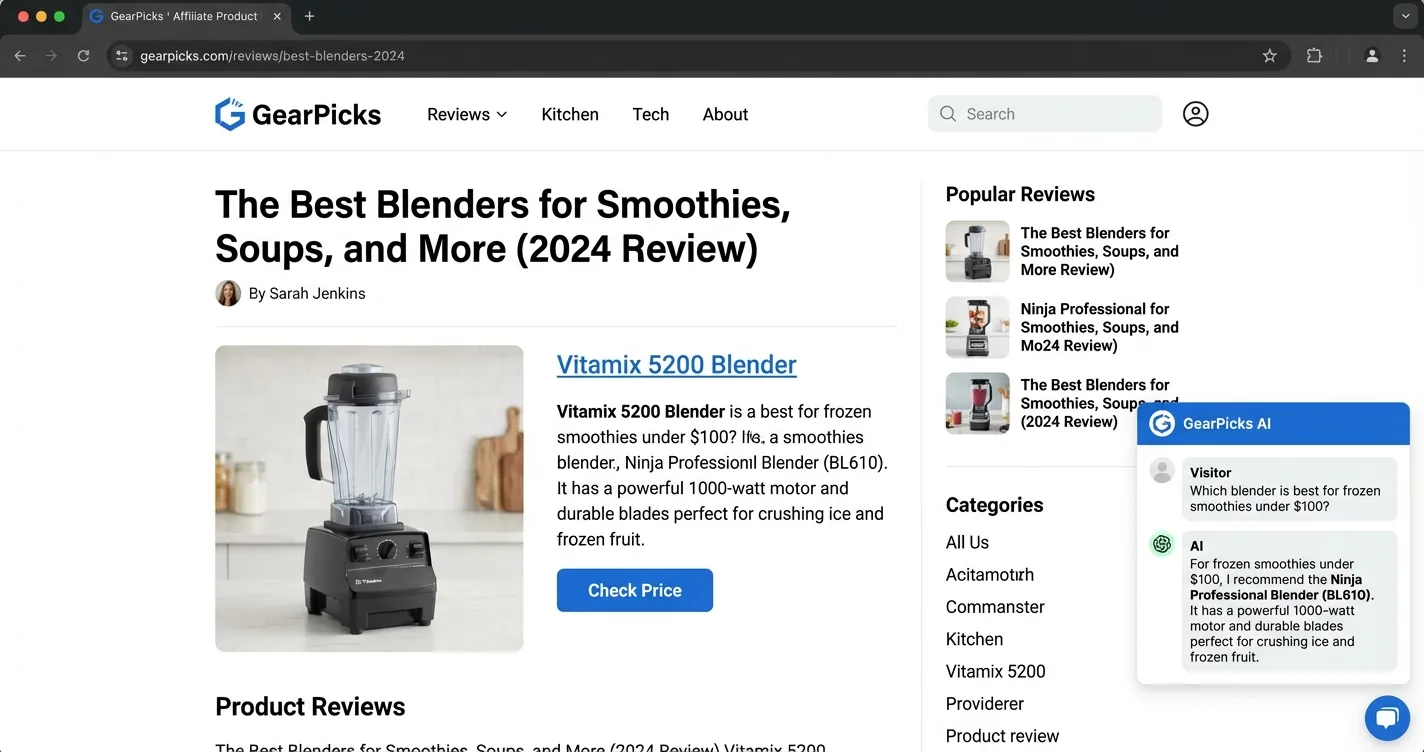
A user who opens a chat widget and types “which blender handles frozen fruit under $100” is ready to click a link right now, and that gap is exactly what an AI shopping assistant fills.
The conversion data makes the case clearly on its own. AI-assisted shoppers convert at 12.3% compared to 3.1% for unassisted visitors, a difference large enough to change your revenue even on lower traffic. Personalized conversational messaging drives 4.8x higher click-through rates than traditional retargeting ads, and that gap holds across niches.
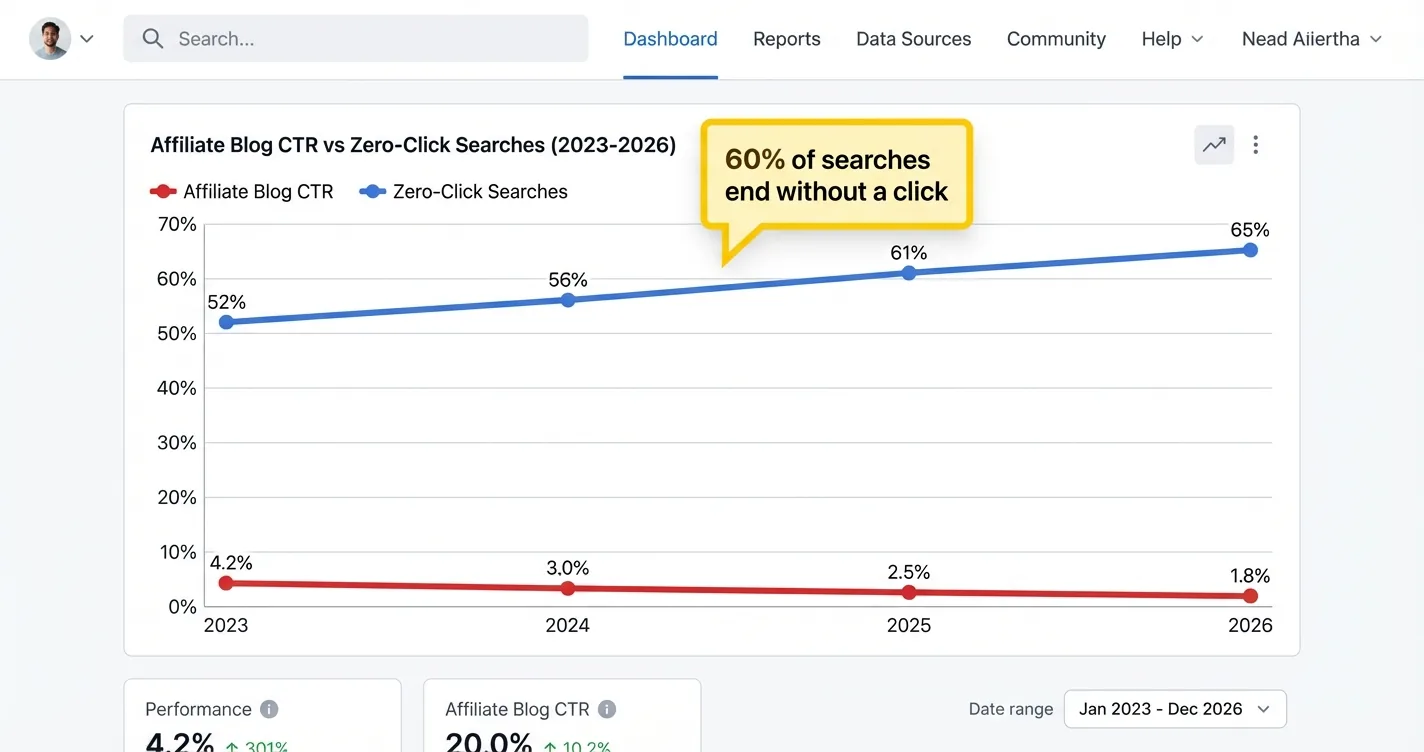
The risk worth knowing upfront: a generic chatbot without affiliate links doesn’t just fail to earn, it actively cannibalizes your revenue. If a visitor asks your site’s chat widget for a product recommendation and gets an answer with no link, that visitor has gotten what they came for without converting. The AI layer only works as a revenue channel when the widget can actually insert tracked affiliate links into its responses.
A chat question like "which blender under $100 is best for smoothies" signals purchase intent that no organic search click can match. Your job is to be present for that question on your own site rather than letting Google's AI Overview or a third-party chatbot answer it first. For a deeper look at how AI chatbot monetization works as a strategy, that article covers the revenue model in more detail.
How Should You Prepare Your Content for an AI Chat Widget?
Most chat widgets work by crawling your pages and using that content as context when generating answers. What your AI assistant knows about your products depends entirely on how clearly you’ve written your reviews. The good news is that a well-structured affiliate review is already most of the way there.
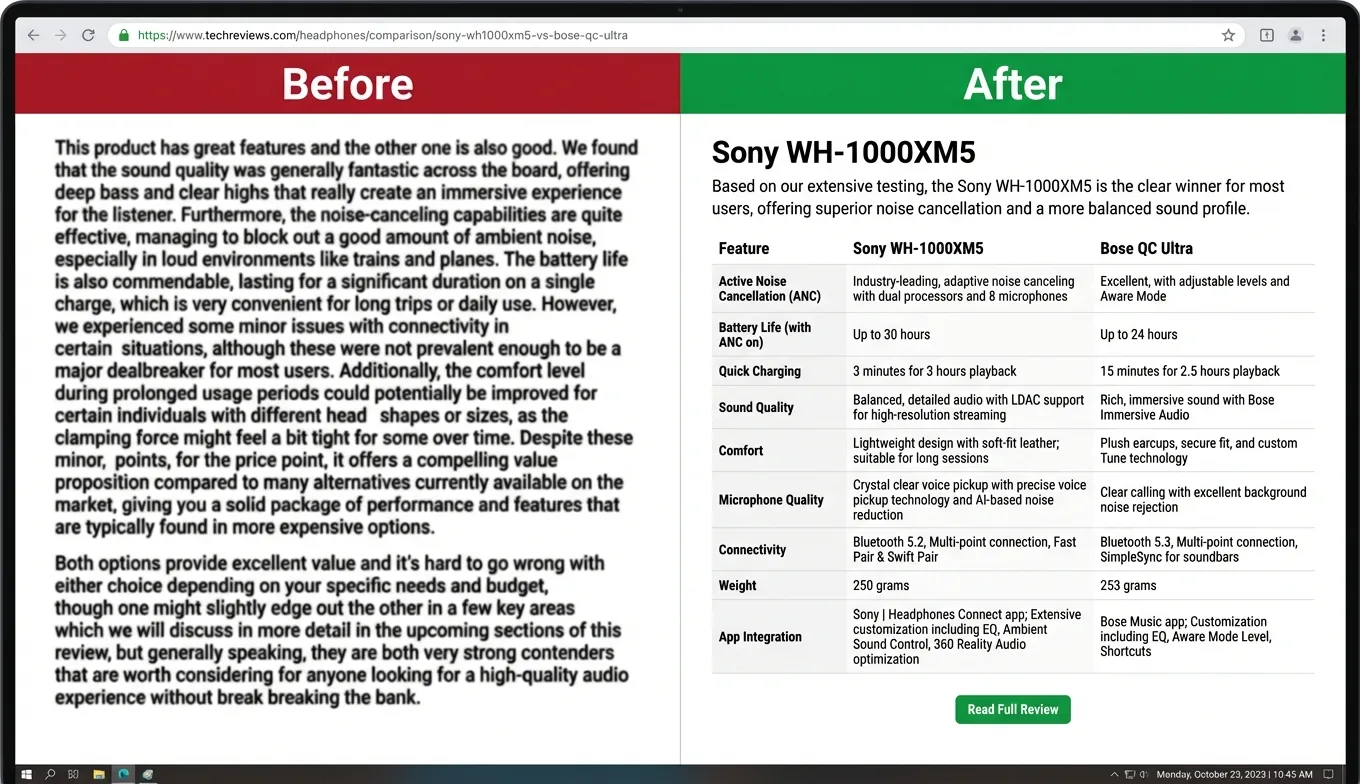
The single biggest adjustment you can make is entity clarity. An AI widget parsing “this product has excellent noise cancellation” doesn’t know which product you mean. Swap that for “The Sony WH-1000XM5 has excellent noise cancellation” and the widget can surface it correctly when someone asks about headphones.
This isn’t unique to chat widgets. It’s how retrieval systems work across generative search: “if your paragraphs reference “it,” “this,” or “these” without clear antecedents, the extracted chunk becomes meaningless.” A widget or search engine chunks your review into paragraphs, and a pronoun-heavy chunk stops making sense the moment it’s pulled out of context.
The other structural change worth making is moving comparisons into tables and keeping product sections focused on one product at a time. Content that earns 30–40% more visibility in LLM-generated answers (per The Brand Algorithm) tends to have clear, verifiable data points rather than dense prose.
Answer-first writing rounds out the approach: put your recommendation at the top of the section, then explain why. JumpFly senior SEO specialist Laura Plack’s content chunking research backs the “bottom line up front” structure (BLUF): “each paragraph should stand alone with two to four sentences, around 40–120 words.”
- Use full product names. "Sony WH-1000XM5" not "this headphone" or "the Sony model."
- Lead with the recommendation. Put your pick in the first sentence of each section, then explain why.
- Replace dense paragraphs with comparison tables. Structured data is easier for AI to extract than prose comparisons.
- One product per section. Mixing two products in the same section confuses retrieval when someone asks about a specific model.
Which Chat Widget Options Actually Support Affiliate Monetization?
Most chat tools on the market were built for customer support, not affiliate publishing. Tidio, Chatbase, DocsBot, and Robofy all let you build a knowledge-base chatbot from your site content, but not one of them injects tracked affiliate links into chat responses. For a wider view, our roundup of tools for adding AI chat to your blog weighs each option on cost, platform reach, and monetization.
You can add a custom system prompt that mentions specific products, but the widget won’t generate tracked links dynamically. That means any click you do earn from a chat-recommended product is untracked and unmonetized.
There are three realistic paths for affiliate bloggers, and the tradeoffs are meaningful:
- Generic widget with manual workarounds. Use a support-oriented tool and configure the system prompt to mention specific products. You get a chatbot experience but no affiliate link generation. Useful for engagement, not for incremental revenue.
- Purpose-built affiliate widget like ChatAds. Designed specifically for affiliate publishers. Auto-injects affiliate links into AI responses when products are mentioned. Free tier handles 100 messages per day. No code required.
- Custom build with an LLM API plus ChatAds. You (or a developer) wire up an LLM directly, then use the ChatAds API to handle link detection and affiliate URL resolution. Highest flexibility, requires technical setup. See the guide to adding affiliate links to AI assistant responses for the developer approach.
For a full comparison of these approaches including setup time and cost, see the article on how to add a chatbot to your affiliate blog. The short version: if you’re non-technical and want affiliate links working today, option two is the starting point.
★ = low · ★★ = medium · ★★★ = high
| Approach | Setup Effort | Affiliate Links | Monthly Cost |
|---|---|---|---|
| Generic widget (Tidio, Chatbase) | ★ | None | $0–$50 |
| ChatAds (purpose-built) | ★ | Auto-injected | Free tier available |
| Custom LLM + ChatAds API | ★★★ | Auto-injected | ~$0.001/conversation |
How Do You Install and Configure the Widget?
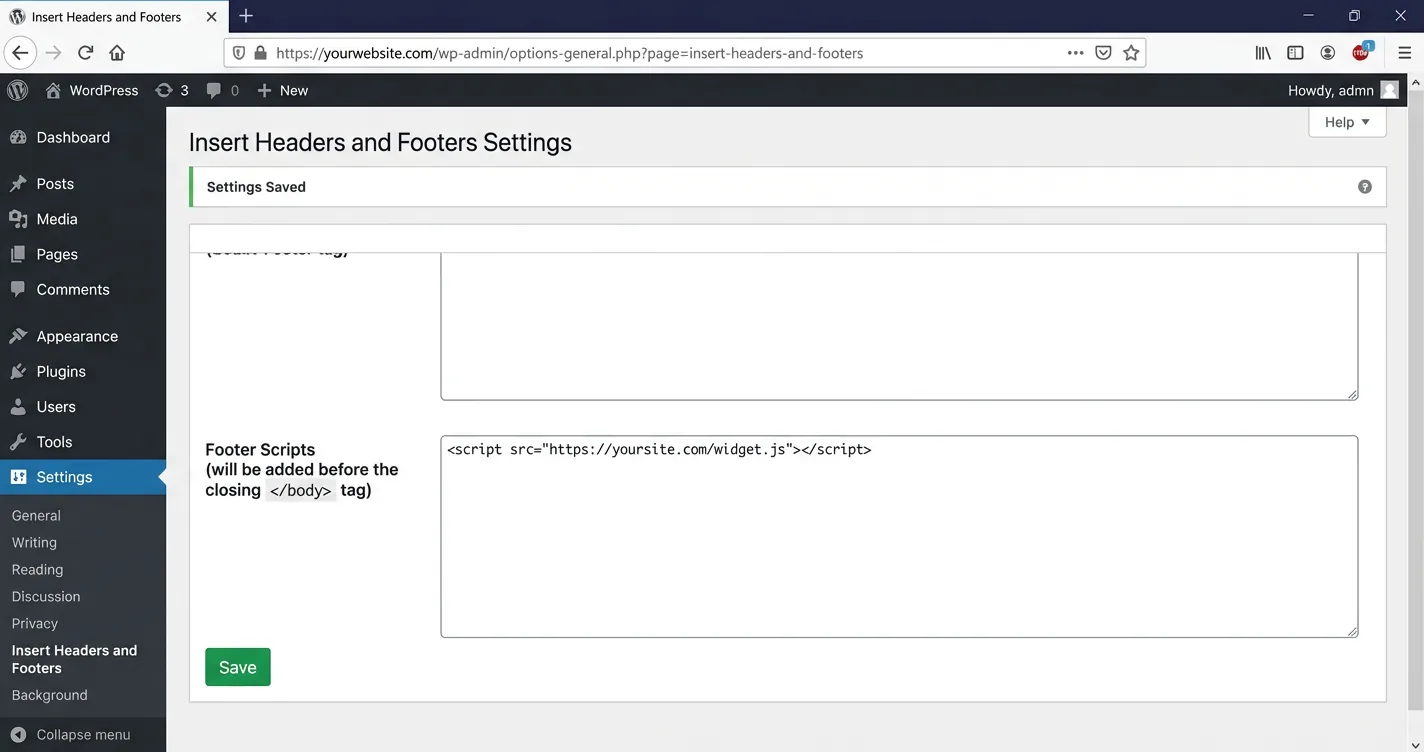
Installing a chat widget is a copy-paste operation regardless of which platform your blog runs on. Every tool generates an embed snippet, and you paste it into your site’s HTML before the closing </body> tag. The difference is where you find that setting on each platform:
- WordPress. Go to Appearance > Widgets and add a Custom HTML block, or use a header/footer plugin like "Insert Headers and Footers" to paste the code sitewide. If you would rather compare native options, see our breakdown of WordPress AI chatbot plugins.
- Ghost. Open Settings > Code Injection and paste into the Site Footer field.
- Squarespace. Open Settings > Advanced > Code Injection and paste into the Footer section.
- Custom HTML site. Paste directly before the closing
</body>tag in your base template.
Once the widget is installed, a few configuration decisions matter more than most people realize. Start by limiting the widget to your highest-value pages: product reviews and buying guides. Your About page and contact form don’t need a shopping assistant.
Most tools also let you delay the widget appearance, which keeps it from interrupting visitors who just landed and scrolling through your in-article content. A 60-second delay is a reasonable starting point for review pages.
The system prompt is where you shape the widget’s personality and focus. A good prompt tells the assistant what your site covers, what products you review, and what kind of questions it should answer. For a niche site, something like “You are a helpful shopping assistant for a hiking gear review site. Help visitors find the right gear based on their needs and recommend specific products from our reviews” outperforms a generic default.
- Embed code placed correctly (before
</body>on all target pages) - Widget restricted to product reviews and buying guides (not sitewide)
- 60-second appearance delay set for review pages
- System prompt customized for your niche and product categories
- Mobile display tested (chat widget should not block product images)
- FTC disclosure visible within the chat interface
How Do You Connect Your Affiliate Program and Enable Monetization?
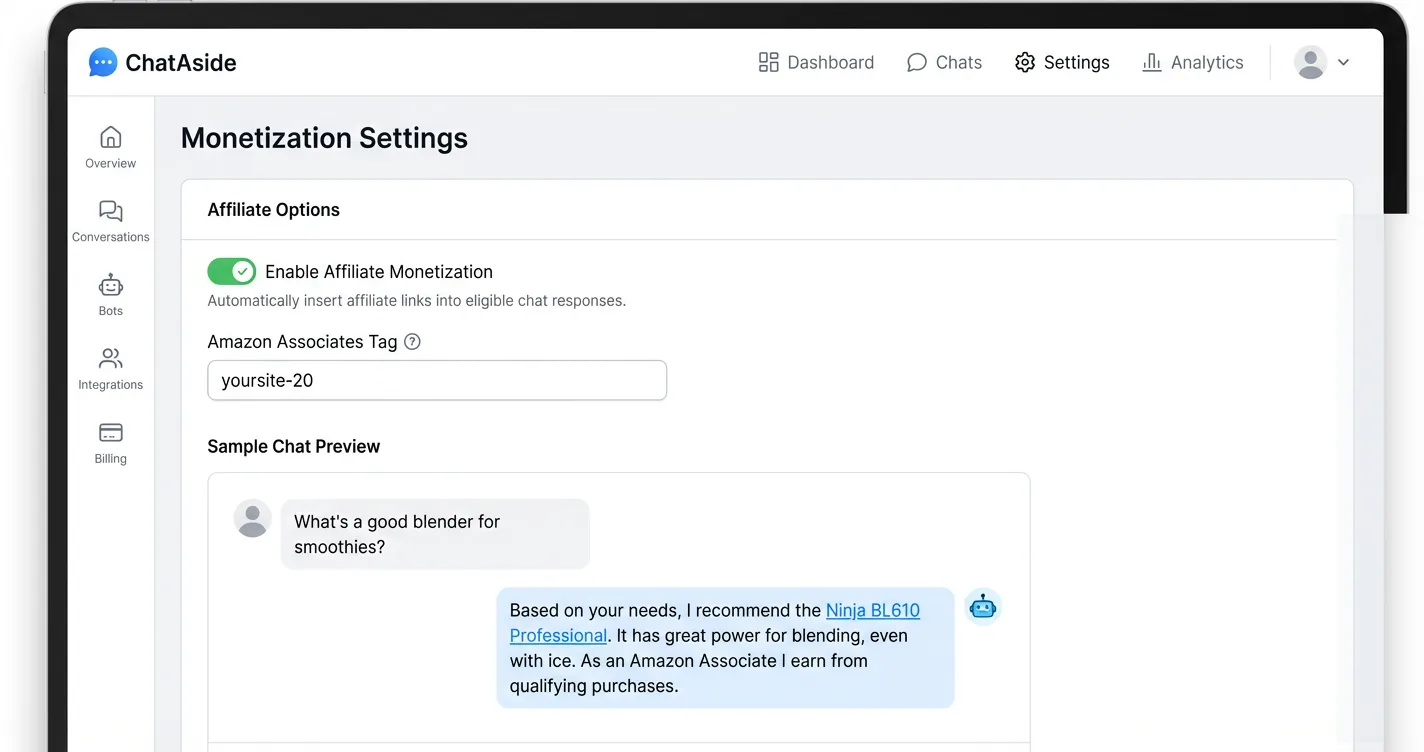
For purpose-built tools like ChatAds, monetization setup is a toggle in the dashboard. You enter your Amazon Associates tag (the yourname-20 format), enable monetization, and the widget starts resolving product mentions into tracked affiliate links automatically. The technical flow happens invisibly: the AI generates a response mentioning a product, the monetization layer detects the mention, resolves the affiliate URL, and the link appears inline for the visitor.
For custom builds using the ChatAds API, the process produces the same outcome but requires developer setup. The ChatAds integration guide walks through that developer path in detail.
For the non-technical route, the key thing to verify is that your Associates tag is actually firing. Test this by opening the widget on a review page, asking for a product recommendation, and checking the returned link URL for your tag before it resolves.
Pricing for the non-technical path is more accessible than most bloggers expect. ChatAds’s free tier handles 100 chat messages per day, which is enough to test on your highest-traffic review pages and see whether the channel converts before committing to a paid tier. For reference, LLM costs on a custom build run approximately $0.001 per conversation, so at 100 messages per day the infrastructure cost is under $4 per month.
The monetization question worth asking before you scale: are affiliate clicks from the widget incremental to your in-article clicks, or are they cannibalizing the same conversions? That answer comes from your analytics, not from the widget dashboard.
ChatAds is the chat widget built specifically for affiliate publishers. It reads the review a visitor is on, answers their questions, and injects your Amazon Associates tag into product links automatically. The free tier covers 100 messages per day with no code required. If you're looking at the full monetization picture, ChatAds is the fastest path from zero to affiliate-linked AI chat on your blog.
What Metrics Should You Track to Scale?
Three numbers matter most in the first 30 days after launch. The first is messages per day, which tells you whether visitors are actually engaging with the widget. Low engagement usually means the widget is appearing on the wrong pages or the system prompt is too generic.
The second is affiliate clicks from chat versus affiliate clicks from your in-article links. This comparison answers whether the widget is creating new revenue or just rerouting existing clicks.
The third and most telling number is revenue per message. Divide your chat-attributed affiliate revenue by total messages in the same period. AffiliateBooster’s data shows a 31% conversion rate increase on pages where chatbots are active, but that benchmark assumes the chatbot is monetized. As affiliate marketer Jitendra Vaswani put it after running the test on his own site: “A chatbot answers their questions instantly. And when their question is answered, they feel confident enough to click your affiliate link.”
Without tracked links, you’re running engagement infrastructure that earns nothing for the work it does. For a detailed breakdown of how to set this up as a sustainable metric, the article on revenue per message (RPM) is worth reading alongside your first month of data.
Scaling from there follows a straightforward pattern: expand the widget to more product review pages, refine the system prompt based on the questions visitors are actually asking, and upgrade your tier when message volume outgrows the free limit.
The strategic point that gets missed in most chatbot guides is ownership. OpenAI and Perplexity both launched AI shopping features in Q4 2025 (TechCrunch), and every one of those conversations is a conversion event their platform captures. Onton CEO Zach Hudson made a related point to TechCrunch about competing head-on with platforms that size: “If you’re using only off-the-shelf LLMs and a conversational interface, it’s very hard to see how a startup can compete with the larger companies.” The same asymmetry applies to a publisher’s own site: putting the chat widget on your own domain sidesteps that fight, because the conversion event lands in your analytics, not a platform’s.
Most affiliate dashboards don't separate chat-attributed clicks from in-article clicks natively. One approach is to use a distinct Associates tracking ID for your chat widget versus your in-article links. Amazon allows multiple tracking IDs under one account, so tagging widget-generated links separately gives you clean attribution data from day one. This is also covered in our guide to affiliate networks for AI chatbots.
Affiliate blogs are not dying, but the way they earn is changing. The content you’ve already written has real value, and adding an AI chat layer is the most direct way to keep that value working for you as search behavior shifts.
The six steps in this guide cover the core of the transition: understanding why intent-driven chat converts better than passive reading, preparing your content so an AI can actually use it, picking a tool that handles affiliate link injection, installing it correctly, connecting your affiliate program, and measuring whether it’s working. None of these steps require a developer or a large upfront investment. The free tier on purpose-built tools like ChatAds is specifically designed to let you test the channel before you commit.
The broader point running through all six of these steps is ownership. When you add AI chat to your own site, you are building a direct relationship with visitors rather than sending them to a platform that will try to capture that same conversion event.
Frequently Asked Questions
Can I turn my affiliate blog into an AI shopping assistant without coding?
Yes. Purpose-built tools like ChatAds are designed specifically for non-technical affiliate publishers. You paste an embed snippet into your site (the process is the same as adding any third-party widget on WordPress, Ghost, or Squarespace), enter your Amazon Associates tag in the dashboard, and enable monetization. The widget reads the review the visitor is currently on and handles affiliate link injection automatically. No code changes to your site are required beyond the embed paste.
Will an AI chat widget cannibalize my existing affiliate link clicks?
It can, if you use a generic chatbot that doesn't inject affiliate links. If a visitor asks the widget for a recommendation and gets an answer with no tracked link, they've converted without clicking your in-article affiliate link, and you've earned nothing from either touchpoint. The solution is to use a widget that generates tracked affiliate links in its responses, and to use a separate Amazon tracking ID for chat-attributed clicks so you can measure whether the channel is incremental or substitutional.
How do I make my blog content work better with an AI chat widget?
The biggest gains come from entity clarity and structure. Use full product names and model numbers throughout your reviews instead of pronouns or vague references. Organize content with one product per section, lead each section with your recommendation, and use comparison tables instead of dense prose comparisons. Content with clear, verifiable data points earns substantially more visibility in AI-generated answers than narrative-heavy writing, and that directly affects how accurately your widget can answer visitor questions.
What does an ai chatbot affiliate marketing setup cost to run?
For the no-code route, ChatAds's free tier covers 100 chat messages per day at no cost. Paid tiers scale up from there. For a custom build using an LLM API plus ChatAds, LLM costs run approximately $0.001 per conversation, so 100 messages per day works out to roughly $3–4 per month in infrastructure costs. The breakeven point depends on your niche's average commission value, but at a 12% chat conversion rate and even modest cart values, the channel tends to pay for itself quickly at moderate traffic volumes.
Which blog platforms support embedding an affiliate blog chatbot?
Any platform that lets you add custom HTML supports a chat widget embed. WordPress supports it via the Custom HTML widget block or a header/footer plugin. Ghost has a Code Injection field in settings. Squarespace has a Code Injection section under Advanced settings. Custom HTML sites can paste the snippet directly before the closing body tag. The embed process takes a few minutes on any of these platforms and does not require modifying theme files or touching your site's core code.
How do I track whether my ai shopping assistant affiliate blog is earning incrementally?
Create a separate Amazon Associates tracking ID specifically for your chat widget and use a different tracking ID for in-article links. Amazon allows multiple tracking IDs under one account at no charge. With separate IDs, your Associates dashboard will show chat-attributed clicks and earnings in their own column, making it straightforward to compare chat revenue against in-article revenue. Track messages per day alongside that revenue figure to calculate your effective revenue per message, which is the clearest signal of whether the channel is healthy or needs optimization.