Retail media is a large and fast-growing channel, and most of that money still flows to search results and product pages. eMarketer puts the US number at “$71.09 billion in 2026,” up from $60.32 billion in 2025. The landscape is shifting though.
Amazon now runs sponsored prompts tied to its Rufus assistant. Walmart is testing ads inside its Sparky shopping agent. The next retail media channel is conversational AI.
For ecommerce companies, this creates a new opportunity to promote your own products. Instead of competing for ad space on Amazon or Walmart, you can surface sponsored listings directly in your own chatbot. A customer asks about running shoes, and your chatbot highlights the SKUs you want to push. Same concept as sponsored search results, but inside a conversation.
This guide covers how to set up sponsored listings in your AI chatbot, from catalog integration to FTC disclosure requirements.
Chat traffic buys. Adobe data reported by TechCrunch found that "AI traffic converted 42% better than living, breathing customers in March 2026," with revenue per visit 37% higher than non-AI traffic. Sponsored listings let you guide that purchase intent toward specific products.
Ask ChatGPT to summarize the full text automatically.
Step 1 - Understand How Sponsored Listings Work in Chat
Sponsored listings in traditional ecommerce appear when shoppers search for specific terms. A brand bids on “wireless headphones,” and their product shows up at the top of search results with a “Sponsored” label. The model works because search queries reveal purchase intent, similar to how native ads in AI chats rely on context to feel relevant.
Conversational AI captures the same intent, just in a different format. Instead of typing “wireless headphones” into a search box, a customer might ask “what are good headphones for working out?” The underlying need is identical. The difference is that chat provides more context about what the customer actually wants.
eMarketer projects that "US retail media ad spending will grow 17.8% year-over-year in 2026," and that "Amazon and Walmart will capture 89% of incremental retail media spending in 2026." Note that 89% figure is share of the growth, not of all retail media dollars. Their AI assistants are the next battleground.
Amazon’s Rufus assistant now displays sponsored products pulled from existing Sponsored Products campaigns. The ads appear with clear labels and are triggered based on how well product content matches the shopper’s question.
Walmart’s Sparky takes the same approach with its own product catalog. Both companies report that AI-assisted shoppers convert at significantly higher rates than those browsing without help.
For ecommerce companies running their own chatbots, sponsored listings work similarly. You define which products to promote, set the conditions for when they appear, and the chatbot surfaces them when conversations match those conditions. The products could be high-margin SKUs, new arrivals, overstocked items, or anything else you want to push. You control the rules.
Step 2 - Connect Your Product Catalog
Your chatbot needs access to your product data before it can recommend anything. This means connecting your SKU database or product feed to the system that handles conversation responses.
The minimum product data includes name, price, availability status, and a link to the product page. More detailed catalogs produce better results. Include category, brand, key attributes, and any tags that help match products to customer needs. If someone asks about “comfortable shoes for standing all day,” attributes like “cushioned insole” or “arch support” help the system find relevant matches.
- SKU, name, and description
- Price and inventory status
- Category and brand
- Attributes and specifications
- Promotion flags (clearance, new arrival, featured)
The connection method depends on your existing infrastructure and how often your catalog changes. API integrations pull live data on each request. Batch syncs update the chatbot’s product index on a schedule. Real-time inventory checks prevent the chatbot from promoting out-of-stock items, which frustrates customers and wastes the opportunity.
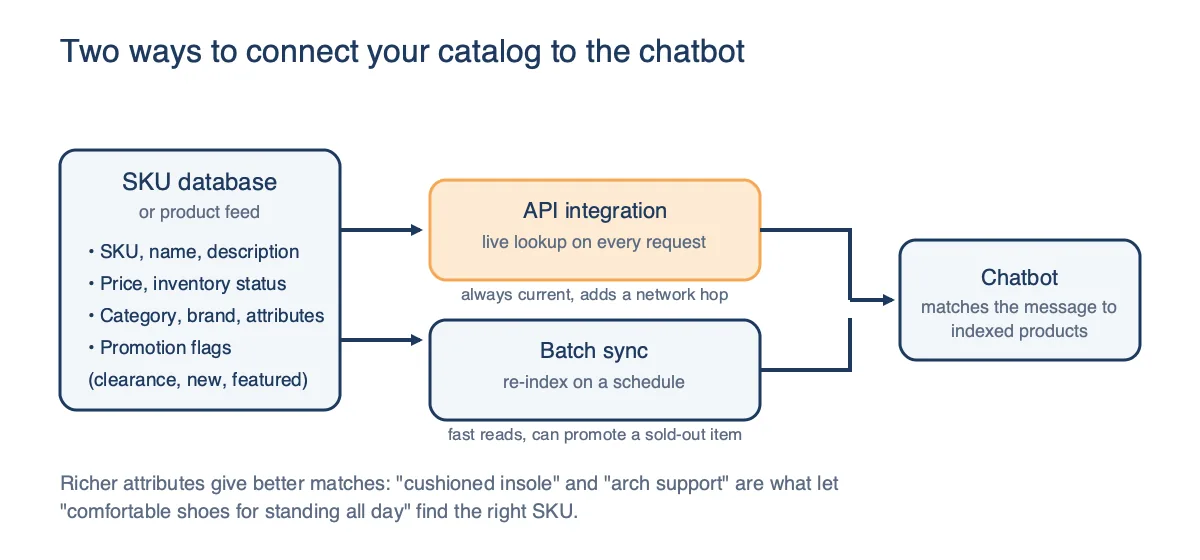
If you’re weighing options, our roundup of retail media solutions for AI chat compares the leading platforms. ChatAds handles this integration so you don’t have to build it yourself. You provide your product feed or connect via API, and the system indexes your catalog for conversational matching. When a customer’s message relates to one of your products, ChatAds identifies the match and returns the sponsored listing for your chatbot to display.
Step 3 - Define Targeting Rules for Conversations
The hard part of sponsored listings in chat is determining when to show them. Traditional retail media relies on explicit search queries where the customer types “running shoes” and you show running shoe ads.
Chat is messier than search because customers describe problems, ask questions, and meander through topics before getting to what they want to buy.
Most solutions require you to extract keywords from the conversation and send them as search terms. You parse the customer’s message, pull out “running shoes,” and query your product database. This works for simple cases but misses nuance. “My feet hurt after long runs” contains no product keywords, yet clearly indicates interest in running shoes with better cushioning.
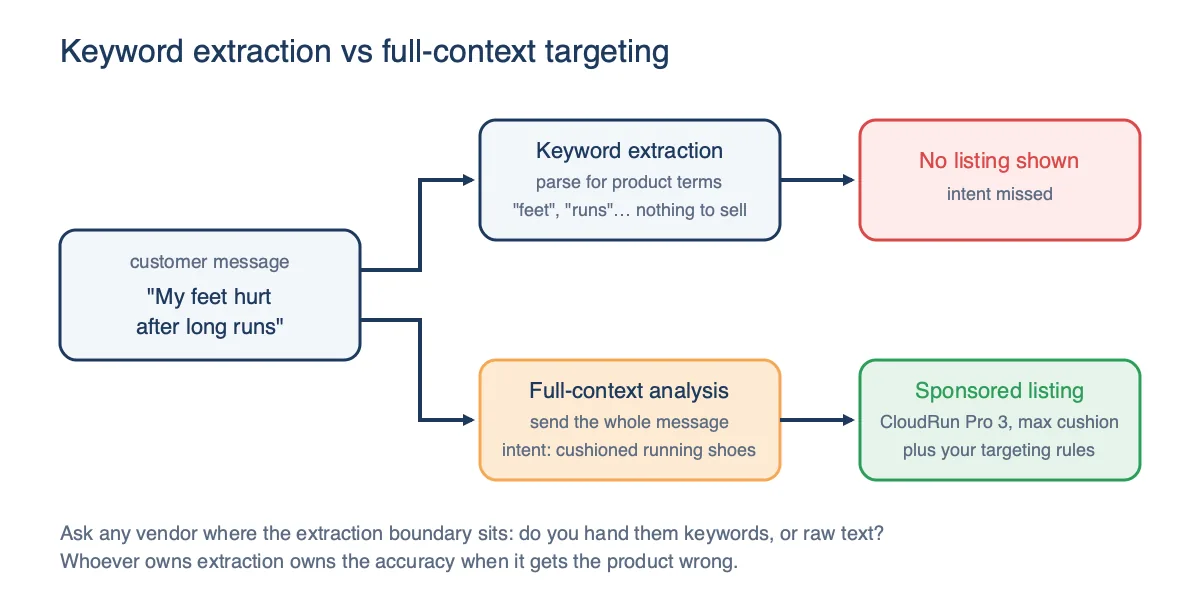
- Keyword extraction: Parse messages for product terms, send as search query
- Full-context analysis: Analyze entire message to identify purchase intent and product fit
ChatAds takes the full-context approach: instead of requiring you to extract and send keywords, you send the complete message. The system identifies relevant terms, matches them against your product catalog, and returns sponsored listings that fit. This catches intent that keyword extraction misses and reduces development work on your end. Several platforms now do contextual matching of some kind, so the question worth asking any vendor is whether you hand them keywords or raw text, and who owns the extraction accuracy when it gets the product wrong.
The targeting rules you set determine which products appear for which contexts. You might boost certain SKUs for specific categories, prioritize high-margin items when multiple products match, or suppress products that are low on inventory. These rules run on top of the contextual matching to give you control over what gets promoted.
Step 4 - Handle Disclosure Requirements
The FTC requires clear disclosure when there’s a material connection between an endorser and a product. The rule at 16 CFR 255.5 puts it this way: “When there exists a connection between the endorser and the seller of the advertised product that might materially affect the weight or credibility of the endorsement, and that connection is not reasonably expected by the audience, such connection must be disclosed clearly and conspicuously.” Sponsored listings in your chatbot count. If you’re promoting certain products because they benefit you financially, customers need to know. Our free Affiliate Disclosure Generator & FTC Checker can write that disclosure or audit an existing one.
The threshold is lower than most teams assume. The same rule states that “a material connection needs to be disclosed when a significant minority of the audience for an endorsement does not understand or expect the connection.” You don’t get to skip disclosure because most of your users could probably figure it out.
The standard approach for disclosure is a visible “Sponsored” label on promoted products. Amazon and Walmart both use this labeling in their AI assistants. The label should be unambiguous and easy to spot. Burying it in fine print or using vague language like “Featured” doesn’t meet the requirement.
State law adds a second layer, though it is narrower than the summaries floating around suggest. Get the scope right before you build compliance work around it.
California’s B.O.T. Act (Bus. & Prof. Code 17941) is not a blanket “tell users it’s a bot” rule. It bars using a bot to communicate “with the intent to mislead the other person about its artificial identity for the purpose of knowingly deceiving the person about the content of the communication in order to incentivize a purchase or sale of goods or services.” Disclosing that it is a bot is the safe harbor, and that disclosure must be “clear, conspicuous, and reasonably designed to inform.”
New York’s synthetic performer law took effect June 9, 2026, but it is narrow: it covers ads containing AI-generated performers designed to look like real people, not AI-generated ad copy or product recommendations generally.
Colorado is the one people get wrong most often. SB 24-205 is frequently cited as a current AI disclosure mandate, but it never took effect. It was delayed, then repealed and reenacted as SB 26-189, which shifts the focus to automated decision-making in consequential decisions like housing and employment, with developer requirements landing January 1, 2027. A retail chatbot recommending shoes is not the target of that regime.
None of this is legal advice, and the picture keeps moving. The FTC’s material-connection rule is the stable floor to design against.
FTC civil penalties for knowing violations run to $53,088 per violation, the maximum the Commission set effective January 17, 2025. The figure is adjusted for inflation, so check the current Federal Register notice rather than trusting a number in a blog post. Each ad shown without proper disclosure could be a separate violation.
The safest approach is consistent labeling across every chatbot interaction you deploy. Mark every sponsored product clearly. Don’t mix sponsored and organic recommendations without distinguishing them. Keep records of what was shown and when. Compliance is straightforward if you build disclosure into the system from the start.
Step 5 - Measure Performance and Optimize
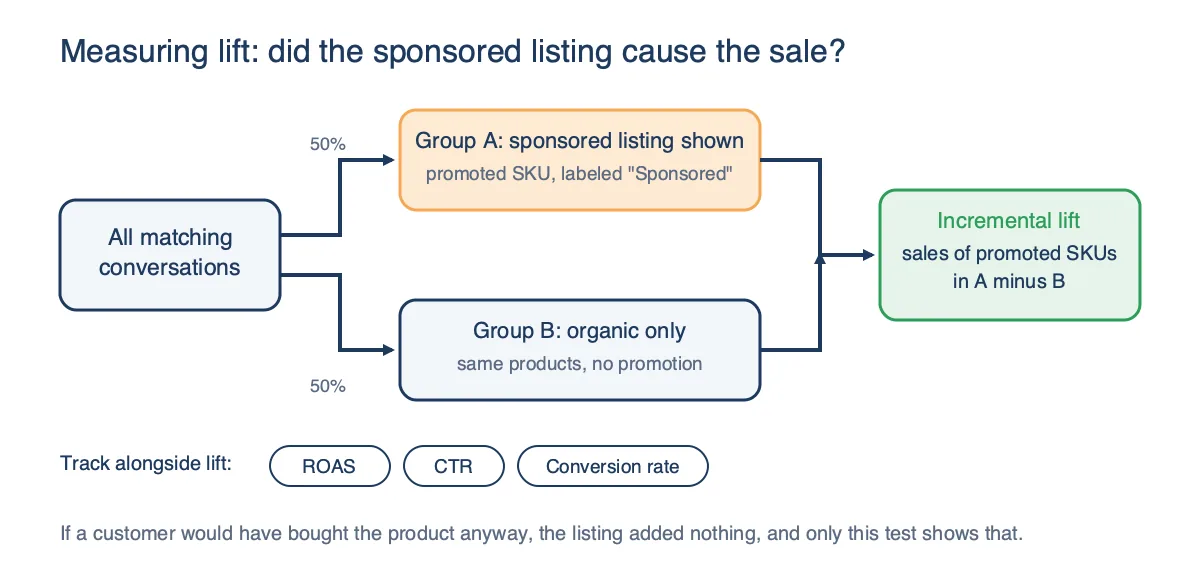
Sponsored listing performance comes down to whether the promoted products actually sell. The core metric is return on ad spend (ROAS), measuring revenue generated per dollar spent on the sponsorship. You can also track revenue per message to understand monetization at the conversation level. For internal promotions where you’re not paying for ad space, track the incremental revenue from sponsored placements versus what those products would have sold organically.
Click-through rate shows whether customers actually engage with your sponsored listings. Published CTR benchmarks for retail media search sit behind analyst paywalls (eMarketer maintains one sourced from Skai), and the numbers you’ll find free on the open web mostly trace back to unsourced blog posts. Conversational placements are new enough that no reliable public benchmark exists at all. Track your own CTR over time and treat that as your baseline rather than chasing someone else’s number.
- ROAS: Revenue per dollar of ad spend
- CTR: Percentage of sponsored listings clicked
- Incrementality: Sales lift versus organic baseline
- Conversion rate: Clicks that become purchases
Incrementality testing matters more than looking at raw conversion numbers alone. If a customer was going to buy the product anyway, the sponsored listing didn’t add value. Run tests where some conversations show sponsored listings and others don’t, then compare sales across groups to measure true lift.
Published incremental ROAS results vary widely by brand and category, and the eye-catching multiples that circulate in vendor decks rarely come with methodology attached, so generate your own number before you defend a budget with one.
Optimization follows naturally once you have solid measurement practices established and running. Products with high CTR but low conversion might need better landing pages or clearer product descriptions. Products with low CTR might be appearing in the wrong conversational contexts.
Adjust your targeting rules based on what the data shows over time. The advantage of conversational AI is the rich context available for analysis, so use it to refine which products appear where.
Sponsored listings in AI chatbots bring retail media principles to conversational commerce. The setup requires catalog integration, targeting logic, disclosure compliance, and performance tracking. Tools like ChatAds simplify the targeting piece by analyzing full conversation context rather than requiring keyword extraction. Start with a few high-priority SKUs, measure results, and expand from there.
Frequently Asked Questions
How do sponsored listings work in AI chatbots?
Sponsored listings in AI chatbots display promoted products when conversation context matches targeting rules. When a customer asks about a product category, the chatbot surfaces SKUs you want to promote alongside or instead of organic recommendations. ChatAds handles the context matching automatically by analyzing full messages rather than requiring keyword extraction.
What product data do I need for chatbot sponsored listings?
At minimum, you need SKU identifiers, product names, prices, and availability status. Better results come from including categories, brands, attributes, and promotional flags. ChatAds accepts product feeds via API or batch upload and indexes them for conversational matching.
Do I need to disclose sponsored products in my AI chatbot?
Yes. Under 16 CFR 255.5, a material connection must be disclosed clearly and conspicuously when the audience would not reasonably expect it. Mark sponsored listings with visible "Sponsored" labels. State law is narrower than often reported: California's B.O.T. Act targets bots that intend to mislead about being human to drive a sale, and New York's 2026 law covers AI-generated synthetic performers in ads rather than AI content generally. FTC penalties for knowing violations reached $53,088 per violation as of January 2025.
How do I target sponsored listings based on conversation context?
Many solutions require you to extract keywords from messages and send them as search queries. ChatAds analyzes full message context in real time instead, identifying relevant products without requiring keyword extraction, which catches purchase intent that keyword matching misses. When comparing vendors, ask whether you must supply keywords or can send raw text.
What metrics should I track for chatbot sponsored listings?
Track ROAS (return on ad spend), click-through rate, conversion rate, and incrementality. Incrementality testing compares sales with and without sponsored listings to measure true lift, which matters because a customer who would have bought anyway represents no added value. Reliable public benchmarks for conversational placements do not yet exist, so build your own baseline.
Can I use ChatAds for sponsored listings in my ecommerce chatbot?
Yes. ChatAds integrates with your product catalog and analyzes conversation context to identify when sponsored products should appear. You send full messages rather than extracted keywords, and ChatAds returns matching products from your SKU list. This simplifies implementation and improves targeting accuracy.