
Most advice about using Claude for affiliate marketing stops at the prompt, and a prompt cannot read your transactions. The model writes a review, invents a model number, and never touches the network account where the money actually lives.
An MCP server is a small connector that gives an assistant real access to one outside system. You add it once in your client’s settings, and after that a chat in Claude, ChatGPT, or Cursor can pull last month’s Awin transactions, resolve a product name against a live catalog, or build a tracking link on your own publisher ID. The protocol’s own docs describe servers as “programs that expose specific capabilities to AI applications through standardized protocol interfaces.” Each tool the server exposes does one job, and the assistant picks the right one from your question.
The eight jobs below are tasks rather than vendors, and each one names the server that does the work. If you would rather compare the servers themselves, our rundown of the best MCP servers for affiliate marketing sorts them by whose affiliate ID lands on the link.
- Works on day one - link insertion, product matching, and reader-question mining need one key and no network approvals
- Needs an approved publisher account - coupons, earnings, reconciliation, and tracking links all read a network you already belong to
Ask ChatGPT to summarize the full text automatically.
| Client | How You Add a Server | Worth Knowing |
|---|---|---|
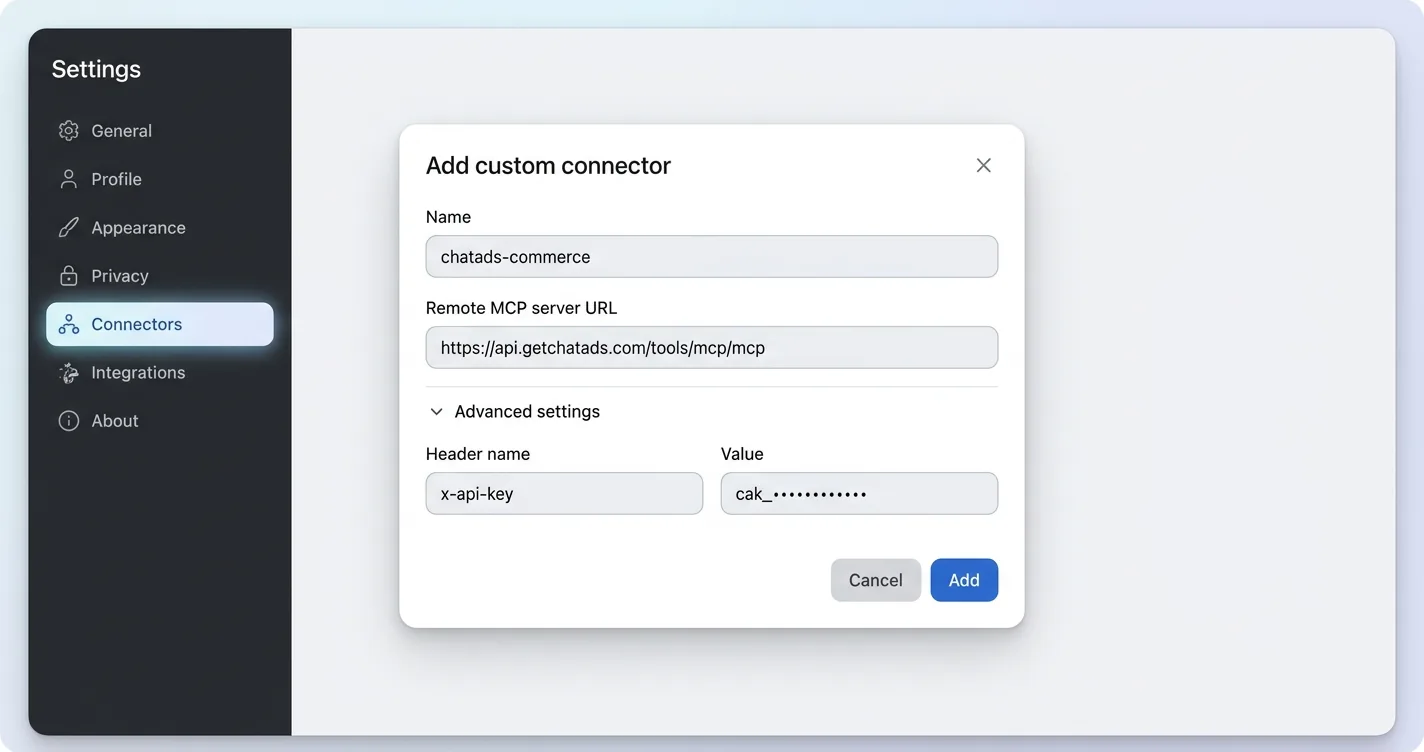
| Claude (web, Desktop, mobile) | Settings, then Connectors, then Add custom connector, then paste the URL | Anthropic's connector guide states that "Free users are limited to one custom connector" (source); paid plans are unrestricted |
| Claude Code | One claude mcp add line in the terminal |
Fastest path if you already live in a terminal |
| ChatGPT | Developer Mode, then add the server URL | Web only, on Pro, Plus, Business, Enterprise, and Education accounts, and per OpenAI's docs "Write actions by default require confirmation" (source) |
| Cursor and similar desktop clients | Paste a JSON config block, then restart | The universal fallback when a client has no connector screen |
Add Affiliate Links to a Post You Already Wrote
The most common affiliate job is also the least glamorous, and that is linking a post you already finished. A buyer’s guide names nine products in the prose, none of them carry a link, and each one means an Amazon search, a link builder, and a CMS edit. ChatAds Commerce Insert runs the other direction from most tools here, because it starts from the draft instead of a search box, and our walkthrough on adding Amazon affiliate links with Claude covers the setup click by click.
Paste the post into your chat and ask the assistant to run insert_product_links on it. Back comes the exact phrase to hyperlink, its character offsets in the text you sent, and Amazon products carrying your own Associates tag. Your prose returns untouched, so you or your CMS decide where each link actually belongs. Wherever they land, the FTC’s endorsement guidance still applies: “You should disclose your relationship to the retailer clearly and conspicuously on your site, so readers can decide how much weight to give your endorsement” (source).
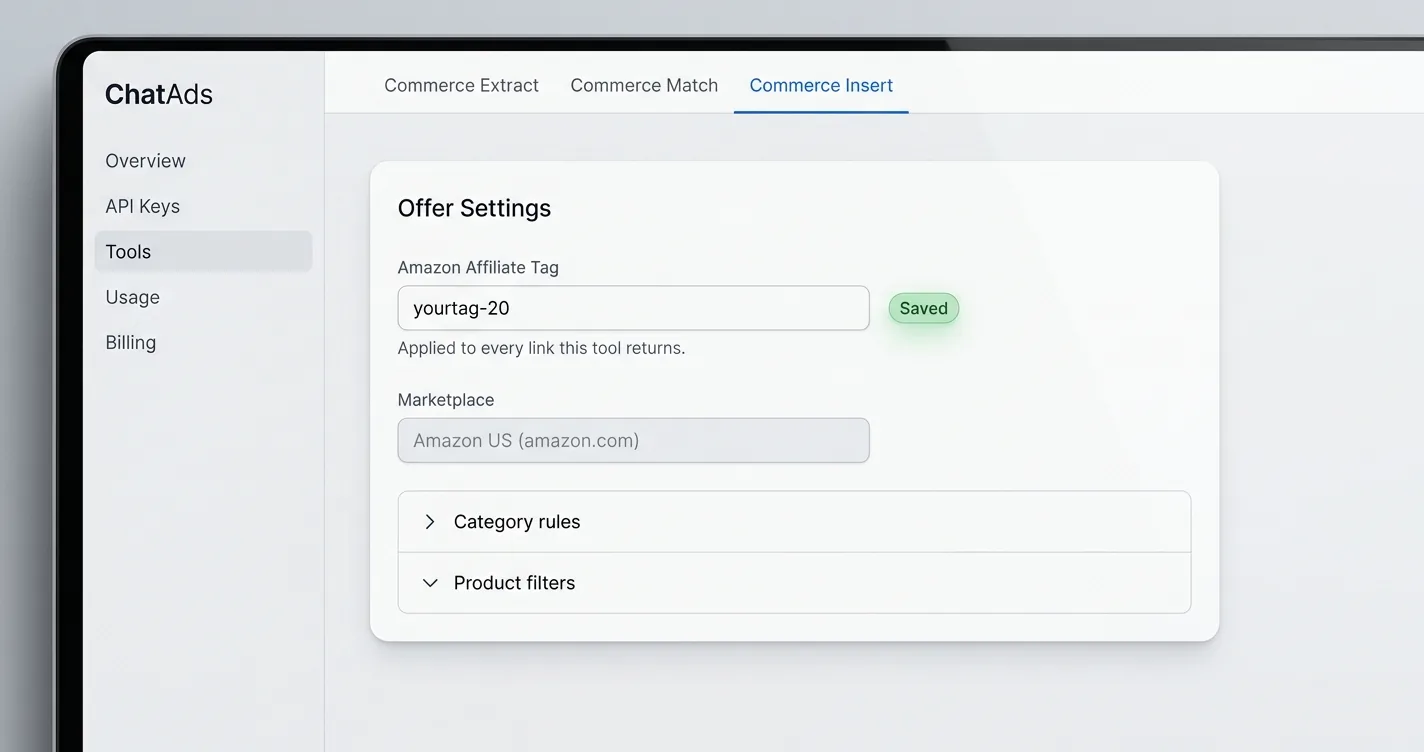
Three limits are worth knowing before you paste a draft into the chat. The catalog is Amazon US in English, the affiliate tag has to be set under Offer Settings or the URLs come back untagged and earn nothing, and the free tier covers 500 requests a month shared across all three ChatAds commerce tools. A no_offer status is a real answer rather than a failure, so sending the same text again will not produce links.
For developers
The server is remote and stateless, so a config entry is the whole install: ```json { "mcpServers": { "chatads-commerce": { "url": "https://api.getchatads.com/tools/mcp/mcp", "transport": "http", "headers": { "x-api-key": "cak_your_access_key" } } } } ``` In Claude Code it is one line instead: ```bash claude mcp add --transport http chatads-commerce https://api.getchatads.com/tools/mcp/mcp --header "x-api-key: cak_your_access_key" ``` Each offer carries `link_text`, `match_start` and `match_end` in Unicode code points with `match_end` exclusive, `is_branded`, `term_brand`, and a `products` array whose first entry is the link to use. `max_products_per_offer: 1` cuts the response to roughly a third of its size without losing anything you would splice in. Full field list in the [Commerce Insert docs](https://docs.getchatads.com/guides/commerce-insert).Draft a Roundup From Real Products Instead of Invented Names
Ask a model for the five best trail cameras and some of the model numbers it hands back will never have shipped. The prose reads fine, the specs are plausible, and two of the products do not exist, which is the failure mode that makes AI-drafted roundups dangerous to publish. ChatAds Commerce Match fixes the draft at the point where names enter it.
The pattern is to let the assistant outline the piece, then call find_product_matches on every product it wants to name. Each call returns up to three real listings, best pick first, with the ASIN, brand, a confidence score, and the product URL. Anything the catalog cannot confirm comes back as an empty array, which is your signal to cut that entry rather than publish a guess.
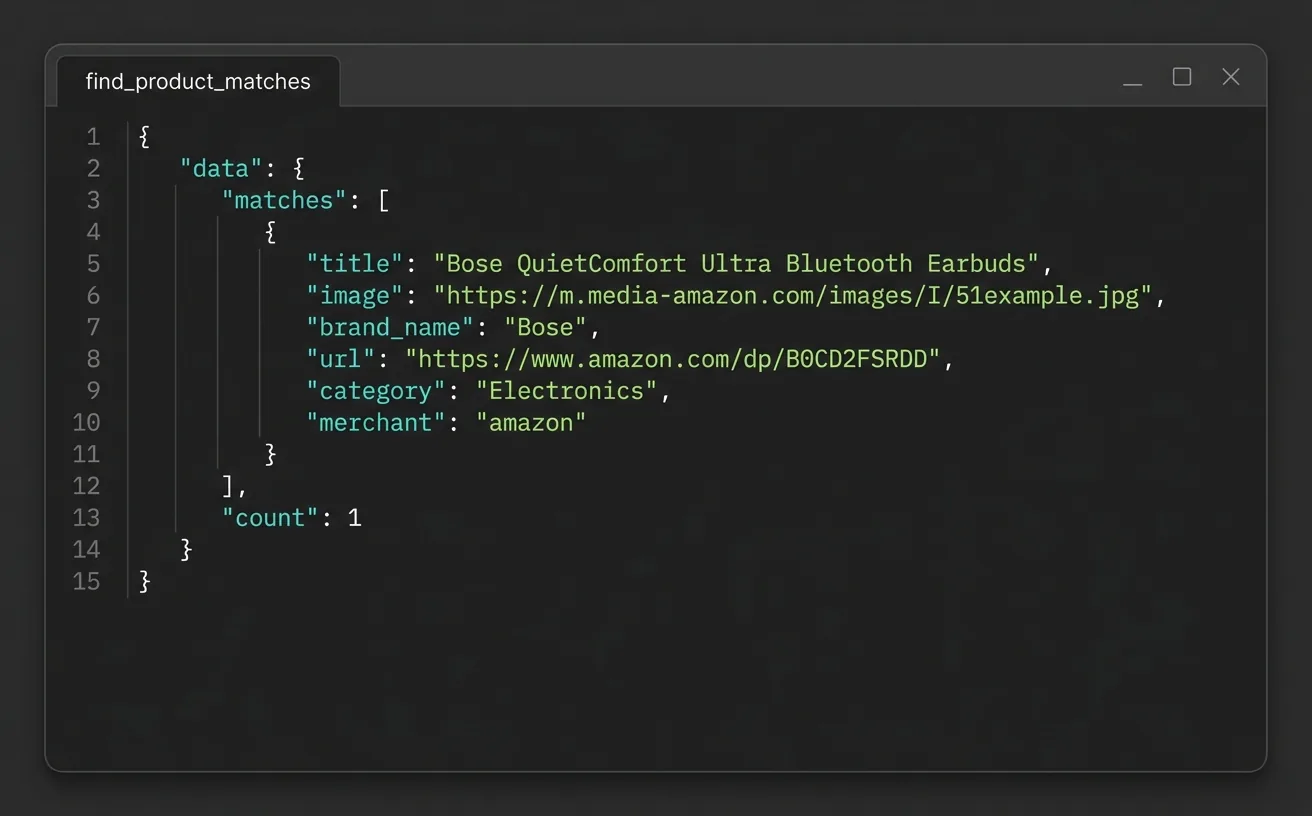
Two things about the input decide whether a product actually resolves to a match. Put the brand inside term, since “Bose QuietComfort Ultra earbuds” resolves far better than “earbuds”, and if you pass context it must contain that term word for word, because it is the passage the phrase came from rather than background you write yourself. Match returns untagged URLs, so you append your own affiliate tag before publishing, and it shares the same 500-request monthly pool as Insert.
For developers
Two arguments, one of them optional: ```json { "term": "Bose QuietComfort Ultra earbuds", "context": "The Bose QuietComfort Ultra earbuds are great for commuting." } ``` `term` is capped at 100 characters and `context` is windowed to 500 characters either side of the term's first occurrence, so over-length input is trimmed rather than rejected. The response is a `matches` array of 0 to 3 items plus a `count`, and `matches[0]` is the best pick. Full field list in the [Commerce Match docs](https://docs.getchatads.com/guides/commerce-match).Find Coupons and Deals for a Seasonal Roundup
Black Friday posts live or die on whether the codes in them still work on the day. Gathering those codes normally means logging into three network dashboards, exporting whatever each one calls a promotion, and reconciling the expiry dates by hand. Two Apify actors and one impact.com tool turn that into a question you can ask.
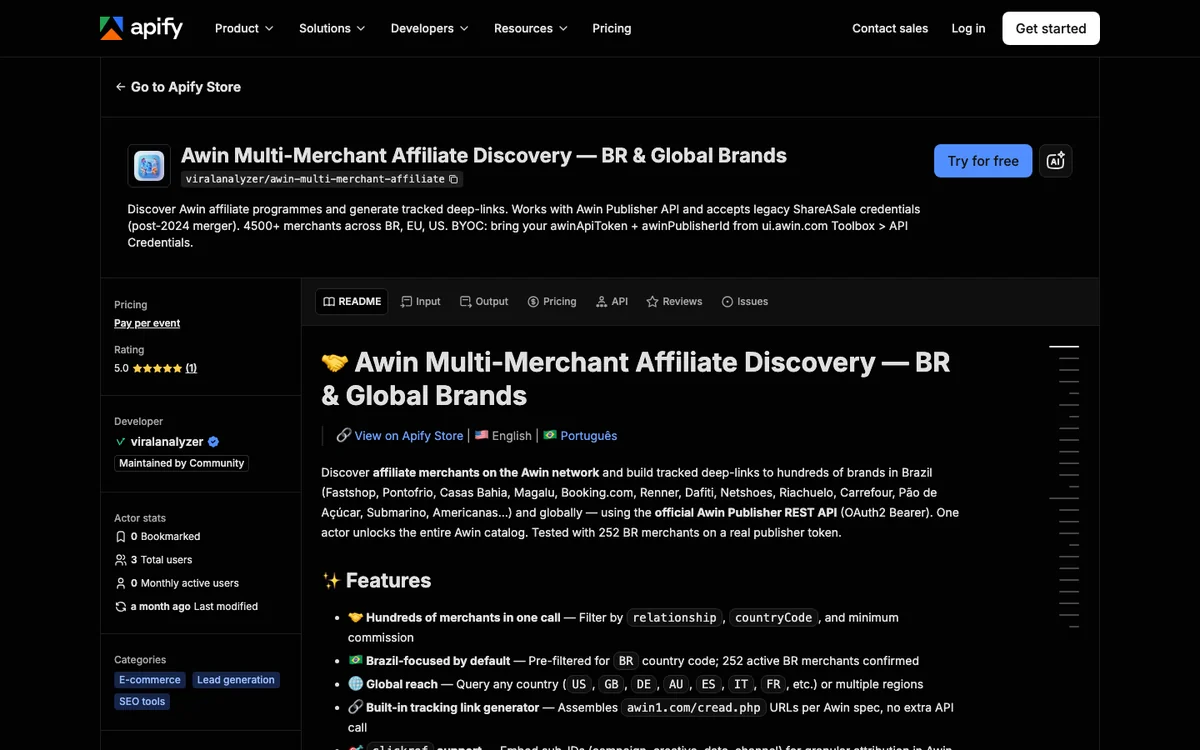
The Apify actor for Rakuten Advertising returns merchants, products, and coupons together, with couponCode, offerDescription, offerStartDate, offerEndDate, merchantName, and a clickUrl generated against your own publisher site ID. A sibling actor covers Awin promotions and transactions on the same bring-your-own-credentials model. If you already hold codes assigned to you, impact.com’s list_partner_promo_codes returns the active and pending ones without any scraping at all.
| You Ask | Tool | You Get |
|---|---|---|
| Active codes from my Rakuten merchants that expire after November 15 | Apify Rakuten actor | Code, description, start and end dates, merchant, and a link on your site ID |
| Awin vouchers running this month | Apify Awin BYOC actor | Promotions with voucher codes and validity windows |
| Which promo codes are assigned to me right now | impact.com list_partner_promo_codes |
Your own active and pending codes, no network scraping |
Both Apify actors are community builds by a single developer rather than official network products, and adoption is thin enough to matter, with two total users listed on the Rakuten actor and three on the Awin one, neither showing meaningful monthly activity. Neither actor grants network access by itself, so an approved publisher account with API credentials has to exist before either one returns anything. Billing is pay per event, listed on the Rakuten actor at $0.005 per record written, with zero results costing nothing. That thin adoption is worth weighing against Anthropic’s own advice to “Only connect Claude to servers built and hosted by organizations and applications you trust” (source). Sovrn is not the tool for this job, since none of its 12 MCP tools returns a coupon.
Check Which Links Earned Last Month
Every publisher runs the same monthly ritual of opening one dashboard per network to answer a single question. An MCP connector collapses that into a sentence, because the assistant queries the reporting API you were about to click through by hand. Three servers cover most of the ground, and which one fits depends on how many networks you run.
impact.com is the smoothest of the three if your programs live there. Its partner-side query_performance returns clicks, actions, and revenue grouped by brand, partner, or date, and get_payout_status answers the follow-up about when the money arrives. For publishers spread across many networks, affiliate-networks-mcp ships an affiliate-earnings-report skill plus per-network tools such as affiliate_awin_get_advertiser_performance. Sovrn takes the aggregator route, with trx_Merchants_By_Date breaking merchant performance out by day.
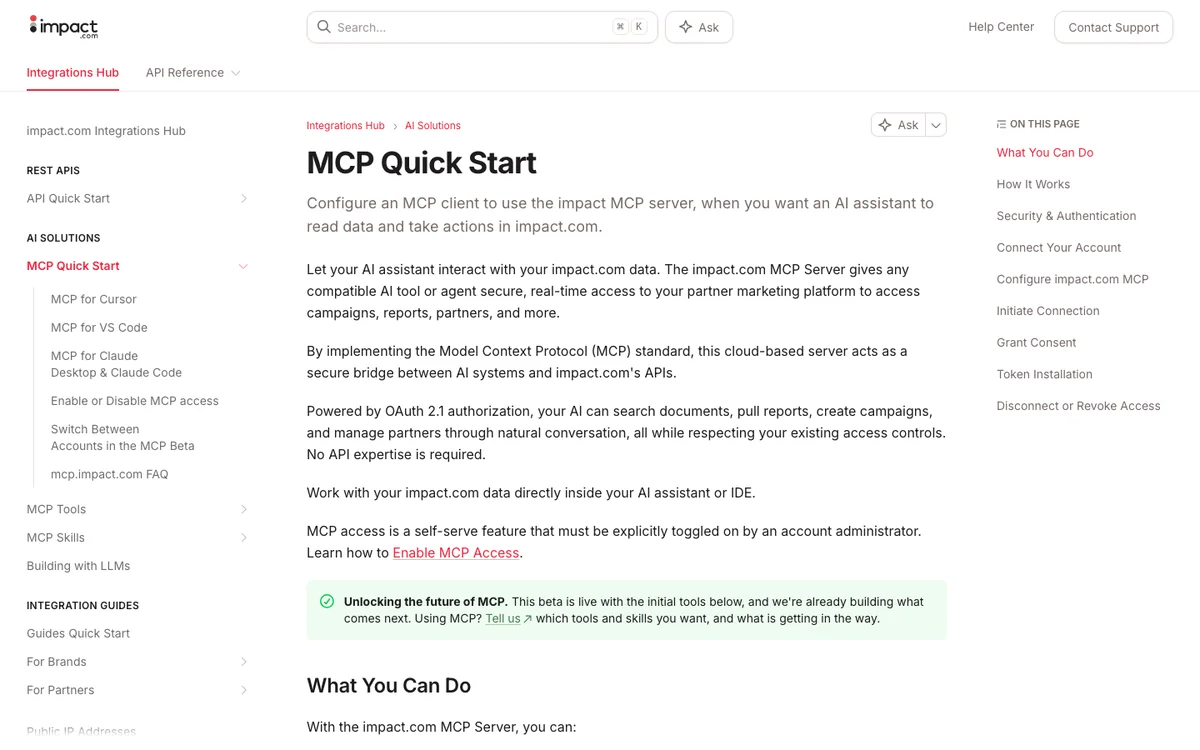
- impact.com says "MCP access is a self-serve feature that must be explicitly toggled on by an account administrator" (source), and the connection binds to whichever account was active when you authorized it
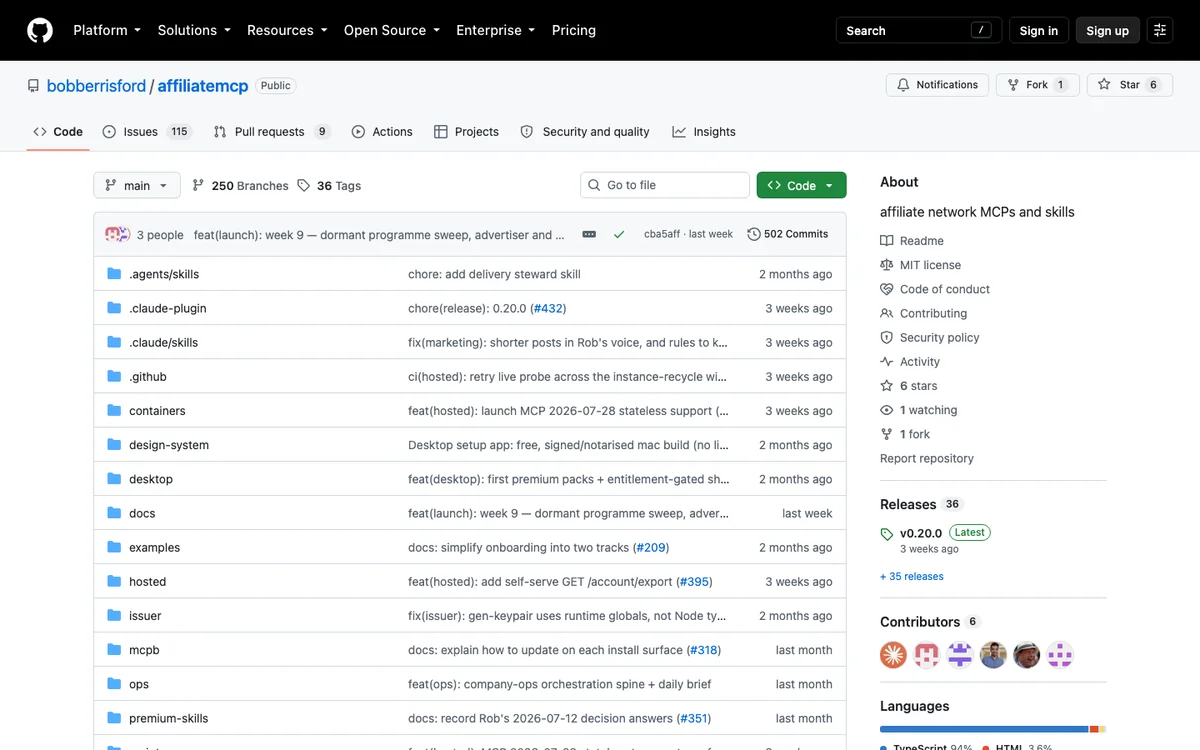
- affiliate-networks-mcp is bring-your-own keys, and its own network table marks 65 adapters "no clicks" and 5 more "clicks gated", so click data is the exception
- Sovrn states that reporting and transaction tools "are typically limited to 1 request per 60 seconds" (source) and returns empty responses when you omit the date filters
These tools answer what you earned, never what you should have earned. ChatAds cannot help here at all, since it reads text and resolves products rather than reading your network accounts. If earnings reporting is the reason you want a connector, start with whichever network holds most of your revenue and add the second one later.
Find Declined and Missing Transactions
Missing commissions cost more than most publishers ever recover, mostly because chasing them is tedious. A sale gets tracked, then reversed, then vanishes from the report you actually read, and nobody sends you a note about it. Reconciliation queries are where a connector pays back the setup, because you can ask the same question every week without opening a dashboard.
This is a query you run rather than an alert you receive, and the distinction matters. affiliate-networks-mcp does ship an anomaly watch, but that skill is scoped to the brand side, so publishers have no equivalent “tell me when something breaks” tool yet. What you do get is the ability to pull enquiries, inquiries, and transaction-level rows in one conversation and compare them against what you expected.
| Tool | Covers | Returns |
|---|---|---|
affiliate_awin_list_transaction_queries |
Awin | Enquiries for missing, incorrect, declined, or untracked transactions |
list_action_inquiries and get_action_inquiry |
impact.com | Your open inquiries, then the full record for any one of them |
trx_Transactions |
Sovrn | Transaction-level rows you can filter down to a single suspect day |
Treat the date filter as required on these reporting tools even where the docs call it optional. Reporting tools that receive no range tend to return an empty result rather than an error, which reads exactly like a clean month and is the most common way people fool themselves here. Ask for a named window every time, then compare two months side by side rather than trusting a single pull.
Every server above assumes you already hold approved publisher accounts, which is a real barrier when you are still building the traffic that earns them. ChatAds Commerce Insert starts from the other end, taking a draft you wrote and handing back the phrases to link plus Amazon products carrying your own Associates tag. The free tier runs 500 requests a month across the three ChatAds commerce tools, the catalog is Amazon US in English, and tagged links need an Associates tag on your account.
Ask What Your Blog Readers Are Chatting About
Keyword tools tell you what strangers search for, and your own readers tell you what they still cannot find, which is the same signal behind detecting purchase intent in AI conversations. If you run the ChatAds chat widget on your blog, every question a reader types is first-party demand data sitting in your account. The MCP Data Connector makes that queryable from the same chat window where you plan your calendar.
Three read-only tools cover the job, and each answers a different question. chatads_widget_conversations returns recent transcripts grouped by session, newest first, so you can read what people actually asked in their own words. chatads_widget_clicks shows which inline links got clicked, and group_by set to page or source turns those events into a tally instead of rows. chatads_widget_usage gives the daily message, page-load, and click counts behind both.
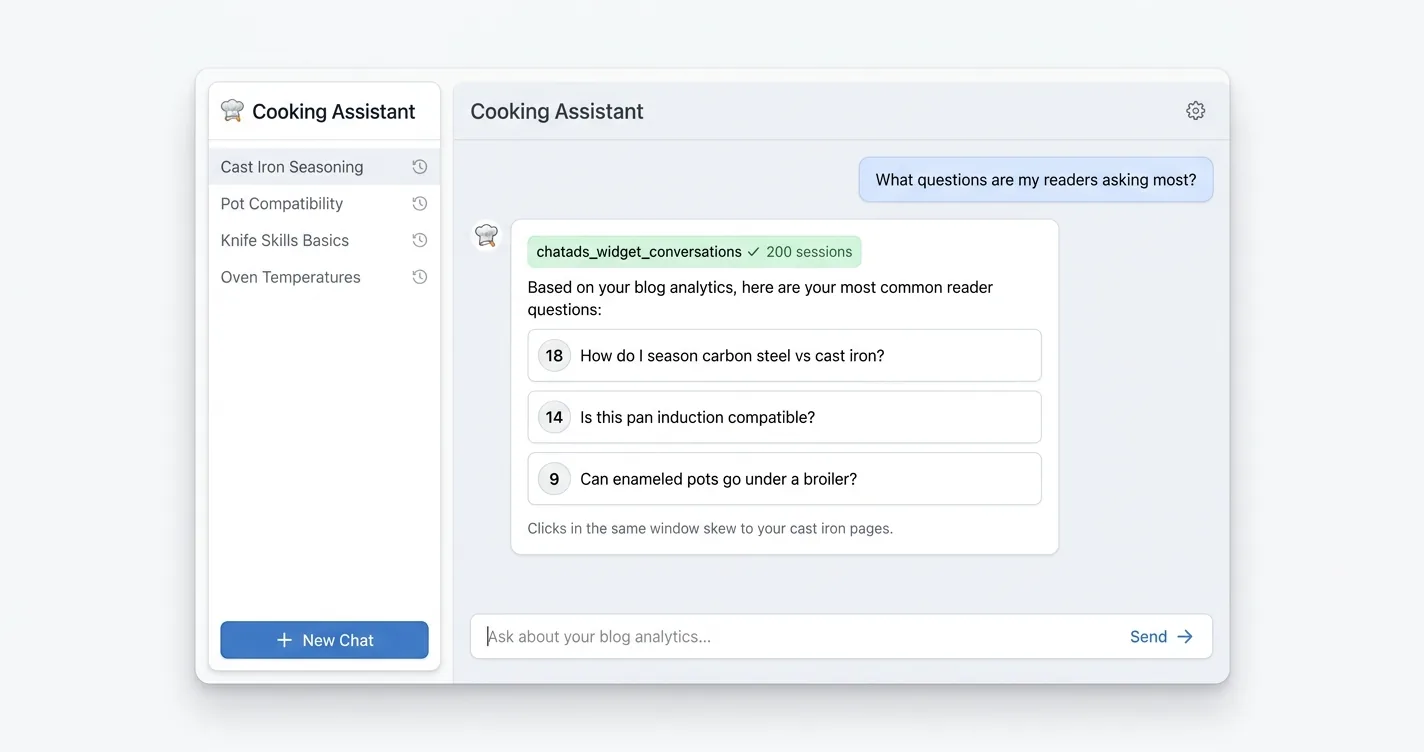
The Data Connector is scoped tightly on purpose, and its limits are worth stating plainly. It takes a uk_ personal key created on your Account page, a cak_ team key is rejected outright, and it reports only on your ChatAds widget rather than your site traffic as a whole. Conversations and clicks are kept for 90 days, and nothing the connector exposes can change a setting. Setup is the same shape as the commerce server, pointed at https://api.getchatads.com/mcp/mcp.
chatads_widget_conversations- recent transcripts grouped by session, up to 1,000 at a time, newest firstchatads_widget_clicks- inline link clicks from the last 90 days, with asourcelabel per event, or a tally when you setgroup_bychatads_widget_usage- daily message, page-load, and click counts, plus your plan tier and daily chat limit
Build a Comparison Table From Live Product Fields
Comparison tables age badly, since a price you typed in March is wrong by June and a discontinued model just sits there. Building one from live catalog fields instead of from memory takes two calls rather than one, because the identity columns come from ChatAds and the listing columns come from Amazon itself. Ask for both in the same conversation and the assistant assembles the row.
find_product_matches supplies the identity side, returning an ASIN, brand, confidence score, and product URL for each name you feed it. Title, image, and price are deliberately absent from everything the ChatAds tools return, so those columns come from Amazon’s Product Advertising API keyed on the ASIN, which needs your own access. insert_product_links returns the same identity fields with your Associates tag stamped on the URL, so it fills the link column rather than the pricing one. Affiliate.com is the cross-network alternative among the broader affiliate product data sources, exposing regular_price, final_price, sale_discount, in_stock, and merchant_name, though it publishes no endpoint, no config example, and no statement about whose ID rides on its commission_url.
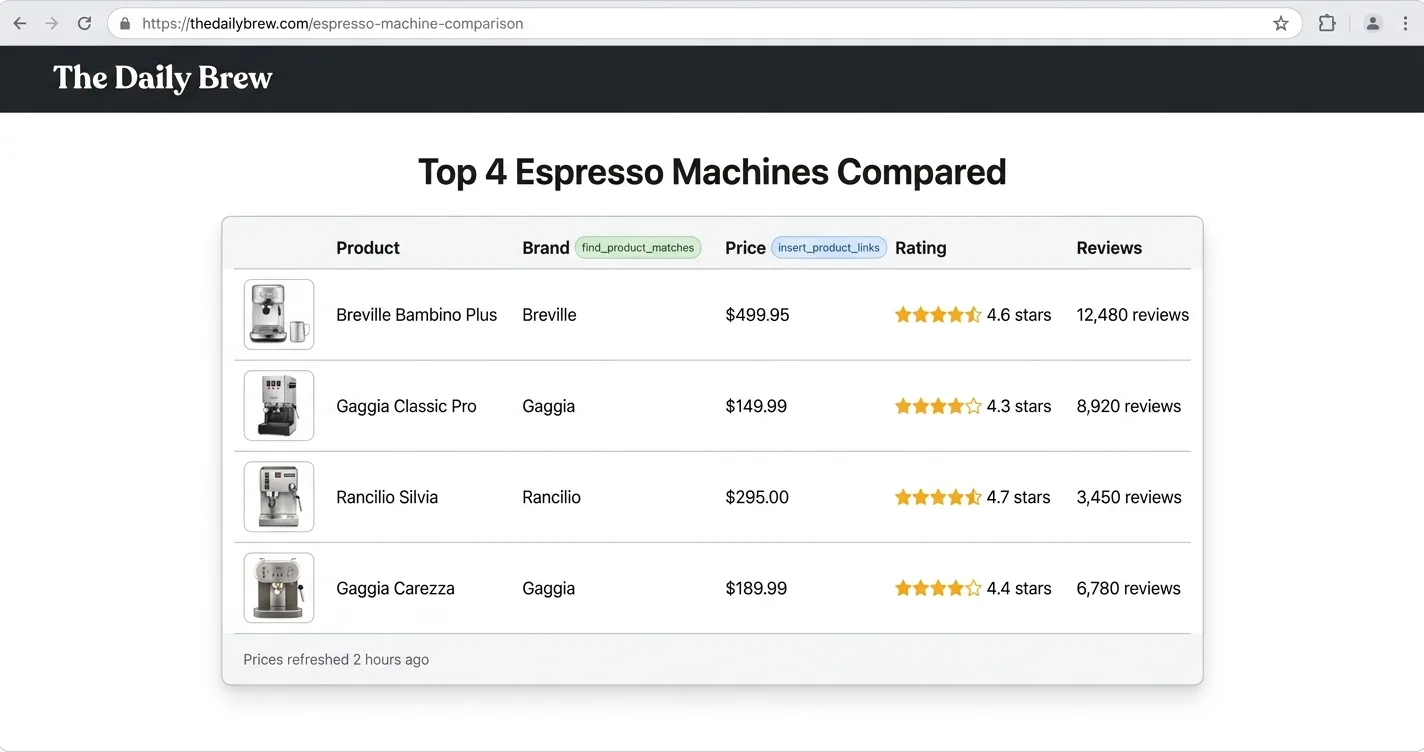
| Column | Where It Comes From |
|---|---|
| ASIN, brand | find_product_matches |
| Product URL | find_product_matches, untagged |
| Title, image, price, star rating, review count | Amazon Product Advertising API, by ASIN |
| Link carrying your Associates tag | insert_product_links |
Both ChatAds calls draw on the same monthly allowance, so a ten-row table costs you rather more than one request. Build the table once, keep the ASINs, and refresh the price column from Amazon on a schedule instead of rebuilding the whole thing every time you update the post.
Turn a Merchant URL Into an Affiliate Link
Sometimes the job is exactly one link, and logging into a dashboard to build it costs more time than the link is worth. Three servers do this conversion inside the chat, and each one runs on credentials you supplied, which is what keeps the commission yours. Paste the merchant URL, name the network, and the link comes back ready to drop into a post.
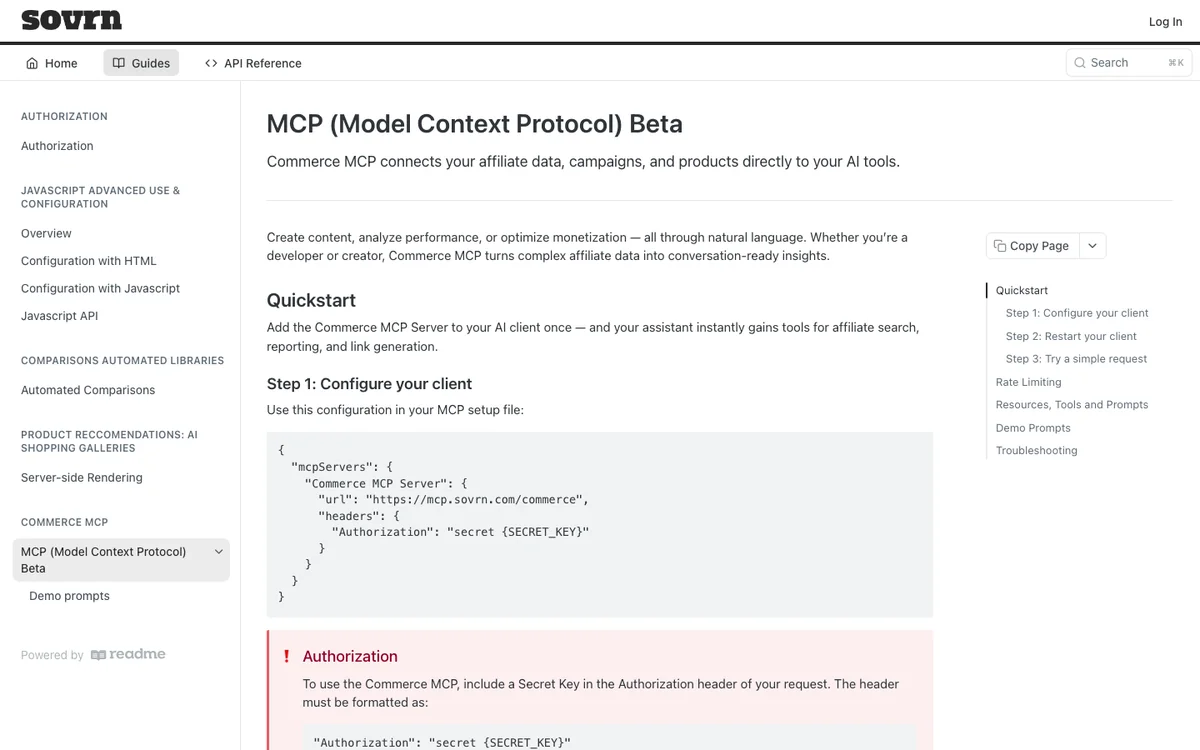
The three differ mostly in how much they will do at once. Awin’s builder through affiliate-networks-mcp takes a single URL or batches of up to 100, which suits a listicle you are linking in one pass. impact.com creates links for program destinations you are already promoting, and that tool exists only on partner accounts rather than brand ones. Sovrn’s link_check_link doubles as a validator, so it will tell you whether a URL is already affiliated before it converts anything.
| Tool | Batch Size | Runs On Your ID |
|---|---|---|
Sovrn link_check_link |
One URL at a time | Yes by inference, since the secret key is scoped to your own site, though Sovrn never says so outright |
affiliate_awin_generate_tracking_links |
Up to 100 per batch | Yes, built through Awin's Link Builder on your own account |
impact.com create_tracking_links |
Program destinations you promote | Yes, created inside your authenticated partner account |
Sovrn scopes its secret key per site rather than per account, which surprises anyone running several blogs under one login. Grab the key from Commerce Settings for the specific site you are linking, or the tool will happily build links against the wrong property.
Eight jobs, six servers, and one question that sorts them faster than any feature list, which is whether the link that comes back carries your own affiliate ID. Insertion and product matching work on day one with no network approvals. Earnings, coupons, reconciliation, and tracking links all assume you already hold publisher accounts, so they reward the setup rather than replacing it.
Start with the task you repeat most often instead of the server with the longest tool list. If that task is turning finished writing into linked writing, ChatAds Commerce Insert is one config block and a cak_ key away, and Commerce Match and the Data Connector sit behind the same setup once you have it. And if you are building an MCP server rather than consuming one, the revenue side has its own rundown of tools for monetizing MCP servers.
Frequently Asked Questions
Can you use Claude for affiliate marketing?
Yes, once you connect an MCP server that reaches a real commerce or network system. Claude on its own writes copy and invents model numbers, but with a connector added under Settings it can resolve products against a live catalog, build tracking links on your own publisher ID, and pull last month's transactions.
Do MCP affiliate marketing tools work in ChatGPT?
Most of them do, since a remote MCP server is just a URL. ChatGPT supports custom connectors through Developer Mode on paid plans on the web, and asks for confirmation on every write call, so read-only jobs like reporting and product matching are the smoother fit there.
Do you need an Amazon Associates account to use MCP affiliate tools?
Not to get matches, but yes to get paid. ChatAds Commerce Match returns untagged product URLs that work without any affiliate account, while Commerce Insert stamps your Amazon Associates tag onto the links it returns, and leaving that tag unset means the URLs come back untagged and earn nothing.
Are MCP tools for affiliate marketing free?
Several are. The ChatAds commerce tools include 500 requests a month on the free tier shared across all three, and the open-source affiliate-networks-mcp server costs nothing beyond the network credentials you supply. The Apify actors bill per event, listed at $0.005 per record on the Rakuten actor.
Why did an MCP affiliate tool return no links?
An empty result is usually a real answer rather than a failure. ChatAds returns a no_offer status when nothing in the text clears the matching bar, so sending the same passage again will not help, and reporting tools across every network tend to return an empty response when you leave the date range out.
Is it safe to connect an MCP server to your affiliate network account?
It depends who built it. Network-operated servers such as impact.com authorize through your own account and an administrator enables them, while community wrappers ask you to hand over publisher API credentials to a third party. Check whether the server is bring-your-own-credentials, who maintains it, and how many people actually use it before you paste a key.