
AI image generators are creating a new kind of purchase intent in 2026, because when someone uses a tool to design a living room or style an outfit, they aren’t just browsing. They’re building a visual list of things they actually want to buy.
The gap between “I love that generated sofa” and “where can I actually buy it” is where affiliate revenue lives. Platforms like Wayfair Decorify already match AI-generated room designs to real products from a catalog of 30 million items. But most visual AI apps haven’t found the right monetization approach yet because the pipeline from pixels to purchasable products isn’t obvious.
This guide covers how to build that image-to-commerce pipeline: extract product details from AI-generated images, match them to real items with affiliate links, and serve those links in your chat interface.
Extract product descriptions with a vision model, detect and crop individual items for precise matching, or generate images with pre-determined products from your catalog. Each path connects to affiliate links through direct network relationships or a single API like ChatAds.
Ask ChatGPT to summarize the full text automatically.
Why AI-Generated Images Drive Purchase Intent
Traditional advertising interrupts people who aren’t actively thinking about buying. Visual AI works differently because the purchase intent comes built in. Someone generating an interior design is already deciding what furniture they want, and someone creating an outfit is already picking what to wear.
- 71% of consumers want generative AI in their shopping experiences (Capgemini)
- 32% longer site visits from AI-driven shoppers (Adobe)
- 84% growth in AI-driven revenue-per-visit in the first half of 2025 (Adobe)
Several companies are already building on this behavior at real scale. Wayfair’s Decorify tool transforms room photos into styled designs, then matches each generated piece to real items from 30 million products.
Paintit.ai connects generated room concepts to IKEA inventory through a chat-based interface. Instacart built AI meal planning into ChatGPT so users go from a generated recipe to a filled grocery cart in one conversation.
All of them follow the same three-step path: generate something visual, identify the products in it, and connect them to items users can actually buy.
How to Identify Products to Recommend in Generated Images
Three approaches connect AI-generated images to real products. Each trades off implementation effort against control over what gets recommended.
Extract product descriptions after generation
The simplest path. Generate the image as you normally would, then send it to a vision model to describe what’s in it. The model returns text attributes like “mid-century walnut coffee table with tapered legs” that an affiliate API can match against real products.
response = openai.chat.completions.create(
    model="chatgpt-5.2",
    messages=[{
        "role": "user",
        "content": [
            {"type": "text", "text": "List every purchasable product in this "
             "AI-generated room design. For each, provide: "
             "name, style, material, color, category."},
            {"type": "image_url", "image_url": {"url": image_url}}
        ]
    }]
)
product_descriptions = response.choices[0].message.content
Prompt specificity matters here. “A table” produces poor affiliate matches downstream. “Round marble-top bistro table with black metal base” gives the matching API something specific to work with. Include materials, colors, styles, and dimensions in your extraction prompt.
Detect and crop individual products
For images with many items, like a full living room or a styled outfit, you can have a vision model return bounding box coordinates for each product. Crop the image to isolate individual items, then match each one separately against affiliate catalogs.
response = openai.chat.completions.create(
    model="chatgpt-5.2",
    messages=[{
        "role": "user",
        "content": [
            {"type": "text", "text": "Identify each purchasable product in this "
             "room design. Return JSON with name, description, "
             "and bounding_box [x_min, y_min, x_max, y_max] "
             "as pixel coordinates."},
            {"type": "image_url", "image_url": {"url": image_url}}
        ]
    }],
    response_format={"type": "json_object"}
)

products = json.loads(response.choices[0].message.content)
for product in products["items"]:
    box = product["bounding_box"]
    cropped = image.crop((box[0], box[1], box[2], box[3]))
    # Match cropped image or description against affiliate API
This approach pairs well with shoppable annotations, where users click on specific regions of the generated image to see matching products. It also produces more accurate matches than whole-image extraction because each product is isolated from the surrounding scene.
Generate images with pre-determined products
If you control the image generation step, work backwards. Start with products from an internal SKU list, then pass their images as references when generating the scene. Since you already know which products appear in the output, affiliate matching is instant with no extraction needed.
# Select products from your catalog
sku_items = catalog.get_products(category="living_room", limit=4)

# Generate a scene using product images as references
result = openai.images.generate(
    model="gpt-image-1",
    prompt=f"A modern living room naturally featuring these items: "
           f"{', '.join(item.name for item in sku_items)}",
    image=[item.reference_image for item in sku_items]
)

# No extraction step — products are already matched
for item in sku_items:
    print(f"{item.name}: {item.affiliate_url}")
This gives you the highest conversion rates because every item in the image maps directly to a product you can link. The tradeoff is less creative freedom for the user, since you’re steering the output toward specific items from your catalog.
Post-generation extraction works for any image generator with minimal code. Object detection adds precision for complex images with many products. Pre-determined catalogs maximize conversion but require controlling the generation step. Most teams start with extraction and add the others as they scale.
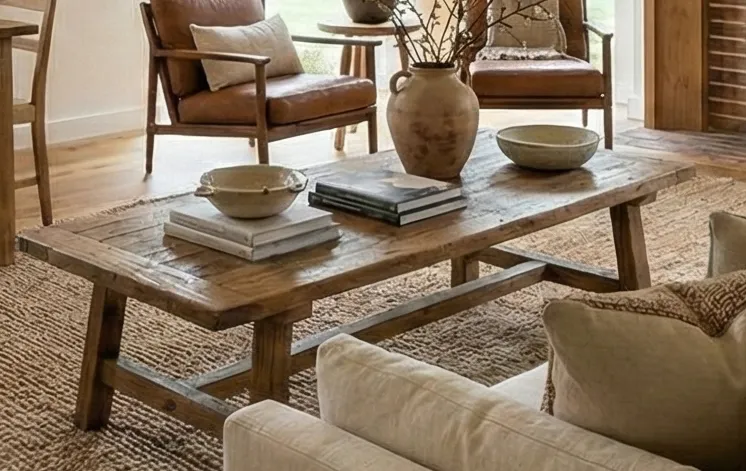
Here’s what this pipeline looks like end-to-end. A user uploads a photo of their empty living room:

An AI image generator fills the space based on style preferences:

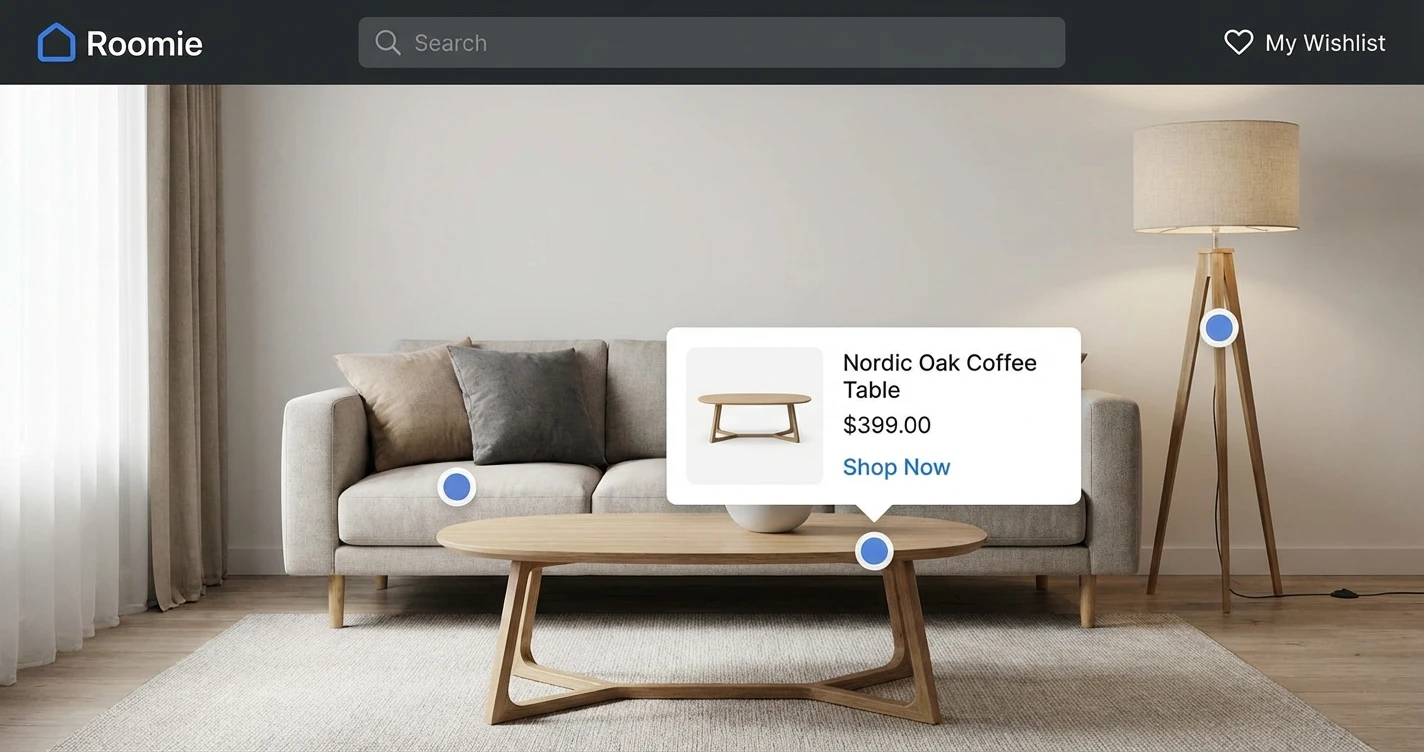
A vision model detects individual products in the generated image. Here it isolates the coffee table:
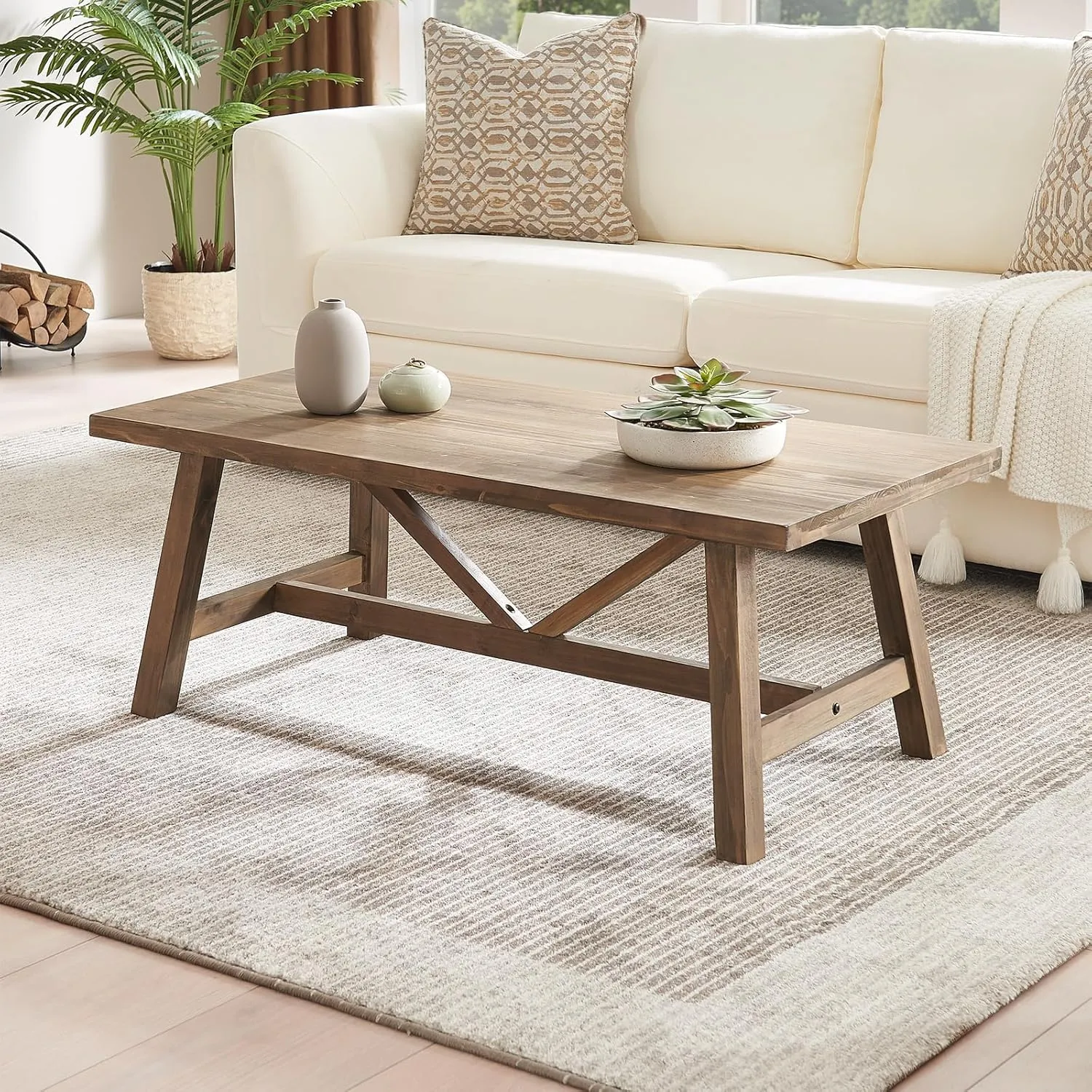
And matches it to a real product available for purchase with an affiliate link:
How to Turn Product Images into Affiliate Products
You’ve identified the products in your generated image. Now you need to connect them to real items that earn affiliate revenue. The right approach depends on how much you already know about the products in the image.
Match against your own catalog
If you seeded the image with specific SKUs from an internal product catalog (approach #3 from the previous section), you already have the affiliate URLs. No matching step needed.
If you used a broader catalog as inspiration without specifying exact SKUs, run a semantic similarity search against your product database. Compare the extracted image or description against your inventory using vector embeddings, and return the closest matches. This is the path most retail media platforms take, since they control both the catalog and the generated content.
Build direct affiliate relationships
Without an internal catalog, you need to find the closest matching real product and tie it to an affiliate partner. This means signing up with networks like Amazon Associates, Sovrn, CJ Affiliate, or ShareASale, then querying their product feeds with your extracted descriptions or cropped images.
The challenge is coverage. A single affiliate network won’t have matches for everything in a generated room design. Furniture might live on Wayfair’s partner feed, lighting on Amazon, and textiles on another network entirely. Managing multiple integrations, normalizing results, and handling different integration patterns across networks adds real engineering overhead, especially when users generate dozens of unique designs per session.
Use a single affiliate API
ChatAds consolidates the multi-network problem into one call. You still need your own affiliate relationships with partners like Amazon, but ChatAds becomes the single API you call to match products and return the right affiliate link. Send the extracted text or cropped product image, and get back the closest match in under two seconds.
import chatads

result = chatads.extract_links(
    message="The room features a mid-century walnut coffee table "
            "with tapered legs, a cream linen sectional sofa, "
            "and a brass arc floor lamp."
)

for offer in result.offers:
    print(f"{offer.link_text}: {offer.url}")
If someone generates an interior design and waits three seconds for product links to appear, the creative momentum breaks. ChatAds returns results in under two seconds, keeping product links feeling like a natural part of the conversation rather than something bolted on after the fact.
How to Display Affiliate Links in Visual AI Chat
The generated image is in the chat and matched products are ready to serve. Three display patterns work well, each with different tradeoffs for implementation effort and conversion.
Inline text links
Embed product names as clickable links directly in the chat response below the image. Users encounter links while reading the recommendation naturally, which makes this the most conversational pattern. It also requires the least frontend work since you’re just adding <a> tags to the response text.
Inline links convert well because users are already reading about the product when they see the link. There’s no context switch, no separate UI to process. For most teams starting out, this offers the best ratio of conversion to engineering work. It plugs into any chat framework and doesn’t need custom UI components.
Product cards
Append a grid of matched items after the AI response. Each card shows a product thumbnail, name, price, and link. This pattern works well for interior design tools and fashion platforms where users expect to browse and compare multiple options side by side.
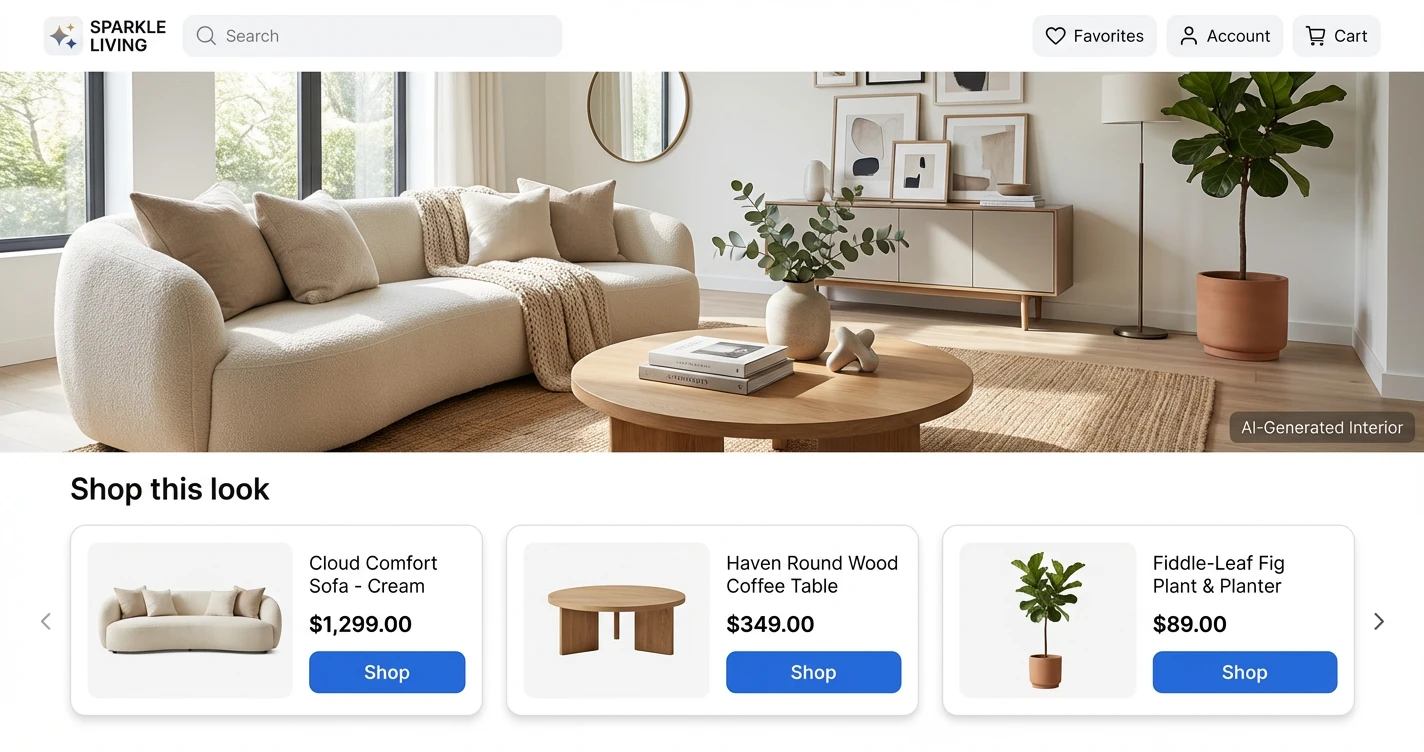
Product cards take more frontend work than inline links because you need a card component, image loading, and a responsive grid layout. But they give users a richer browsing experience and let you show prices upfront, which helps with purchase decisions. This pattern also works well when you’re matching multiple products from a single generated image and want to present them all at once.
Shoppable annotations
Let users click directly on regions of the generated image to see the closest real product match. A hotspot or pin appears on each identifiable product in the image, and clicking it reveals a tooltip or popup with the product details and affiliate link.
This creates the most direct connection between what users designed and what they can buy. It pairs naturally with the bounding box detection approach from the identification section, since you already have the coordinates for each product. The tradeoff is more frontend engineering: you need an image overlay system, coordinate mapping, and tooltip components. But for image-first platforms where the visual is the primary interface, annotations outperform the other patterns because users never leave the image to shop.
- Inline text links for conversational AI with mixed content (best conversion per effort)
- Product cards for design tools where users browse and compare multiple options
- Shoppable annotations for image-first platforms where the visual is the primary interface
One legal requirement applies regardless of which display pattern you choose: FTC disclosure. A line like “Product links may earn us a commission” once per session covers you. This is legally required for affiliate content in AI applications.
The Visual AI Use Cases That Convert Best
Not every visual AI platform converts equally for affiliate monetization. Three categories consistently perform because the generated images map cleanly to real, purchasable products.
Interior design leads in revenue per user because every generated item is a potential purchase. Average order values for furniture run $200 to $2,000 or more.
Users typically generate multiple room concepts per session, which multiplies the affiliate opportunity. Wayfair Decorify has already proved this model works at scale.
Fashion and styling leads in volume because outfit generation is fast and repeated. Users often create 10 to 20 variations in a single session while searching for the right combination. Each outfit contains three to five purchasable items, and the decision cycle is shorter than furniture since clothing choices happen quickly.
Food and meal planning has the shortest path from image generation to checkout. A user generates a meal concept from a fridge photo, and the ingredients translate directly to grocery items. Instacart’s ChatGPT integration already handles this end-to-end, converting AI-generated meal ideas into filled shopping carts.
The generated images need to contain recognizable, categorizable products that people can actually purchase. Interior design, fashion, and food work because the items are specific. Abstract art generators or landscape creators won't convert because there's nothing to buy.
If your platform generates images of things people can purchase, the pipeline described in this guide applies directly. The category matters less than the specificity of the products in the generated output.
The path from AI-generated image to affiliate revenue has multiple entry points now. Extract descriptions after generation if you want simplicity, crop and match individual products for precision, or pre-determine what appears in the image for maximum conversion. Each approach connects to affiliate links through your own network partnerships or through a single API like ChatAds.
Visual AI platforms are sitting on high purchase intent that most haven’t monetized yet. Users generating designs are already telling you what they want to buy through their creative choices. The technical pipeline covered here works with any chat framework and any image generator, and the display patterns scale from a simple weekend prototype to a production shoppable experience.
Frequently Asked Questions
How do you monetize AI-generated images with affiliate links?
Three approaches work: extract product descriptions from the image using a vision model, detect and crop individual products for precise matching, or generate images with pre-determined products from your catalog. Then connect those products to affiliate links through your own network partnerships or a single API like ChatAds. Display the links inline in chat, as product cards, or as shoppable image annotations.
Can vision models identify real products in AI-generated images?
Yes. Models like ChatGPT 5.2, Gemini 3.5 Pro, and Claude Opus 4.6 can analyze AI-generated images and return specific product descriptions including style, material, and color. The key is writing detailed prompts that ask for specific attributes rather than generic labels.
What is shoppable AI and how does it connect to affiliate monetization?
Shoppable AI refers to platforms where AI-generated visual content connects directly to purchasable products. When a user generates a room design or outfit, the system identifies products in the image and returns affiliate links through APIs like ChatAds, letting developers earn commission on every purchase.
Which visual AI use cases have the highest affiliate conversion rates?
Interior design leads in revenue per user with furniture order values of $200 to $2,000+. Fashion and styling leads in volume with users generating 10-20 outfit variations per session. Food and meal planning has the shortest path to checkout, as seen with Instacart's ChatGPT integration.
How fast should an affiliate API respond for AI-generated image monetization?
Under two seconds to avoid breaking the creative flow. ChatAds returns results in under two seconds, keeping product links feeling like a natural part of the conversation. Slower responses cause visible delays that interrupt the user experience.
Do you need FTC disclosure for affiliate links in AI-generated image recommendations?
Yes. FTC regulations require clear disclosure of affiliate relationships in AI-generated content. A single disclosure per session such as "Product links may earn us a commission" is sufficient for compliance.