LLM API costs are one of the biggest line items for AI chatbot developers in 2026. The same workload can run you $3,250 per month on a flagship model or $195 per month on a budget one, a 16x difference for near-identical output on most queries. That gap exists because developers often default to the most capable model without testing whether a cheaper one handles their actual traffic.
This guide covers seven practical strategies to cut those costs. Some require zero infrastructure changes and take an afternoon, while others involve rethinking your architecture. All of them are grounded in real pricing data from 2026 provider rates.
The goal here isn’t to run the cheapest possible stack at all costs. It’s to stop paying for capability you don’t need, so the budget you do spend goes toward the conversations that actually require it.
- GPT-5.4 Mini costs approximately $1.52 per 1,000 messages at typical chatbot workloads
- GPT-5 Nano comes in around $0.13 per 1,000 messages, a 12x difference
- Output tokens cost 4-5x more than input tokens across all major providers
- Semantic caching achieves 61-68% hit rates in production workloads per GPTCache benchmarks
- RouteLLM's open-source router cut costs by 85% on MT Bench while preserving 95% of GPT-4 quality
Ask ChatGPT to summarize the full text automatically.
How Do You Audit Your Token Spend?
Before you start cutting costs, you need to know where the money is actually going. Most developers have a vague sense that their flagship model is “a bit expensive” but no idea which endpoints are burning the most tokens or what percentage of queries are repetitive.
Two observability tools make this process fast and low-effort. Helicone takes about two minutes to set up: change your OpenAI base URL to point at their proxy, and you immediately get per-request token counts, cost breakdowns by endpoint, and latency. Langfuse is open-source and self-hostable if you’d rather keep data on your own infrastructure.
from openai import OpenAI

client = OpenAI(
    api_key="sk-your-key",
    base_url="https://oai.helicone.ai/v1",  # swap in Helicone proxy
    default_headers={"Helicone-Auth": "Bearer sk-helicone-key"}
)
What to look for once you have data:
- Which endpoints burn the most tokens. Often one or two routes account for 60-70% of total spend
- What percentage of queries are near-duplicates. This tells you whether caching would help
- Whether max_tokens limits are set anywhere. Many codebases don’t cap output length at all
- Output vs. input token ratio. Output tokens cost 4-5x more, so an output-heavy workload has a very different cost profile than an input-heavy one
A developer running one million conversations per month on a flagship model at $3,250 per month may find 90% of those queries never needed that model in the first place. The audit tells you which 90%.
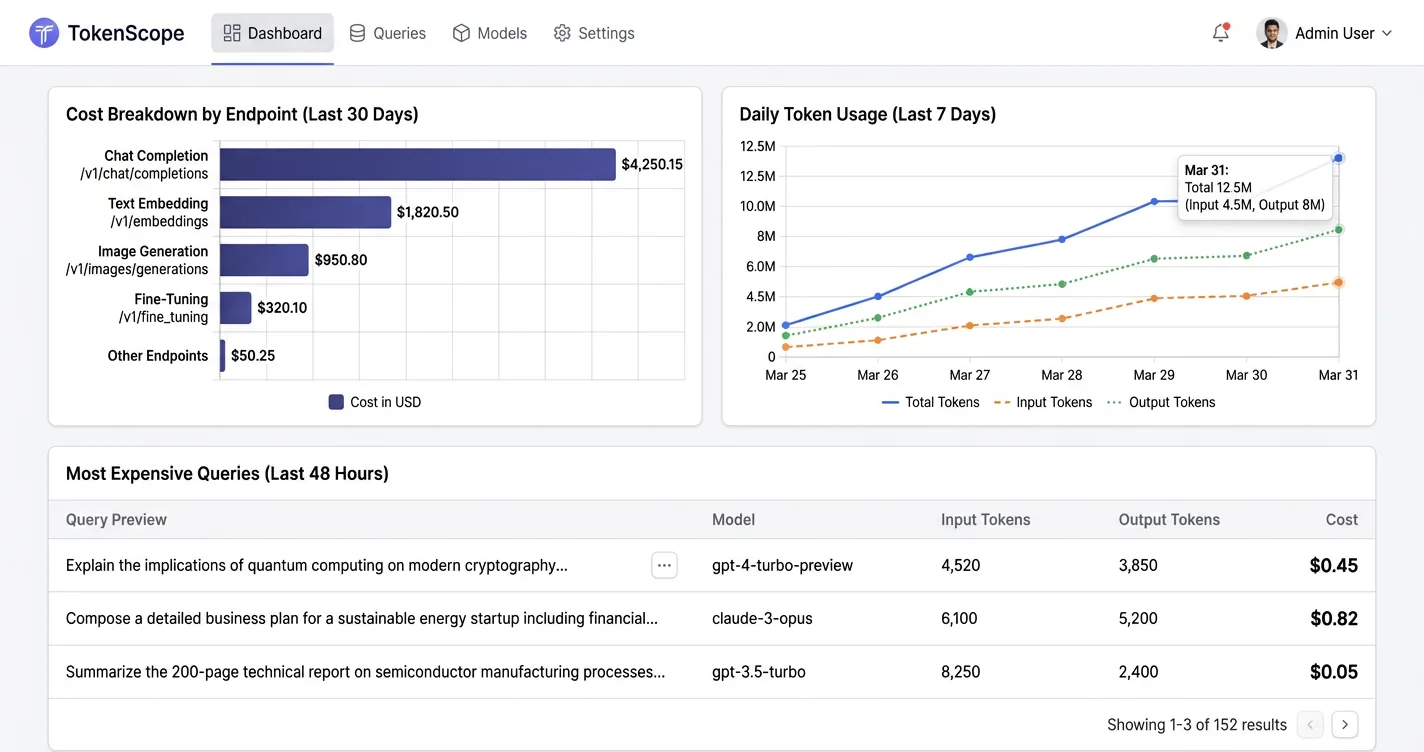
If your audit shows output tokens are the dominant cost driver, that's good news. Capping response length with max_tokens and adding an instruction to "answer in 2-3 sentences unless asked for more detail" directly attacks the most expensive part of the bill before you change anything else.
Which Model Should You Actually Use?
Model selection is the single highest-impact decision in your cost stack. Most teams default to a frontier model at launch and never revisit it, even as cheaper models have closed much of the quality gap on everyday tasks.
The cost differences between model tiers are stark in 2026. GPT-5 Nano costs around $0.13 per 1,000 messages with no page content attached, while GPT-5.4 Mini runs approximately $1.52 per 1,000 messages, a 12x difference. Llama 3.1 8B on Groq comes in at $0.05 per 1,000 messages but lacks provider-side caching, so its price climbs faster once you start attaching page content ($0.21 versus Nano’s $0.19 at heavy usage).
Before assuming your workload needs a frontier model, test it on a budget one. Run 200-300 real queries from your logs through GPT-5 Nano or Llama 3.3 70B and compare outputs manually. Many teams discover that 70-80% of their traffic is simple enough that the quality difference is imperceptible to users.
For the cases where you genuinely need different quality levels, model routing solves the problem without sacrificing quality where it counts. A lightweight classifier evaluates each query and routes simple ones to cheap models, reserving the expensive model for complex reasoning. RouteLLM (open-source, MIT license) demonstrated 85% cost reduction on MT Bench while preserving 95% of GPT-4 level quality. The classifier itself costs almost nothing to run.
def route_query(query: str) -> str:
    complexity = classifier.score(query)  # 0-1 scale
    if complexity < 0.4:
        return "gpt-5-nano"       # ~$0.13 / 1K messages
    return "gpt-5.4-mini"         # ~$1.52 / 1K messages

response = client.chat.completions.create(
    model=route_query(user_message),
    messages=conversation
)
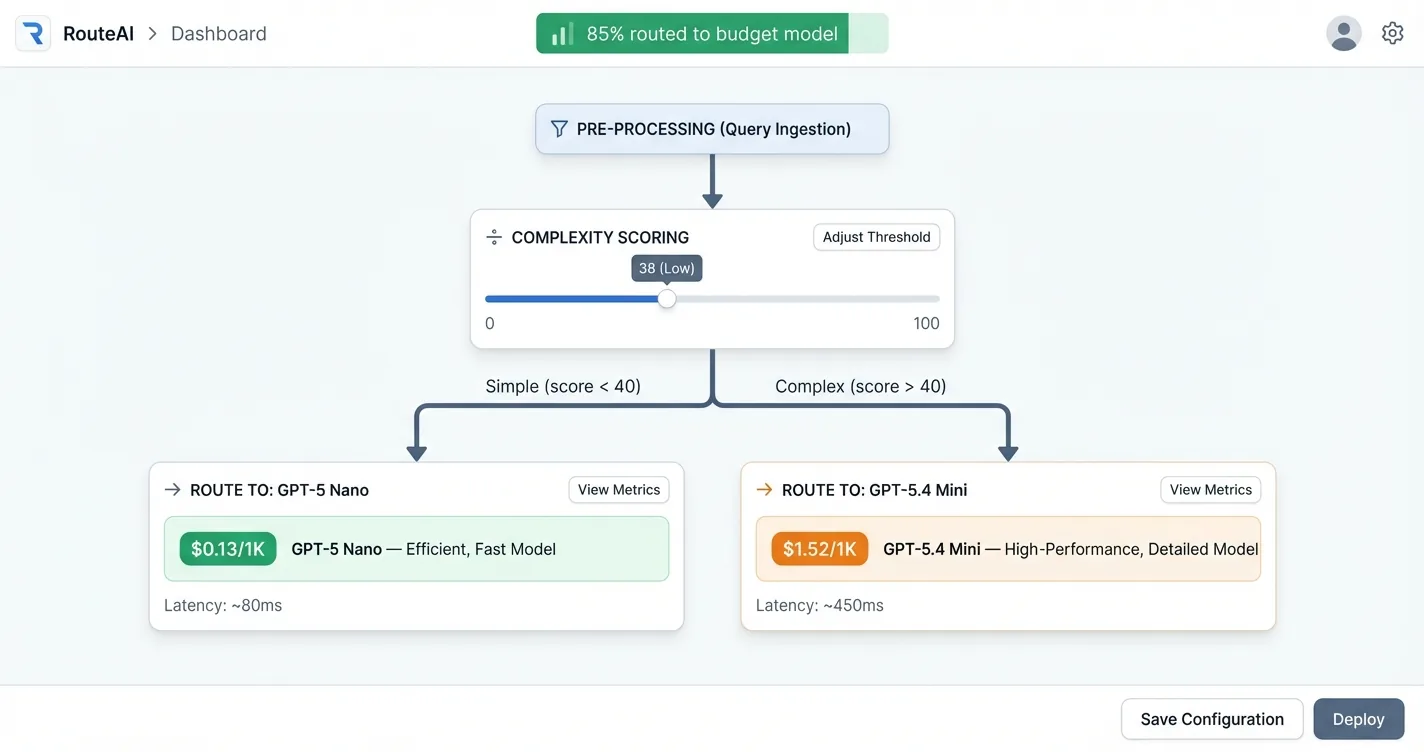
Estimated cost per 1,000 messages at typical chatbot input/output ratios, no page content
| Model | Provider | Cost / 1K Messages | Caching |
|---|---|---|---|
| GPT-5 Nano | OpenAI | ~$0.13 | Yes |
| Llama 3.1 8B | Groq | ~$0.05 | No |
| GPT-5.4 Mini | OpenAI | ~$1.52 | Yes |
| Llama 3.3 70B | Groq | ~$0.21 (w/ content) | No |
How Do You Control What Goes In and Out?
The cheapest optimization is also the most overlooked: put constraints on the conversation itself. No infrastructure required, just a few configuration changes and a prompt update.
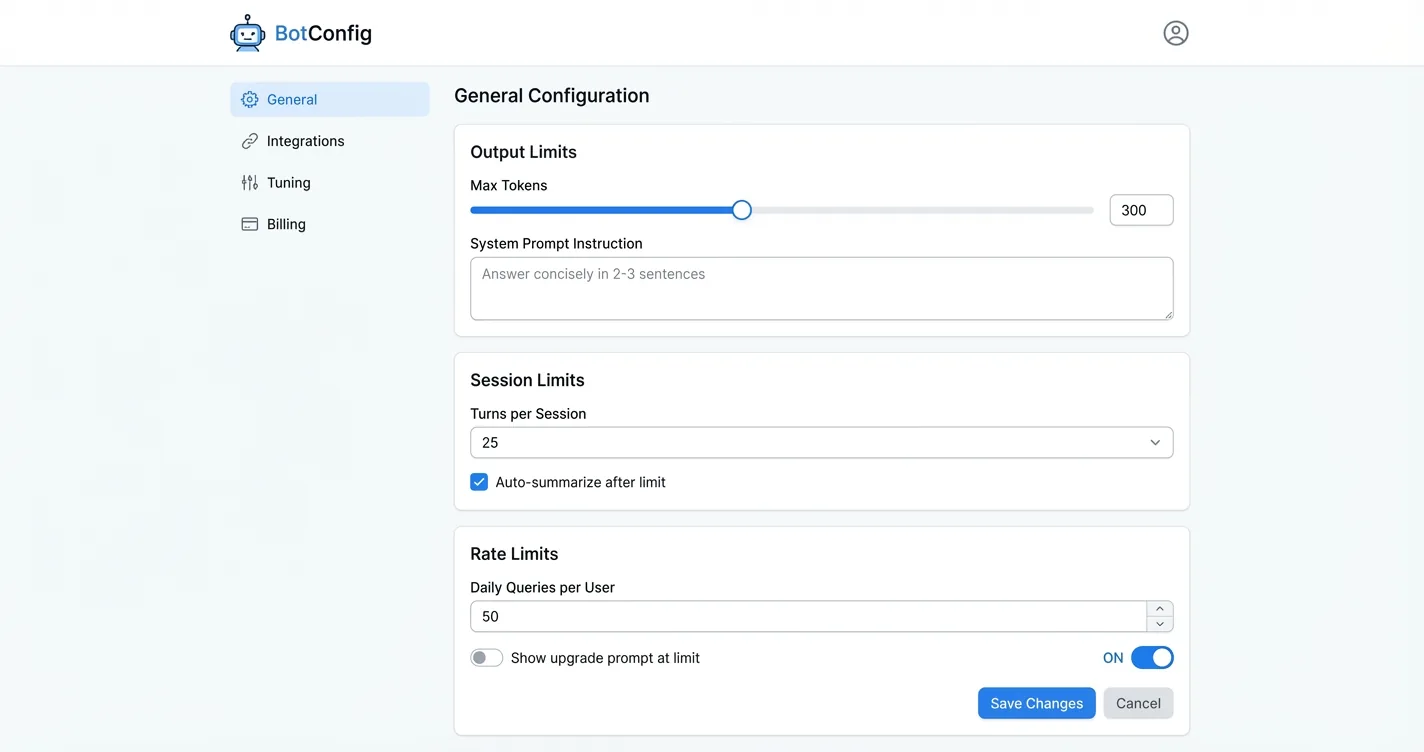
Cap output length. Set an explicit max_tokens on every API call. Then add an instruction in your system prompt: “Answer concisely. Respond in 2-3 sentences unless the user explicitly asks for a detailed explanation.” Output tokens cost 4-5x what input tokens cost, so this is the highest-leverage single change you can make before touching anything else.
response = client.chat.completions.create(
    model="gpt-5-nano",
    max_tokens=300,
    messages=[
        {"role": "system", "content": "You are a helpful assistant. "
         "Answer concisely in 2-3 sentences unless the user "
         "explicitly asks for a detailed explanation."},
        {"role": "user", "content": user_message}
    ]
)
Limit conversation history. Multi-turn chatbots that let sessions run indefinitely accumulate context fast. A 500-message conversation is sending 500 messages worth of history on every call. Cap sessions at 20-50 turns and start fresh, or summarize older turns before they get expensive. Most users aren’t scrolling back 400 messages anyway.
Rate-limit per session and per day. Hard per-session limits cap your worst-case spend from unusually long conversations. Daily limits across users create a natural upsell moment: free users get 50 queries per day, paid users get more. This ties directly into your chatbot ad revenue strategy and gives you a monetization lever at the same time.
- Add
max_tokens: 300(or similar) to all API calls - Add "answer concisely in 2-3 sentences" to your system prompt
- Cap conversation history at 20-50 turns
- Implement per-session and per-day query limits
How Do You Send Only the Page Content That Matters?
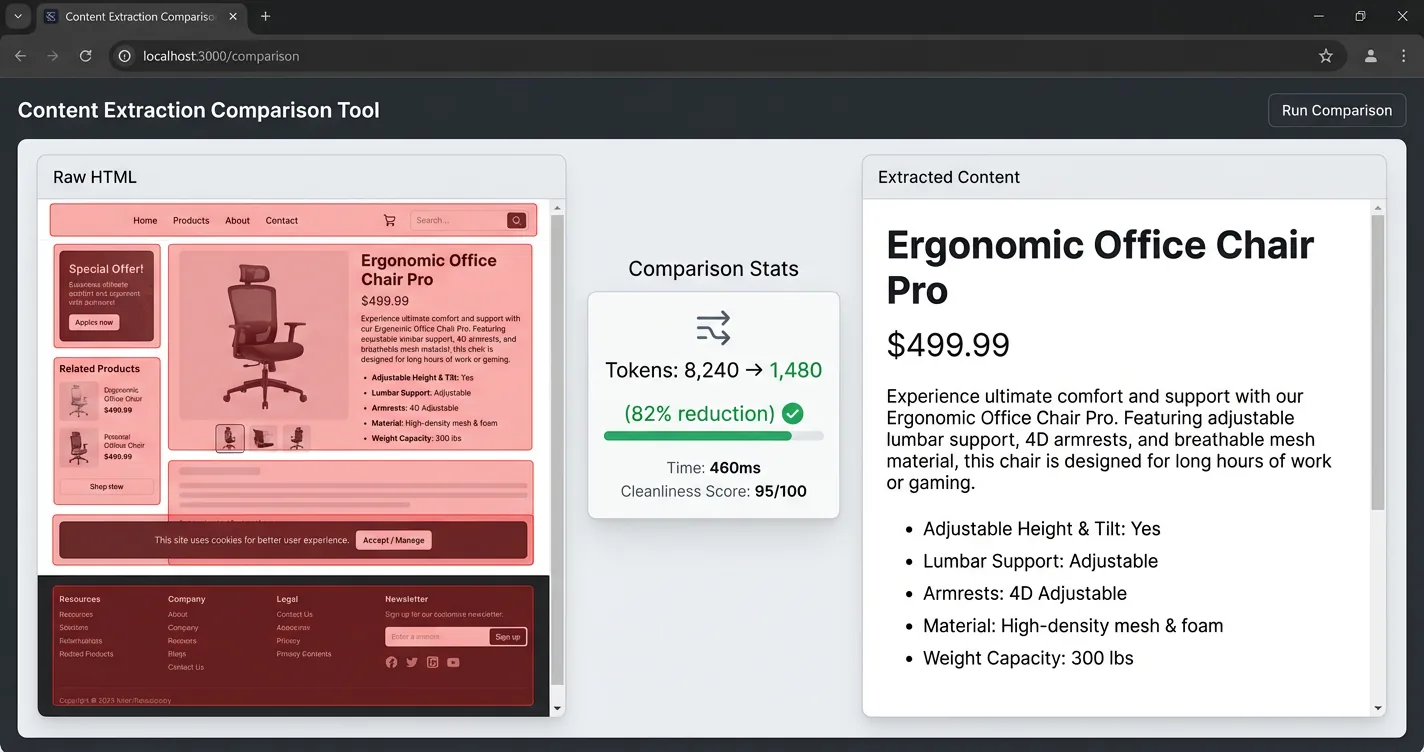
When your chatbot needs full page context (product pages, articles, documentation), the default approach of sending raw HTML is expensive. A typical page runs 8,000 tokens raw, but the actual useful content is closer to 1,500 tokens. That’s an 80% reduction sitting right there before you optimize anything else.
Content extraction fixes this by stripping navigation bars, footers, sidebars, cookie banners, and duplicate boilerplate before sending anything to the LLM. Target the main content container. Pull useful meta tags (title, description, canonical URL). What’s left is the substance of the page, not the scaffolding.
Two approaches to content extraction tend to work well in practice. CSS selector targeting extracts the <main> or <article> element and discards the rest. Readability-style extraction (like Mozilla’s Readability library, used by Firefox Reader View) applies a scoring algorithm to identify the primary content block automatically, without needing page-specific selectors.
Here’s a production example. This function finds the main content container, excludes boilerplate elements, and collects text from semantic elements in priority order. No library dependencies, just DOM queries:
function getPageContext(maxChars = 15000) {
  const container = document.querySelector(
    'article, main, div[class*="article"], div[class*="post"]'
  ) || document.body;

  const exclude = 'nav, footer, script, style, [class*="footer"], '
    + '[class*="nav"], [class*="menu"], [class*="cookie"]';

  const seen = new Set();
  let text = "";

  function collect(selector) {
    for (const el of container.querySelectorAll(selector)) {
      if (text.length >= maxChars) return;
      if (el.closest(exclude)) continue;
      const content = el.textContent?.trim();
      if (content && !seen.has(content)) {
        seen.add(content);
        text += content + " ";
      }
    }
  }

  collect("h1, h2, h3, h4");       // headings first
  collect("strong, b");             // emphasized text
  collect("p, li, td, th");         // body content

  return text.slice(0, maxChars).trim();
}
The pricing impact of page content becomes significant where provider-side caching isn’t available. Adding 1,000 words of page content to a GPT-5 Nano call costs only about $0.04 more per 1,000 messages because OpenAI caches repeated prompt prefixes at a 90% discount. But on Groq’s Llama 3.3 70B (no provider caching), that same content jump pushes cost from $0.50 to $1.33 per 1,000 messages. Clean content extraction plus provider caching makes page context nearly free on caching-enabled providers.
- Mozilla Readability (JavaScript). Same engine as Firefox Reader View, handles most editorial pages well
- BeautifulSoup + CSS selectors (Python). More control, needs per-site configuration
- Trafilatura (Python). Focuses specifically on news and article extraction, very fast
How Does Response Caching Cut LLM Costs?
Caching works at three different layers, each with different complexity and hit rates. Understanding all three lets you layer them in the order that makes sense for your workload.
Exact-match caching is the simplest layer to implement and takes only a few hours. Hash the full prompt, check Redis or Memcached for a cached response, return it if present. Hit rates depend entirely on how repetitive your traffic is. FAQ-style chatbots can see 15-30% hit rates on common questions, while open-ended assistants see much lower rates.
Semantic caching goes further by matching queries by meaning rather than exact text. A user asking “what’s your return policy” and “how do returns work” might be different strings but semantically identical questions. GPTCache demonstrated 61-68% hit rates in production using vector embeddings to match semantically similar queries. The tradeoff is latency on the matching step itself and the infrastructure cost of running a vector store.
import numpy as np

def semantic_cache_lookup(query: str, threshold: float = 0.92):
    embedding = embed(query)  # generate query embedding
    results = vector_store.search(embedding, limit=1)

    if results and results[0].similarity >= threshold:
        return results[0].cached_response  # cache hit

    response = llm.generate(query)
    vector_store.insert(embedding, response)  # cache miss → store
    return response
Provider-native prompt caching is the highest-value option when your prompts have repeated prefixes. OpenAI and Anthropic both cache prompt prefixes automatically, charging about 10% of the normal input token price for cached tokens. If your system prompt is 2,000 tokens and you’re running one million queries per month, you’re paying full price for that system prompt on every single call without caching. With caching, those 2,000 tokens cost a tenth as much on every subsequent request that hits the cache.
A SaaS application that implemented all three layers together saw monthly LLM costs drop from $12,000 to $2,300 at a 78% overall cache hit rate. The investment was about three weeks of engineering.
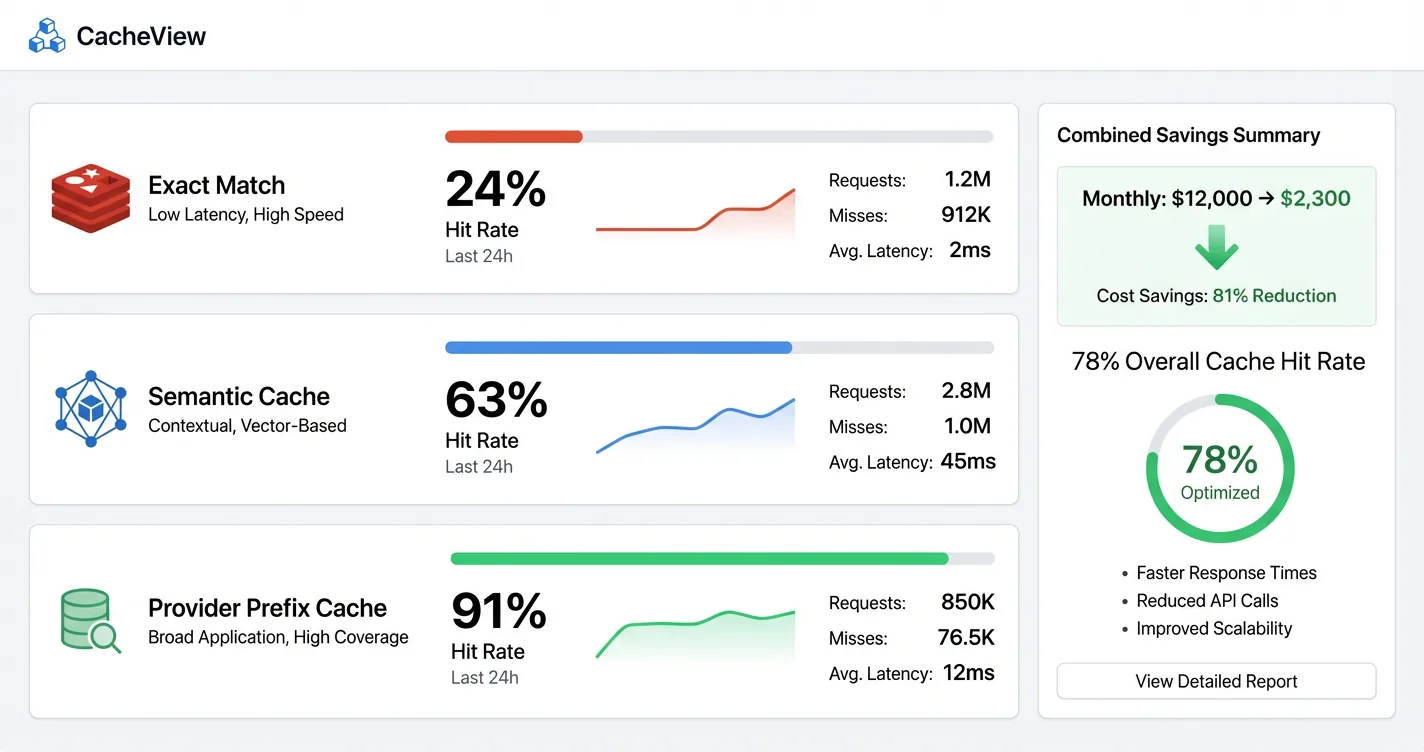
- Exact-match: 15-30% on structured/FAQ workloads
- Semantic caching: 61-68% per GPTCache production data
- Provider prefix caching: Up to 90% cost reduction on cached input tokens
- ~31% of typical LLM queries exhibit enough semantic similarity to be cache candidates
How Do Prompt Compression and History Trimming Help?
Multi-turn chatbots resend the full conversation history on every API call. At 10+ turns, that’s 5,000-10,000 tokens of context being paid for on every request. The user is asking one new question; you’re sending them a novel.
History trimming is the blunt approach: keep the last N messages and discard the rest. It’s fast to implement and works reasonably well for conversations where recent context matters more than old context. The weakness is that it drops information users might refer back to.
A more nuanced approach is summarization-based trimming, which condenses older turns rather than dropping them. When conversation history exceeds a threshold (say, 15 turns), run a cheap model to condense the older messages into a compact summary, then keep that summary plus the recent turns. The summary preserves meaning at a fraction of the token cost. GPT-5 Nano or a small Llama model is cheap enough that the summarization cost is negligible compared to what you save.
MAX_RECENT = 10

def trim_history(messages: list) -> list:
    if len(messages) <= MAX_RECENT:
        return messages

    old = messages[:-MAX_RECENT]
    recent = messages[-MAX_RECENT:]

    summary = client.chat.completions.create(
        model="gpt-5-nano",  # cheap model for summarization
        messages=[{"role": "user",
                   "content": f"Summarize this conversation in 2-3 "
                   f"sentences:\n\n{format_messages(old)}"}]
    ).choices[0].message.content

    return [{"role": "system", "content": f"Prior context: {summary}"}] + recent
LLMLingua, from Microsoft Research, compresses prompts algorithmically rather than summarizing them. It achieves up to 20x compression with minimal accuracy loss by removing tokens that are low-information given the context. The resulting compressed prompt is unreadable to a human but fully interpretable by the LLM. In production, 4x compression is a realistic target without meaningful quality degradation.
Reviewing and trimming your system prompt is also worth the effort before moving on. A 500-token system prompt that could be 250 tokens saves on every single call. That 22-word instruction you can write in 11 words matters when it’s repeated a million times per month.
A 10-cycle ReAct loop can consume 50x the tokens of a single-pass response. If your chatbot uses tool calls or multi-step reasoning, audit those loops first. Even small reductions in loop iterations have outsized cost impact because each cycle compounds the context window.
How Can Monetization Offset Your Remaining Costs?
Even after implementing every strategy above, API costs don’t reach zero. At scale, optimization gets you from expensive to manageable, not from expensive to free. The complementary move is turning a cost center into a revenue contributor.
Affiliate link insertion is the lowest-friction monetization option for most chatbot developers. No payment commitment required from users, implementation takes days rather than weeks, and commissions are earned on product mentions that are already happening in your conversations. When a user asks about stand mixers or running shoes or home office equipment, those mentions can earn revenue through affiliate programs. An AI cooking assistant running 100,000 monthly conversations could earn $1,500-$5,000 per month from affiliate commissions, depending on the category and conversion rates.
ChatAds handles this entire pipeline with a single API call: send the conversation, get back the same conversation with affiliate links inserted where products are mentioned, and keep 100% of the commissions. The practical effect is that revenue from product mentions offsets the LLM API cost of the conversations generating those mentions. Detailed context on the affiliate link mechanics is covered in our guide to integrating affiliate links into AI chatbot responses.
import chatads

client = chatads.ChatAds(api_key="cak_your_key")

result = client.messages.create(
    messages=[
        {"role": "user", "content": "What's a good stand mixer for bread?"},
        {"role": "assistant", "content": "The KitchenAid Artisan is great "
         "for bread dough, and the Cuisinart SM-50 is a solid budget pick."}
    ]
)
# result.content has the same text with affiliate links inserted
- Affiliate links. Commission on product mentions, no user payment required, fastest to implement
- Freemium tiers. Free users get budget model, paid users get frontier model (pairs naturally with model routing)
- Per-session rate limits as upsell. Free tier has daily query caps, paid tier removes them
- B2B pay-per-use. Charge clients based on conversation volume, pass through LLM costs plus margin
The best monetization strategy is one that aligns with your cost structure. If model routing means free users hit a budget model and paid users hit a frontier model, that cost difference is recoverable through subscription pricing. If affiliate links cover 40% of your LLM API bill, that changes what “break-even” looks like. For more on building out the revenue side, see our guide to how to monetize AI chatbots.
The seven strategies here form a natural progression: audit first, then model selection, then content controls, then caching and compression, then monetization. No single change solves the entire problem, but stacking them does.
Start with the audit (a few hours) and model testing (a day). If those two steps don’t move the needle enough, add semantic caching and content extraction. For high-volume workloads, prompt compression and history trimming become meaningful. On the revenue side, affiliate link insertion pairs naturally with any chatbot that already discusses products, and server-side affiliate marketing keeps the integration invisible to users. The goal is a cost structure where LLM expenses are predictable, bounded, and at least partially offset by what those conversations produce.
Frequently Asked Questions
How much can you realistically reduce LLM API costs for an AI chatbot?
The range is wide. Model switching alone can cut costs by 12x on equivalent workloads (from a mid-tier to a budget model). Adding semantic caching at 61-68% hit rates compounds on top of that. Real-world cases have seen 70-85% reductions by combining model routing, caching, and prompt compression. The actual number depends on how repetitive your traffic is and how much margin you're paying for on the current model selection.
What is the cheapest LLM API for AI chatbots in 2026?
Groq's Llama 3.1 8B runs around $0.05 per 1,000 messages at low content volumes, making it one of the cheapest options available. GPT-5 Nano from OpenAI comes in around $0.13 per 1,000 messages with the advantage of provider-side caching, which makes it competitive or cheaper than Groq at higher page-content volumes. The right choice depends on whether your workload benefits from caching and whether Llama-class quality meets your requirements.
Does semantic caching work well for reducing LLM API costs?
Yes, with the right workload. Semantic caching achieves 61-68% hit rates on conversational workloads per GPTCache benchmarks, meaning roughly two out of three queries can be served from cache. It requires a vector store to match queries by meaning rather than exact text, which adds latency on the lookup step. It works best for applications with predictable question patterns (customer support bots, FAQ assistants, product recommendation tools) and less well for fully open-ended assistants.
What is LLMLingua and how does it reduce AI chatbot costs?
LLMLingua is an open-source prompt compression tool from Microsoft Research that removes low-information tokens from prompts before they're sent to the LLM. It achieves up to 20x compression in research settings, with 4x compression being a practical production target without meaningful quality loss. The compressed prompt is unreadable to a human but retains full semantic meaning for the model. It's particularly valuable for long context windows, conversation history, and retrieved documents where much of the content is low-signal.
How does model routing reduce LLM API costs?
Model routing uses a lightweight classifier to evaluate each incoming query and send it to the cheapest model capable of handling it. Simple factual questions, short confirmations, and low-complexity requests go to a budget model. Complex reasoning, nuanced analysis, and high-stakes responses go to a frontier model. RouteLLM's open-source implementation reduced costs by 85% on MT Bench benchmarks while maintaining 95% of GPT-4 quality. The classifier itself is cheap enough that its cost is negligible against the savings.
Can affiliate marketing actually offset LLM API costs for an AI chatbot?
For chatbots in product-adjacent categories (cooking, fitness, home improvement, travel, tech), affiliate commissions can meaningfully offset API costs. An assistant running 100,000 monthly conversations where users frequently ask about products could earn $1,500-$5,000 per month in commissions depending on the category. That doesn't make LLM costs zero, but it changes the unit economics significantly. Tools like ChatAds handle the affiliate link insertion pipeline so you don't need to build NLP extraction and link resolution yourself.