AI assistants recommend products constantly during normal conversations, from headphones to software tools to running shoes. Those mentions happen organically, but they don’t generate any revenue by default.
The gap between a product recommendation and a monetized affiliate link is a real-time pipeline problem. You need to detect the product, resolve an affiliate URL, and inject it before the user sees the response. In 2026, the tooling exists to do this reliably.
This guide walks through each step, from choosing your ad format to handling FTC compliance, and shows how to get affiliate links into your AI assistant’s output without degrading the user experience.
- AI-assisted shoppers convert at 12.3% vs 3.1% without AI assistance, roughly a 4x lift (Neuwark)
- About 20% of AI assistant queries carry commercial intent (products, comparisons, recommendations)
- The affiliate pipeline must complete in under 500ms to avoid noticeably degrading the chat experience
- ChatAds handles detection and link resolution in a single API call at ~50ms
Ask ChatGPT to summarize the full text automatically.
Why Are Affiliate Links in AI Chats Different from Traditional Web?
AI assistants naturally recommend products during conversations, but turning those mentions into monetized affiliate links is a fundamentally different problem than traditional web affiliate marketing. On a blog post or review site, you write the link once and it sits there forever. In a chat, every response is generated dynamically, products appear unpredictably, and the response needs to reach the user in milliseconds.
The core challenge is a three-part process that has to run in near-real-time:
- Detect that a product was mentioned
- Rsolve it to an affiliate link from a partner network
- I nject that link back into the response before the user sees it
Each step has its own failure modes, from false positive product detection to slow API calls to affiliate networks to breaking the streaming UX that users expect from chat interfaces.
By 2026, the tooling has matured enough to solve all three steps reliably. Research from Neuwark puts AI-assisted shopper conversion rates at 12.3% versus 3.1% without AI assistance, and roughly 20% of queries carry commercial intent according to Mobile Dev Memo. That combination makes affiliate monetization in AI chat one of the highest-value opportunities in the space right now, with clear patterns for solving each piece of the workflow.
Here is what in-line affiliate links look like in a live AI chat — product names become clickable links in real time:
What Types of Affiliate Ads Work in AI Chat Responses?
Before writing any code, decide how affiliate content will appear in your assistant’s responses. That choice shapes every technical decision downstream, from how you detect products to how you insert links into streaming responses.
In-line affiliate links are the most natural fit for conversational AI. When your AI recommends “the Sony WH-1000XM5,” the product name becomes a clickable affiliate link that blends into the conversation with minimal UX disruption. They convert at lower rates but feel organic.
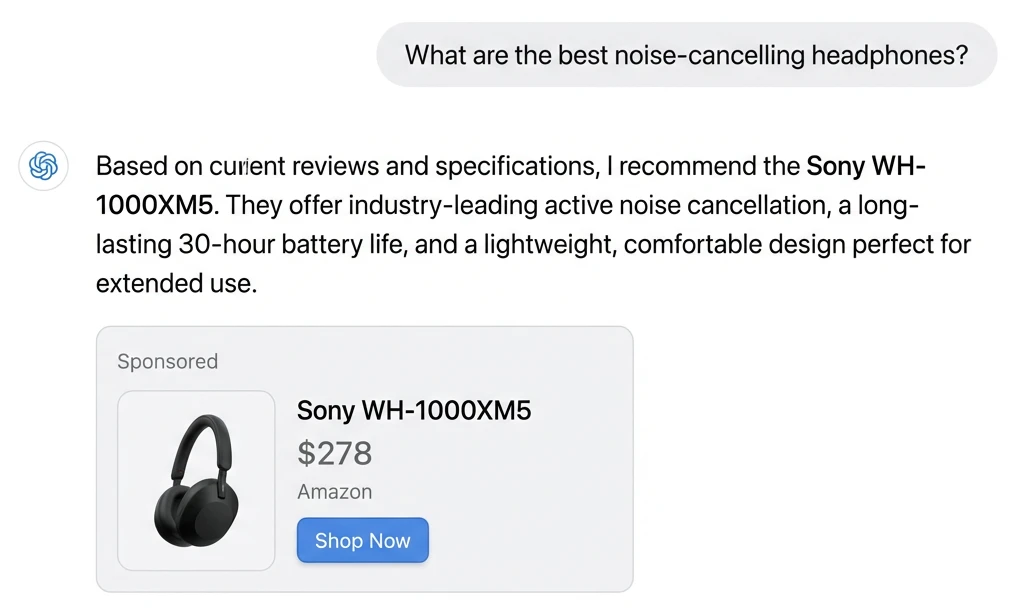
Sponsored product messages go a step further: dedicated recommendation blocks (such as “Sponsored pick: [Product] — [price] at [retailer]”) that appear alongside the AI’s organic response, clearly separated and labeled. They drive higher click-through because they stand out, but require explicit disclosure.
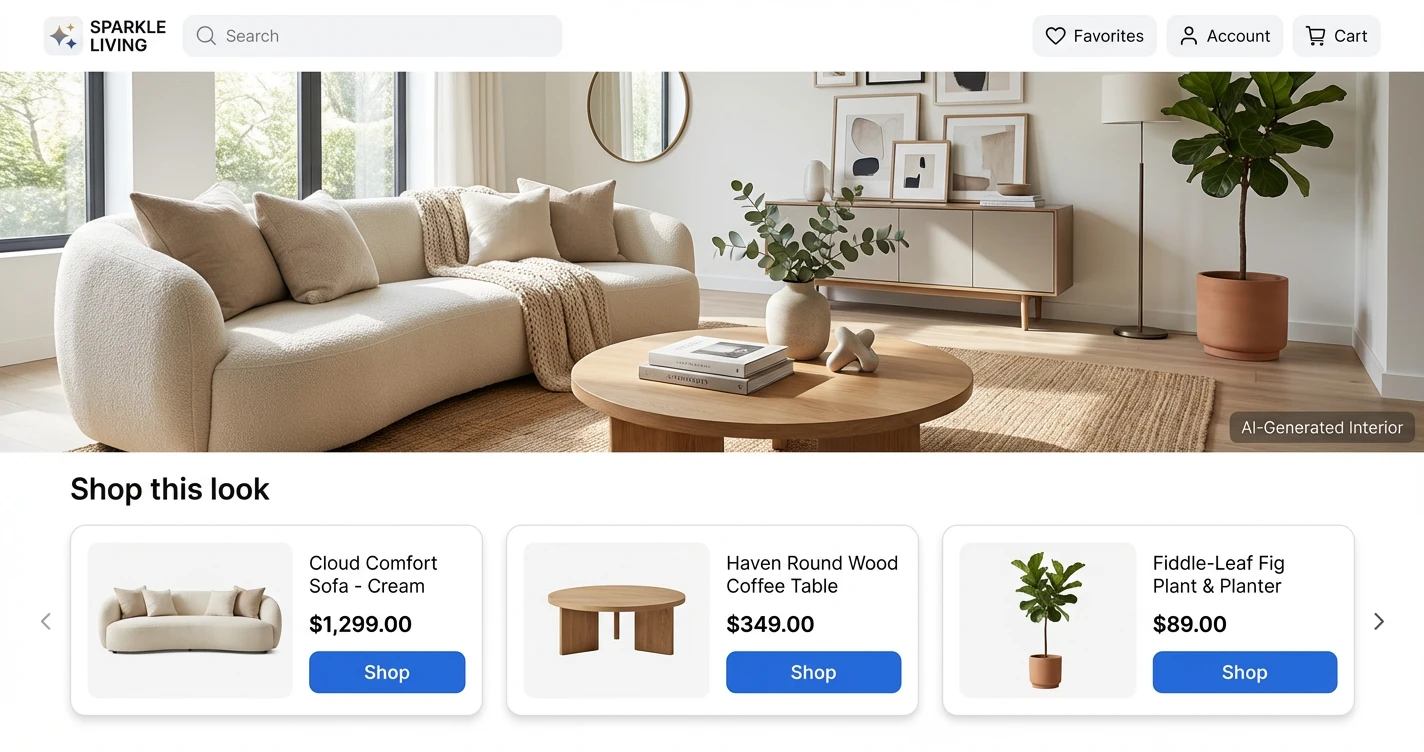
Product carousels or card-based displays work well for comparison queries (“what are the best running shoes under $150?”), rendering multiple affiliate-linked products in a visual grid below the text response.
- In-line links — Lowest friction, highest trust. Works for any product mention. Requires precise text insertion at the exact mention location.
- Sponsored blocks — Higher CTR, more visible. Can be appended independently without modifying the AI's generated text. Requires clear disclosure language.
- Product cards/carousels — Best for comparison queries. Needs frontend component support and adds more rendering complexity.
The ad format you pick also drives every technical decision in the injection process. In-line links require knowing exactly where in the text the product name appears, while sponsored blocks can simply be appended after the response without touching the original text.
In-line links work best when your assistant covers a wide product domain (general shopping, tech). Sponsored blocks perform better in vertical-specific assistants (travel, fitness, home improvement) where curated recommendations carry more weight.
How Do You Detect Products in Real-Time?
Product detection is the first bottleneck in the process, and you have three main approaches at different speed and accuracy tradeoffs.
Running NLP extraction locally with a library like spaCy gives you Named Entity Recognition that can identify brand names and product categories in the AI’s response. Response times run around 100-200ms with reasonable accuracy on specific product mentions, but you need to maintain models and the approach struggles with generic references like “a good blender.”
A second approach is prompting an LLM to extract product terms from the response. This is the most accurate for understanding context and purchase intent, but adds 1-2 seconds of latency per call, a hard number to absorb on top of the primary LLM generation time. A third option is using a dedicated API like ChatAds that combines extraction and affiliate resolution in a single call at roughly 50ms, purpose-built for the real-time constraint.
You can also sidestep detection entirely by providing the LLM with a SKU list or product catalog in the system prompt, so the model outputs structured product identifiers you can map directly to affiliate links. This works well when your assistant covers a known product domain but falls apart for open-ended conversations.
Latency figures are typical per-request times; accuracy is relative to open-ended product mention detection
| Approach | Latency | Accuracy | Maintenance |
|---|---|---|---|
| Local NLP (spaCy) | 100-200ms | Medium | High (model updates, hosting) |
| LLM extraction | 1,000-2,000ms | High | Low (prompt tuning only) |
| Dedicated API (ChatAds) | ~50ms | High | None |
| SKU list in prompt | 0ms (no extra call) | High (known domain only) | Medium (catalog upkeep) |
Whatever detection approach you pick, the latency budget is unforgiving. Anything over 500ms added to response time noticeably degrades the chat experience, and users in 2026 have calibrated expectations for how fast AI assistants should respond.
How Do You Integrate with an Affiliate Partner?
Once you can detect products, you need affiliate links to attach to them. Most affiliate networks (Amazon Associates, Impact, ShareASale, Rakuten) were designed for web publishers with static sites, not real-time API calls from chatbots.
Their APIs support link generation but weren’t optimized for sub-500ms response times, and each network requires separate approval, authentication, and integration work. Amazon’s Product Advertising API, for instance, can take 3-4s for a response.
Amazon's Product Advertising API is being deprecated in April 2026 in favor of a new Creators API. If your current affiliate setup relies exclusively on the PA API for link generation, plan your migration now rather than when it breaks.
The integration pattern itself is straightforward: send the AI’s response (or extracted product entities) to the affiliate API, get back affiliate URLs mapped to each product mention, and insert them into the response. Key criteria to evaluate include link generation latency (anything over 200ms adds up fast), product catalog breadth, commission reporting APIs for downstream analytics, and whether the service supports server-side attribution since chat environments typically strip referrer headers.
How Do You Inject Links Without Breaking Streaming?
Most AI apps stream responses token-by-token to keep the interface feeling responsive, but affiliate link injection requires knowing the full product mention before you can attach a URL. Three patterns resolve this tension.
The simplest solution is buffering the complete response, running it through your detection and affiliate system, then delivering the final version. This adds 200-500ms of latency but is straightforward to implement and works with any LLM provider.
// 1. Get complete LLM response (no streaming)
const responseText = await getLLMResponse(userMessage);

// 2. Find affiliate links
const result = await chatads.extractLinks({ message: responseText });
const { offers } = result.data;

// 3. Insert links into text
let final = responseText;
for (const offer of offers) {
  final = final.replace(offer.link_text, `[${offer.link_text}](${offer.url})`);
}
return final;
A more sophisticated approach processes text at sentence or paragraph boundaries during streaming, running affiliate lookups on completed chunks while the next chunk streams in. This keeps perceived latency low but adds meaningful engineering complexity.
A third pattern separates concerns entirely: stream the raw AI response to the client immediately for display, then run an async monetization pass that patches affiliate links into the already-rendered text via a client-side update. Whichever approach you use, preserve the AI’s original recommendation. Swapping a genuine product mention for a higher-commission alternative is the worst UX mistake you can make, and users notice.
const CHUNK_THRESHOLD = 40; // words before API call
let buffer = '';
let offers = [];
let affiliatePromise = null;

for await (const chunk of llmStream) {
  buffer += chunk;

  // Trigger affiliate lookup early (don't await)
  const wordCount = buffer.split(/\s+/).length;
  if (wordCount >= CHUNK_THRESHOLD && !affiliatePromise) {
    affiliatePromise = chatads.extractLinks({ message: buffer });
    affiliatePromise.then(result => { offers = result.data.offers; });
  }

  // Insert any ready links before sending chunk
  const output = applyReadyLinks(chunk, offers);
  send({ type: 'chunk', content: output });
}
Start with full-response buffering and measure actual latency before adding streaming complexity. Most AI apps can absorb 200-300ms of affiliate processing without users noticing, especially when the LLM generation itself takes 2-4 seconds. For a deeper dive into each pattern, see our guide on coding affiliate links into AI chats.
Here is how a monetized response looks in a real conversation:
Test redirect chains end-to-end before going live. Tracking parameters appended to affiliate URLs can occasionally interfere with merchant checkout flows, and discovering that in production is unpleasant.
What FTC Disclosures Does an AI Assistant Need?
The FTC treats AI chatbots the same as human endorsers. Every response containing an affiliate link needs a clear, prominent disclosure adjacent to the recommendation, not buried in your terms of service.
The FTC’s 2025 guidance on AI chatbots is explicit: disclosures must be “unavoidable,” meaning visible before the user acts on a recommendation, and a one-time consent at signup does not count. The FTC specifically calls out “automation bias,” the tendency to trust AI outputs as neutral and objective, which makes undisclosed affiliate content more deceptive than the same placement on a traditional web page.
- Add "(affiliate link)" inline next to the product URL, or a disclosure line at the end of responses containing affiliate links
- A persistent disclosure indicator in your chat UI (e.g., a small badge) helps, but does not replace per-response disclosure
- One-time signup consent does not satisfy the "unavoidable" standard, so disclosure must appear with each affiliated recommendation
- Penalty exposure is $51,744 per violation. The FTC launched a formal AI chatbot inquiry in September 2025, signaling active enforcement
Build disclosure into your affiliate injection workflow as a default, not an afterthought. Templating a disclosure string into every affiliate response is far easier than retrofitting compliance after the fact. If you’re using an API like ChatAds, you can configure disclosure text to be appended automatically alongside the injected links.
ChatAds - One API To Do This All For You
Integrating affiliate links into your AI responses is a multi-service process: NLP extraction, affiliate network integration, link injection, and disclosure. You can build that yourself, or collapse it into a single API call.
ChatAds handles the full sequence in a single API call. Send your AI assistant’s response to one endpoint, and it returns the same text with affiliate links already inserted at the right product mentions, resolved against multiple affiliate networks, with configurable disclosure text. The integration is a POST request after your LLM generates a response. No prompt modifications, no NLP model hosting, no per-network affiliate approvals.
Response times run around 50ms, well within the latency budget for real-time chat. Here is a minimal integration:
import requests

CHATADS_API_KEY = "cak_your_api_key"

def monetize_response(ai_response: str) -> str:
    resp = requests.post(
        "https://api.getchatads.com/v1/chatads/messages",
        headers={"Authorization": f"Bearer {CHATADS_API_KEY}"},
        json={"messages": [{"role": "assistant", "content": ai_response}]}
    )
    return resp.json()["choices"][0]["message"]["content"]

# After your LLM generates a response:
raw_response = llm.chat(user_message)
monetized = monetize_response(raw_response)
send_to_user(monetized)
For developers using popular AI SDKs, adding affiliate monetization becomes middleware-level work: intercept the LLM response, pass it through ChatAds, return the enriched version. You keep 100% of affiliate commissions. ChatAds charges for API usage, not a revenue share on your earnings.
- Get an API key at app.getchatads.com
- Send a POST to
/v1/chatads/messageswith the AI response as the message body - Receive back the response with affiliate links injected at the relevant product mentions
- Render the enriched response in your chat UI
The API handles non-product responses gracefully too: if there are no detectable product mentions, it returns the original text unchanged in under 50ms. You don’t pay for messages that don’t generate affiliate opportunities.
ChatAds is the fastest path for most developers because it handles all four steps in a single API call, but the patterns described here apply whether you build the pipeline yourself or use an existing service. For a side-by-side comparison of the platforms available today, see top AI assistant ad monetization platforms. Either way, the underlying dynamic is only going to grow: AI assistants are becoming a primary channel for product discovery, and the window to build good monetization infrastructure around that is open right now.
Frequently Asked Questions
Can you add affiliate links to AI assistant responses?
Yes. The standard approach is to run the AI's generated response through a product detection and affiliate resolution pipeline before it reaches the user. You detect product mentions in the text, look up matching affiliate URLs, and inject those links back into the response. The whole pipeline needs to complete in under 500ms to avoid degrading the chat experience, which is achievable with a dedicated API like ChatAds or by building the detection and resolution steps yourself.
How do you detect product mentions in AI chat responses?
The main options are local NLP (spaCy Named Entity Recognition), a secondary LLM call to extract product terms, a dedicated API that handles detection as part of link resolution, or providing the LLM with a structured product catalog in the system prompt. Local NLP runs in 100-200ms but requires model maintenance. LLM extraction is the most accurate but adds 1-2 seconds of latency. Dedicated APIs like ChatAds combine detection and affiliate resolution in a single ~50ms call.
What affiliate networks work with AI chatbots?
Most major networks (Amazon Associates, Impact, ShareASale, Rakuten) support link generation via API, but they were designed for static web publishers rather than real-time chatbot pipelines. They each require separate approval and authentication, and their response times aren't optimized for sub-500ms budgets. Aggregators like Strackr normalize access to 273 networks through a single endpoint. ChatAds bundles affiliate network access with product detection specifically for AI chat use cases.
Do you need FTC disclosures for affiliate links in AI chat responses?
Yes. The FTC's 2025 guidance on AI chatbots requires that affiliate disclosures be "unavoidable," meaning visible adjacent to the recommendation, before the user acts on it. A one-time consent at signup does not satisfy this standard. Disclosures need to appear with each response that contains an affiliate link, either inline next to the URL or as a disclosure line at the end of the message. Penalty exposure is $51,744 per violation.
How much latency do affiliate links add to AI assistant responses?
It depends on the approach. LLM-based extraction adds 1-2 seconds, which is noticeable. Local NLP adds 100-200ms. A dedicated API like ChatAds adds around 50ms. The practical ceiling is 500ms total before users perceive a meaningful delay in chat responses. Buffering the full response before injecting links is the simplest implementation and typically adds 200-500ms when combined with affiliate resolution.
What is ChatAds and how does it work with AI assistants?
ChatAds is an API that handles the full affiliate link pipeline for AI chat responses. You send your LLM's generated response as a POST request, and ChatAds returns the same response with affiliate links inserted at the relevant product mentions, resolved against multiple affiliate networks. It runs in ~50ms and returns the original response unchanged when no product mentions are detected. Developers keep 100% of affiliate commissions, and ChatAds charges for API usage rather than taking a revenue share.